Showing posts with label LED. Show all posts

Tuesday, August 16, 2011

Logic Level Indicator

To breakup the lessons a little bit more I'm going to publish a write up of a tool that I made whilst I was at university.

When I was at university we used to program Motorola 68HC11s in either Assembly or C. The development boards that we used in class had 4mm connectors on them allowing us to connect boxes containing switches, or lights, or DACs to the chips using simple instrument leads with 4mm plugs on them.

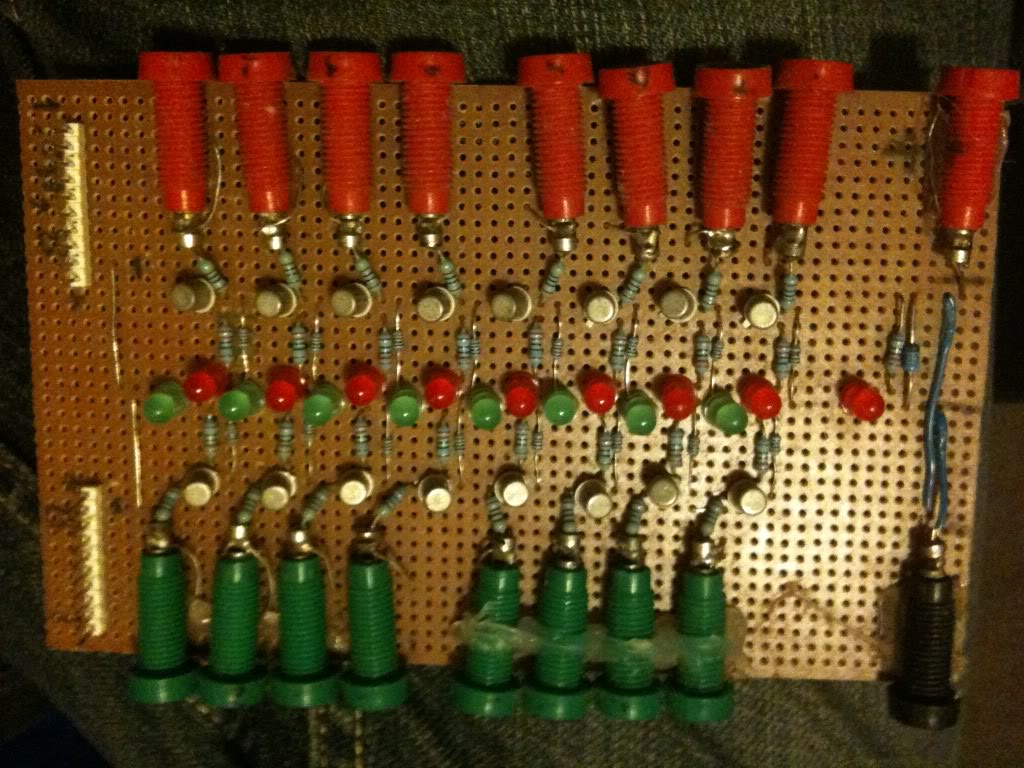
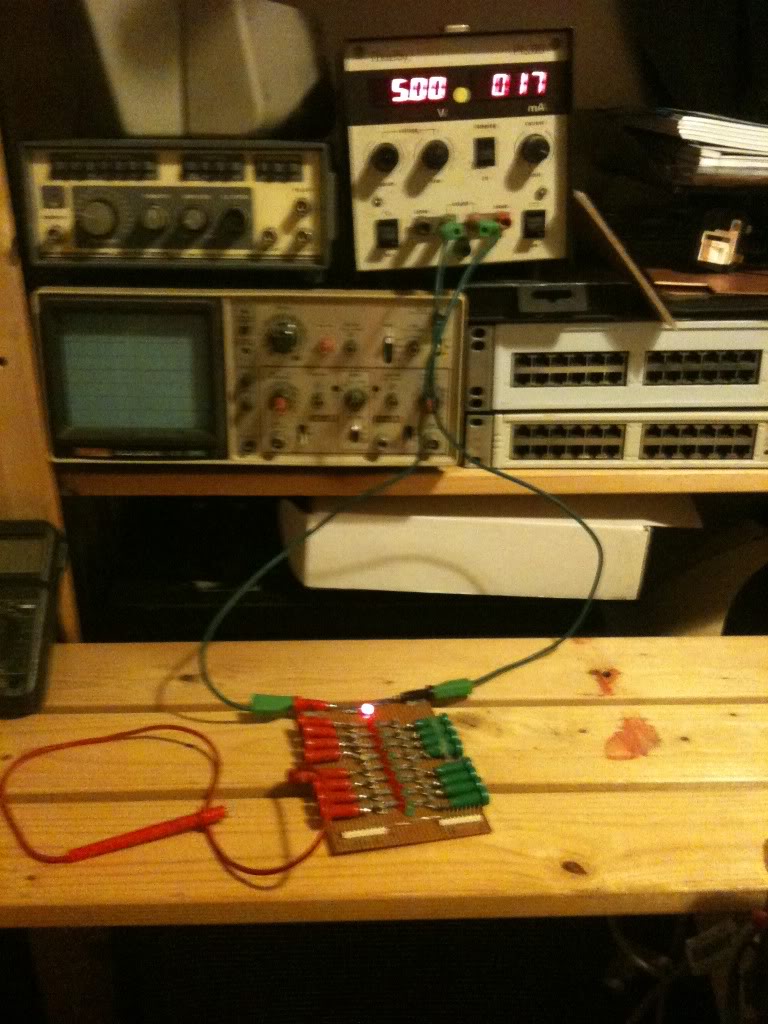
So I made my own logic output board,
The board consists of 16 inputs, and 16 LEDs, to help identify there, these are coded red and green.

The board is powered by a five volt supply, and has an LED to signify that voltage is present, and a Zener diode to help make sure that the supply voltage does not exceed 5V.

In general you cannot rely on a digital output to have enough current to power an LED.

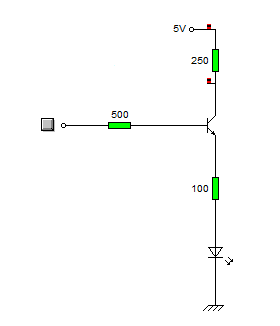
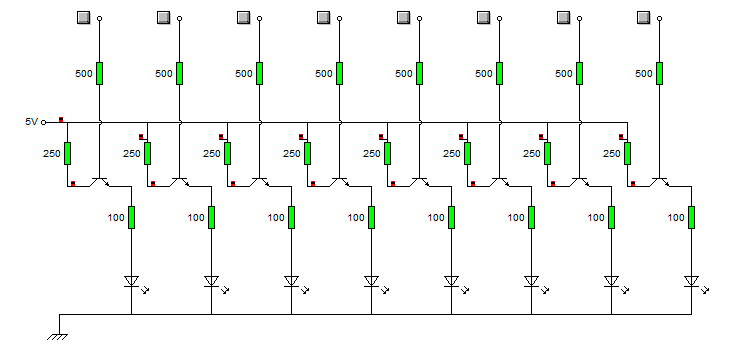
So I'm using a chip output to turn on a transistor, that transistor is then arranged as an emitter follower, that amplifies the current output from the chip, and provides enough current to light the LED.

How and why this circuit works is covered in the entry immediately prior to this.


The circuit is that simple circuit, and it's repeated 16 times


At the bottom of the board there are two ten pin connector, these are 8 logic inputs, and a + 5V supply rail, and a 0v rail.

So I can attach my PSU to this logic indicator board (using the voltage inputs and 4mm plugs), and use the board to power my circuit, with nothing more than a simple ribbon cable carrying the supply and signals.

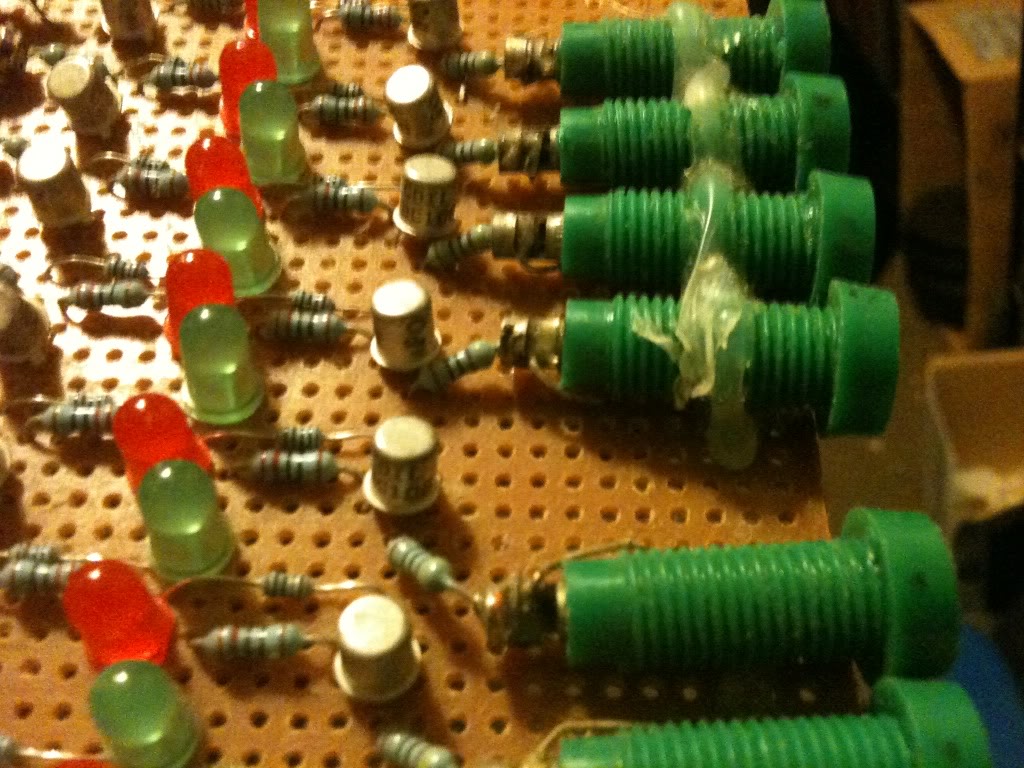
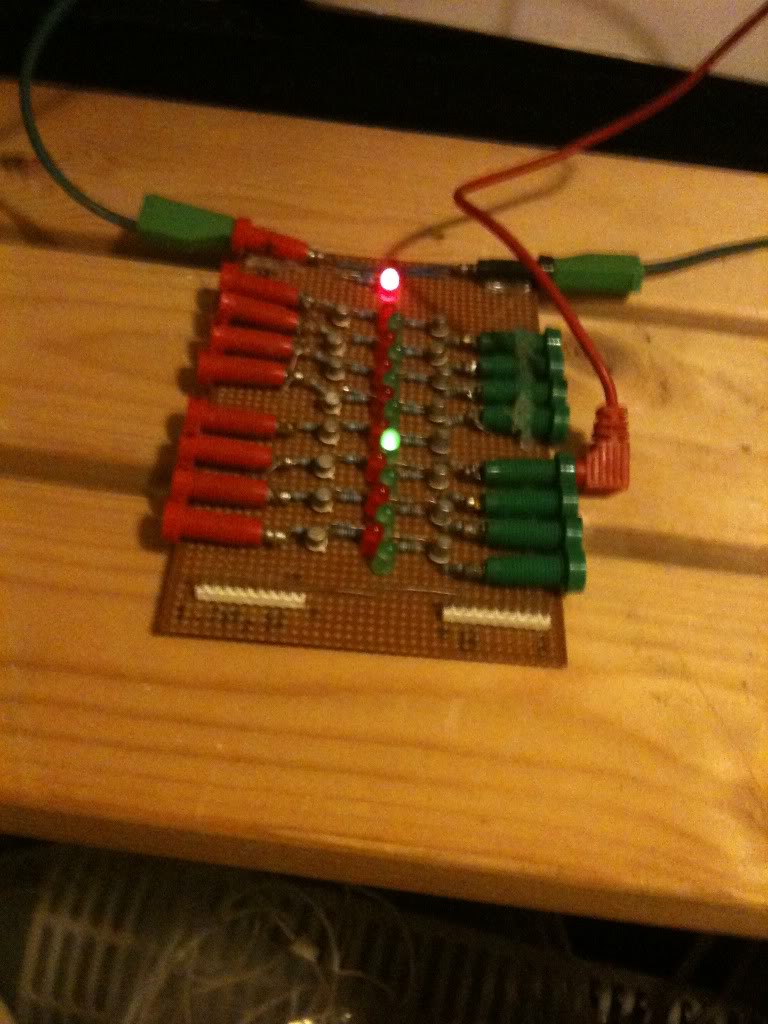
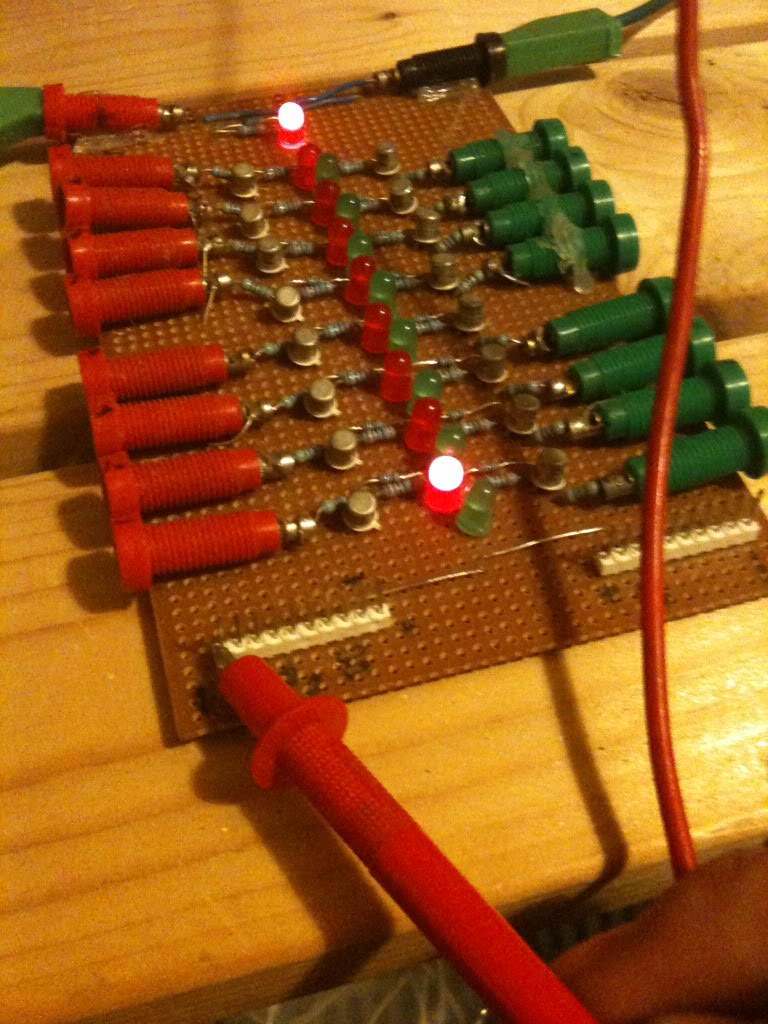
Here are some more pictures of the board, with a probe attached to one of the inputs, and showing a voltage applied to the pin inputs also.

The board powered up:

Logic high applied to an input:

And showing the pin inputs:

so the complete schematic is as follows, this is only one side, but just repeat on the other side.


Whether you decide to put a 5v zener diode across the supply, or an LED to indicate that the device is on, is up to you.

The actual connectors are attached to the board by a loop or wire attached, and soldered into the board, then to hold them a little more securely they are also hot glued to the board.

Thursday, August 11, 2011

Electronics Lessons: The Transistor Simple Circuits (Lab 2)

So in the last lesson I talked about the transistor, I talked about how you could turn the transistor on to a fully conducting state.

I also mentioned that transistors could be used as current amplifiers.

You'll use a current amplifier when you need a little more power to switch on an output than that output can supply.

We discussed before how the transistor was off, and how it could be turned on.

So, lets make a device that puts a light on with the presence of a voltage, even if that voltage source doesn't have the power (current sourcing capability) to light up the light itself.

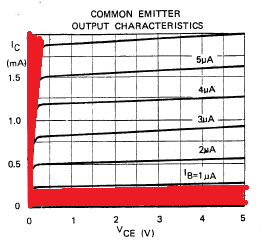
In this tutorial we're interested in two areas of the transistors output, because we're going to use the transistor as a switch we'll either have the transistor in the cut-off region (off), or the saturation region (on) of it's output characteristics. (There are the areas marked in red in the chart below).


The Circuit
What we do is connect the input to the base of the transistor, we use a resistor to ensure that not too much current is pulled from the voltage source that we're detecting.

We'll also put a resistor between the circuit voltage source, and the transistor to limit the current being drawn from the source.

Our light will be an LED, we're expecting that the voltage going to the LED will be 5V at most, but as little as 3v so we look at some data sheets for LEDs and we find that the there are a couple that we can't use, (some have Vmax as 4v), and others will tolerate a higher voltage, but won't light with only 3v.

Eventually we come across the L-53GD-5V made by Kingbright

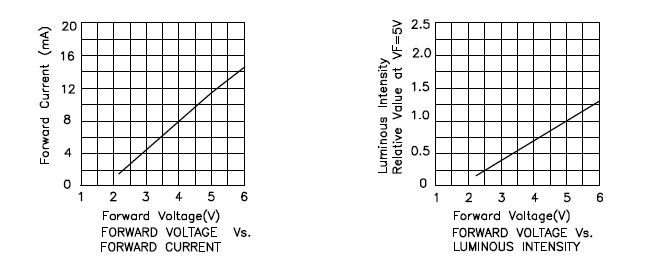
It has the following characteristics.


So we can see that it'll be on, and bright at 5v, and it will turn on, (though only be half as bright) at 3volts, (we're interested in sensing 5v Logic levels and 3.3v Logic levels right?)

Elsewhere in the data sheet it tells us that the maximum current is 17mA
We know that our greatest voltage going through the LED will be 5v
So we use ohms law to determine the resistor needed.

5/0.017 = 294

So we really want to make the total resistance between the supply voltage and the indicator LED around 300Ohms
In case you're interested

3.3/300 = 0.011 or 11mA available for the 3.3v logic level to light the LED.

I say the 3.3v, remember this is a current amplifier, not a voltage amplifier. The voltage is going to remain the same as what's going into the transistor base.
Anyway, at 3.3v the LED only draws some 6mA, so there is plenty of current available. (and that 11mA is below the devices max draw of 17mA

Schematic
Here is the schematic of the circuit.


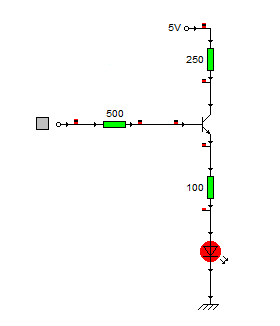
And here's what happens when a logic level of 1 (+5v) is applied to the base resistor


When the circuit is on it pulls around 6ma from the logic source, and the current going through the LED is about 14mA.

Stay tuned to see this idea scaled up!

Tuesday, August 09, 2011

Electronics Lessons: The LED

I briefly touched on LEDs previously in the output devices post a while back.

That post was designed to be a little bit of a primer into all kinds of output devices, to get you thinking about the kind of output that you want to put on your projects.

Now I'm going to start looking at those output devices in a little more detail.
I'll skip over light bulbs for the moment, other than small signal lamps, (torch bulbs) there aren't a lot of light bulbs that are particularly practical to drive from beginner projects, they don't solder directly to boards (requiring bulb holders), and lots require either mains voltage, or the type of current that's really going to burn you if it goes wrong. -I'll come back to light bulbs as output devices later in the series mostly because it'll be necessary to explain a project that I've written up and am waiting to publish.)

LEDs
LEDs are light emitting diodes.

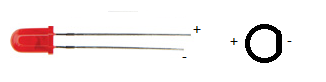
When you buy an LED you'll normally find that appears in a round shape with a dome top.
the round shape has a small ledge of skirt at the bottom of it and one of the sides of this next to a leg is flat.
You'll also find that when you buy the component that one leg is slightly shorter than the other.

The reason that a diode has these characteristics is:
The round body: this is a nice easy package type to make, however, LEDs to come in all different shapes and sizes.
A look here: http://www.rapidonline.com/Electronic-Components/Optoelectronics will help to show just how many different shapes and sizes!

The reason that LEDs generally have a dome shaped top is so that they can be seen from a variety of different angles. if you look at surface mount LEDs these will generally have flat tops, this is so that light guides, that will carry the light from your board to your front panel can fit on top. (a light guide is like a fibre optic cable, except that it's generally made of clear plastic (not glass) and is quite thick (measured in millimetres not microns), and is rigid.

The reason that there is one leg shorter than the other, and the reason for the flat spot on the case is that these show which leg is negative.

The component is a diode and will only conduct one way (when used within specification). and when the diode is conducting it will let you know by giving out light.

Circuit symbol
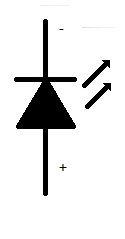
The LED is a diode, therefore is shares the same basic symbol as the diodes, (arrow with a flat bar on it) however, as this device emits light there are also two arrows the come out of the diode.

I've only drawn the basic, and now standard symbol for the LED.
however, you may find that there is a circle around the diode symbol, you may find that the arrows have a zig-zag in the middle, the arrow heads may or may not be filled.

Some experiments to try
There are some experiments that you may wish to try.

The first experiment that you should do is either using a power supply with a variable voltage. or using batteries, the examples that I'll use will involve batteries.

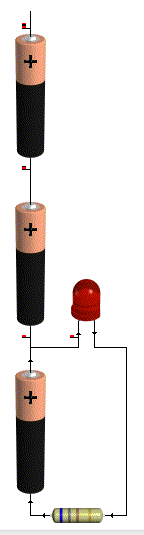
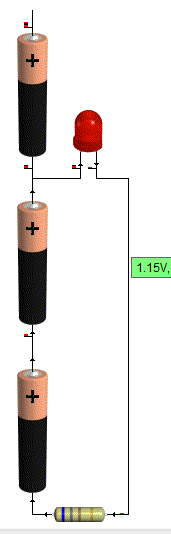
For this experiment you're going to need 3AA batteries, (1.5 Volts).
and a 1K resistor (note this is not the same colour bands as shown in the pictures, that's just a picture).
and a 100Ohm resistor

First connect all the batteries end to end inside a battery holder.
Connect the 1k resistor to the battery packs' negative terminal.
Now connect the other leg of the resistor to the negative leg of the LED
Connect the positive leg of the LED to the first battery in the battery pack.

You'll see that the LED doesn't come on at all.


That's because in order to make the LED light up around 2volts is used up. since you don't even have 2 volts this thing won't light up.

so now connect the positive leg of the LED to the second batteries positive terminal.

Now you've got 3v as a supply voltage, so you've got enough to make the LED light up.
but it'll be very dim.

That's there isn't much current flowing through the device, and the amount of current going through the device is proportional to how bright it looks.

To figure out how much current goes through the device,
start with your supply voltage (3v)
take away the forward voltage of the LED (2v) you're left with 1v

Now use Ohms law to determine how much power is flowing through the circuit
1/1000 = 1miliamp (barely enough to even make it work!)

Now swap your 1k resistor for the 100Ohm, resistor.
the LED should appear to be brighter. the reason is that more current is flowing
1v / 100 Ohms = 10milliamps of current flowing.

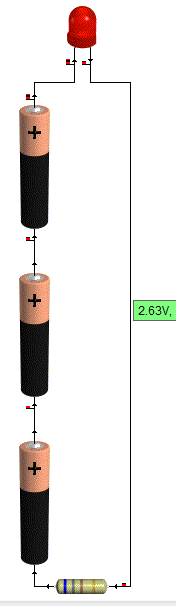
Now repeat the same steps on the positive voltage of the last battery.

This time the LED should be reasonably bright with the 1k resistor and much brighter with the 100Ohm resistor

this is due to the fact that there is now 4.5v supply. (subtract 2 for the LED) leaves 2.5v being dissipated in the resistor.
2.5/1000 = 2.5milliamps.

Before you substitute the 1k resistor for the 100Ohm resistor be sure to take a look at the resistor from the top (birds eye view looking down on the dome,) and from the side.

Notice how it looks brighter at the top. and as you come down to look at the side view, the light almost disappears completely?

Now put that 100 Ohm resistor in the circuit.
When you put the 100ohm resistor into the circuit
2.5/100 = 25milliamps.


You may now find that either the LED is lit very brightly, or that it sort of lit brightly for a bit, but now doesn't work.
It's not going to have exploded! but it might have failed inside. (if you pump enough power through an LED it will explode though!)

Looking at data sheets
To find out why your LED doesn't work any more we'll have a look at the data sheet.

The data sheet that I'm using for reference is:
http://datasheet.octopart.com/L-53GD-5V-Kingbright-datasheet-578943.pdf

Data sheets give you all kinds of useful information, some are better than others, this one just happens to give a lot of information.

So... lets look at the data sheet and find out why the things that were happening above happened.
why varying the resistor made a difference to the brightness, why varying the voltage made a difference, and why the viewing angle made a difference.

We'll start with the viewing angle:
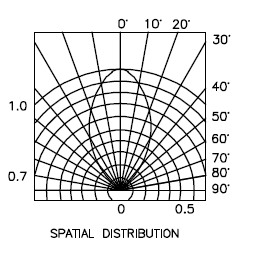
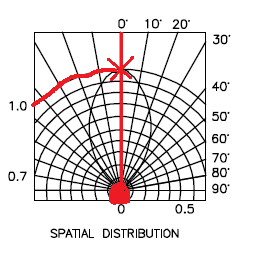
At the end of the data sheet is a diagram called spatial distribution. this diagram is a little confusing at first, but here is now to read it.

firstly there is a circle at the bottom, you need to imagine that the dome of the LED is inside this circle, now you notice that there is a straight line going up to the marking 0 degrees.

This means that you're looking straight down on the LED.
you can see on the blob shape in the middle touches this 0degree line at the top.
moving along this reaches 1 on the brightness scale.


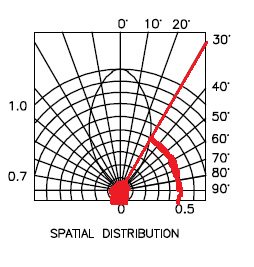
Now if you change your viewing angle to 30degrees, you find that the blob touches a different brightness line, this line is 0.5
This means that at 30degrees that LED is half as bright as when looking at it from the top.

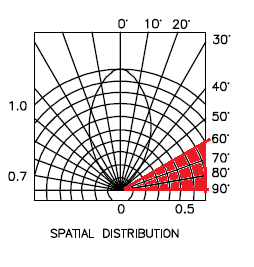
Now if you move anywhere in the 60 - 90degree region, you'll see that the blob doesn't even touch the line, basically, you'd be lucky to see any light at all.


Clearly this is important if you're using the light to indicate anything.

For a start, lets say that your device sits flat at one end of a room, sitting down at the other end of the room your viewing angle will be so shallow that you won't see it at all, OK so this might mean that you just don't know if your cat is inside of outside, no big deal.

Now consider that you're using these LED as brake lights? you're braking in one lane, people behind you can see, but what about people who are only slightly behind and alongside. they can't see that you're braking. what if you try to use these as direction indicators/turn signals? now it's really dangerous as people who need to know your intentions are now given no warning of your intentions.

You might think those LED bulbs are super bright and look cool (and they do) But what if they aren't bright enough? what of the viewing angle? what if they are too bright? this is why (in Europe at least) all car parts have to be E marked, to say that they are tested and approved.

Next let's look at the voltage characteristics:
What these charts are telling us is that as more voltage is applied, the device will get brighter.


And that as more voltage is applied, more current is passed through the device.
This is exactly what we saw in the experiment, as voltage increased, the device got brighter.
As the current limiting resistor was decreased, more current flowed through the device, which was proportional to the voltage "used" in the device, and so the device got brighter.

Next lets look at the maximum ratings:
The maximum ratings are there to tell us what conditions we can place on the device, this this case the maximum rating tell us a few things.


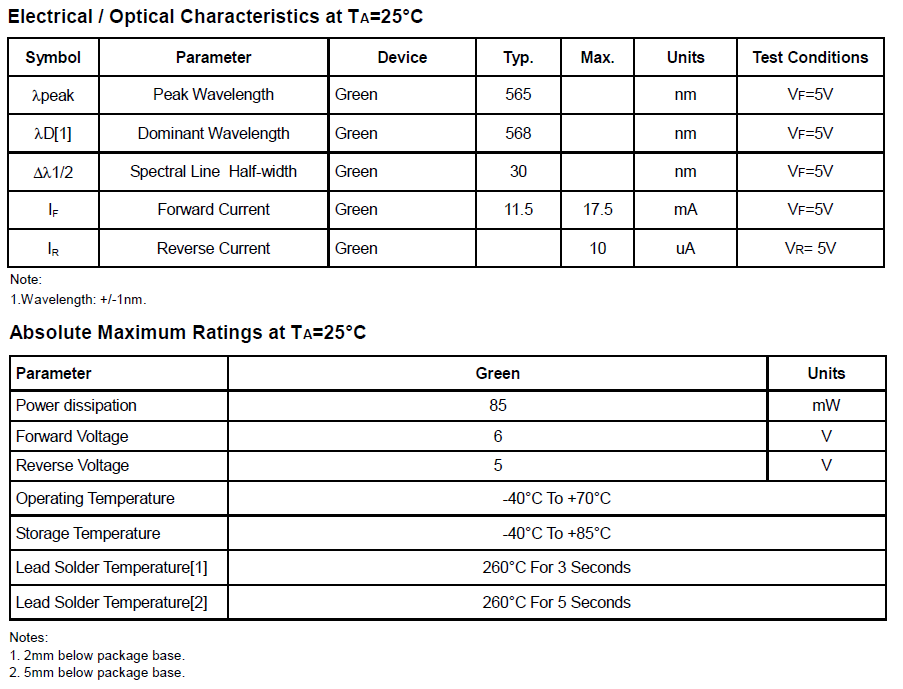
Firstly: forward current (max) the maximum current permitted to flow through this device is 17.5mA (when the voltage is 5v)
This means, select your current limiting resistor such that only this much current can flow.

Then we have absolute maximum ratings:
maximum power: 85mW this means select your input voltage, and current limiting resistor such that less power than this is able to flow, (for lower voltages you can use lower value resistors.)

The absolute maximum voltage rating is 6v, putting more voltage than this through the device will make it stop work, (possibly in a spectacular way.)

Last, but not least we have temperature ratings.
now these are important if you're planning on making a project that'll go in a particular place.
With temperatures of -40 - 60 degrees Celsius, these devices aren't going to be suitable for making stuff that you plan to use in the Antarctic, nor will they be suitable for devices that are left in the baking hot equatorial sunshine.

But lastly, they tell you how long you can hold a soldering iron on the leads before the heat will damage the component. this goes back to the Electronics workbench shopping list of equipment.

If you buy a low power soldering iron, you will have to wait longer for things to heat up. That's because it take the heating element longer to heat up, in the same way that a 2000w kettle boils faster than a 1000w, a 40W soldering iron heats up the components quicker than a 15 or 20Watt one, meaning that you don't have to hold it on the work as long. meaning that you're less likely to damage the components.

Wednesday, June 01, 2011

LED Torch with a difference

This LED Torch has a difference, when most people convert torches to use LED lights they are usually interested in super bright LED's and illuminating entire football pitches with a brilliant white light using something that can be stored in their pockets.

This torch I actually need to be intentionally dim. I also don't want white light, I want red light.

This torch is a star chart reading torch to be used when outside and looking at maps.

it could also be used whilst in a car (assuming that you're not driving) to read maps whilst you're going along the road.

Theory
The theory is actually quite simple.
When you switch off the lights at night, you can't see anything, then after a while, you find that you're able to see quite a lot. after ten minutes you're able to see a reasonable amount of things, after half an hour you can see so much more.

How it Works
This is why, the retina of your eye is made up of photo receptors (things that sense light), these are broadly divided into two groups called rods and cones, seemly like an odd name for bits of your retina, but under a microscope the rods are rod shapes, and the cones are, well cone shaped.
Your rod cells contain a chemical called Rhodopsin, it's this chemical that is senses the photos in light and lets you see. though strangely this chemicals actually breaks down into two different molecules (retinal and opsin), these two molecules, do re-combine, but at a very slow rate (hence why it takes time for your eyes to adjust to the dark!)

Why it's Important
If you're looking up at stars this is especially important, some stars are extraordinarily dim this is why light pollution is a problem for anyone looking up at the stars, the night sky is effectively partly illuminated, for the brighter stars that's not a problem they cut through the light shroud that covers us, dimmer stars don't have enough light coming our way to do this, so we don't see them.

A Simple (no tools or skill required) Experiment
If you are interested in stars, and even if you're not I highly recommend that you drive out to a field somewhere (actually the middle of nowhere is best!), then leave your car and walk into the field, you might need a torch to light your way to get to the middle of the field. When you are in the middle of the field turn off the torch and look up-you'll see loads of stars (more than you'd normally see when looking up when in a town or city. stay there for a while, after ten minutes, look up again, there are seemingly more stars.
Wait half an hour and look up again, try not to fall over backwards as now there will be so many stars in the sky that you'll be amazed at how they all got there!

-you can go back to your car now. and by this point your eyes should be so well adjusted to the dark that you don't even need a torch.

Red Light
The rod cells in your retinas do not perceive red light, if when you were out in the middle of a field you switch on a normal white or yellow torch the Rhodopsin will break down into its component molecules, but since the rod cells don't perceive red light, looking at something with a red light will leave the Rhodopsin (and your night vision) perfectly intact.


Making a Red Light Torch
Even though red light does not make you loose your night vision, you ideally still want to keep the light output down to the pretty much absolute minimum that you can.

Parts required
You will need:
>a torch body (if the bulb is blown then don't worry about replacing this) the torch body must be intact, and the glass front (for keeping out water) and the switch to turn it on or off
>Batteries for the torch. (I have a torch that requires 2 AA batteries, this give a total voltage of 3Volts when using non-rechargable batteries, or 2.4Volts when using rechargeable batteries.
>Red LEDs I used 4 normal 5mm (5v) LEDs, you may choose to use just a single one. bear in mind the low voltages listed above, you may want to use some low voltage LEDs
>A "midrange" value resistor. think above 1k below 10k you can figure out the values for optimum use using the data sheet for your LED.

Ohms Law and Resistor Values
Figuring out the resistor values is easy. you use Ohms law (or at least a part of it).
Ohms law states V = IR (or V/R=I or V/I = R depending on how you write it)
V is voltage
R is resistance
I is current

lets say that LEDs have a maximum current carrying capacity of 3milliamps.

basically you just put those numbers into the equation.
V = 3v
I = 3mA (0.003 amps)
R=?
V/I = R

3/0.003 = 3000 Ohms (3Kohm).

I places 3 LEDs in parallel (therefore splitting the current load between 3 devices). so my total maximum current draw is now 9mA and my resistor needs to be at least 1k.

That would be the resistor value needed to illuminate the LEDs to their fullest brightness, which I didn't want to do anyway, so I chose a trusty 4k7 resistor.

Beam Angle
Now you may be wondering why I say don't illuminate your LEDs to their fullest brightness, but use multiple LEDs which will increase the light output. that's to do with the beam angle.

A single LED has a relatively narrow beam angle, try illuminating an LED and looking at it from the top compared to looking at it from the side. you'll see that the beam is focused into a reasonably narrow channel, this is good for some applications, but for throwing some light onto a large sized star chart, not so good, so I used 3 LEDs arranged in a flared out triangle to increase the beam width pattern.

Unless you're building this into the body of a mini MAG light using miniature LEDs I would recommend this, if you are using a mini MAG light then, it's not the torch that I'd have picked (and I did have a broken one of these I could have picked), but I understand it's going to look a bit nicer than my slightly more bulky plastic wolleys torch.

Putting it all Together
There is no real skill involved in putting it together, -you don't need a doctorate in electronic engineering, but it can be a bit fiddly, so have some patience!

Start with the LEDs take the short lead (or flat side leg) of each LED and put these together being careful not to pull the legs off any of the LEDs. now solder them together.
take the positive side and group then solder these together also. to one side of your LED bulb attach the resistor that you're chosen.

Take the front part of the torch containing the bulb and reflector off of the torch.
remove the bulb.
Carefully push the LED assembly into the bulb housing, (you may need to pull at the assembly and poke in one LED at a time if the hole that the bulb went through isn't big enough).

Inside the reflector you should now have all your LEDs, poking then through one by one means that they've likely splayed out by themsleves anyway, but if not try to make the tops of the LED point towards the reflector in the torch.

Now you can either choose to try to solder wires to the bulb and connect these straight to the switch, or you can position the legs of the LED and resistor into the existing bulb holder in place of the torch -i.e in the future if you need a torch you can just take the LED red bulb out and use a normal bulb again. I went for positioning the wires so that the resistor was in the middle and would make contact with the centre spot (+ve) connection and the short legs of the LED touched the outside of the bulb holder (-ve).

Try turning it on. you should get a light that looks pretty useless indoors, and doesn't really light up a lot, because it's so dim.
But outside, in the dark, it should provide just enough light for you to be able to see to set-up your telescope, or see star maps -without ruining your acquired night vision!

Costs
This cost me nothing but my time, because I already had batteries, a torch LEDs and resistors
however, a rough costed parts list is here.
torch £5 -Wolleys is closed now, but your cheapest supermarket/hardware store/pound land will probably have a torch. don't go overboard and you should get a reasonable torch for not a lot of money.
LEDs -these are in the order of pence when buying in bulk however if you go to Maplin they will be £0.60 each. you'll want three (£1.80)
Resistor -again pence, really look up Rapid Electronics or CPC, don't be afraid to create an account and get parts delivered to your door, from Maplin £0.24 for a single resistor. (twice the price for a single resistor at Rapid, or 3 times the price of bulk buying at Rapid!

Total cost (maplin price) = £7.04. (includes torch)

Which is not a lot to pay when you consider it'll save you half an hour of standing waiting for your eyes to adjust!

Alternatives -and why I didn't use them

Red filter - I tried a red acetate filter, too much white light was escaping around the sides and would have lessened the acquired night vision.

Red filter with torch body covered in Gaffa tape -would have worked but just looked messy.

Red Nail Varnish -I didn't have any, and buying some would have meant spending as more on a bottle of nail varnish as I would have on buying 3 LEDs and 1 resistor anyway! for a substandard result and permenant destruction of a torch -I can take my LED bulb out and have the original torch back. -but if your don't care about the torch and you have access to red nail varnish then you may as well try it that way.