I've had enough of posting lessons for a little while so I'm going to post a little commentary.
back to a subject visited earlier in the year, the what tools should you buy list.
So far I looked at some very basic Electronics tools:
http://ah-screwit.blogspot.co.uk/2011/07/workbenchshop-stock-lists-electronics.html
As that post says, this was prompted by an article on Hack a day that was asking for comments on what are essential workshop stocks.
There was a £60 spend on the very basic electronics workbench and roughly £130 spent on woodworking tools (well you really should make nice cases for your projects!)
So of the original £600 budget I still have around £400 to spend.
During the course of introducing components I've suggested making a logic level indicator
http://ah-screwit.blogspot.com/2011/07/logic-level-indicator.html
This will save you a whole load of time making the circuit over and over and money, it's much cheaper to make this than to buy it.
So far on the list of stuff that you really should have in your workshop/workbench we have:
multimeter
soldering iron
Iron stand
breadboard/choipping board/work surface protector
solder sucker/braid
breadboard
Clamps
Saw
Tape measure
Square
Marking Tools
Hammer
Punch
Chisel
Drill
Drill bits
Screw drivers
Safety Gloves
So lets start adding to that list.
By now you must have figured out that there are a few tools that are rather specialised, (solder suckers can only be used for sucking up molten solder) whilst other tools seems to be able to complete a variety of tasks with no ill effect. -as well as being able to solder a soldering iron is also a really good tool for burning wood, (that's if you're into creating wood burning drawings.
I've realised that there is a pretty essential item missing from the list.
Pliers
A decent set of pliers will include both needle nose and bull nose pliers.
If you're doing Electronics then you'll want a small variety, you'll also want a set of side cutters.
If you do bead craft then you'll mainly be interested in needle nose pliers, and side cutters.
Large work (and metal work) will likely require larger pliers.
A lot of needle nose pliers and have wire cutters built into them, and can also be used for holding nails as you begin to hammer them (saving your fingers!) three uses in a single tool. you should definitely get that!
A set of small pliers
http://www.maplin.co.uk/5-piece-miniature-plier-set-31557
this 5 piece set has bul nose, needle nose, end cutters, side cutter and curved needle nose.
£12.99 can't go wrong.
I think that takes care of all the change from the first £200 and gives you a pretty full tool box capable of working with both wood and electronics.
But lets look at expanding that...
As much as when you're starting out you clearly won't just spend £200 right off the bat on new stuff for a hobby. that list is very far from an exhaustive list of the kind of stuff you;re going to want to have around when you start to get seriously involved in the (very rewarding) world of DIY stuff, or hobby making and fixing.
now we'll start looking at some more specialist tools, these are the kind of non-essential stuffs, but also the high price items, this is where the money starts to disappear fast! so this is also where you may start to specialise. (As you may have gathered from the wide variety of lessons and projects in this blog I'm rubbish at specialising, for the tools I have, to buy new would be thousands, even buying some second hand at car boot sales etc I've probably spent thousands!
Wood Working
If you are into wood working, this is the time you need to start considering some real power tools.
if you cut a lot of boards then you will probably want to invest in a Circular saw (£50), a set of long straight edges to use as a fence when using the circular saw (this could just be a long length of wood) you'll probably want to finish the edges and corners of wooden box projects with rounded or moulded edges, or inlay router detail, so you'll want a router and a set of bits (£50) if you ever want to cut out objects that are not straight you'll want to consider getting a scroll saw/jigsaw (£50) finishing project sanding large table tops by hand isn't great, you want a power sander, maybe even more than one, a belt sander for really ripping into a course surface (£50) and a sheet sander for more detailed work (£50) if you ever plan on doing DIY that involves say hanging a door or making rough timber smooth then you'll likely want a power plane (£50)
now you have £100 of that £600 budget left. if you;re doing big wood working projects, you'll likely need to bolt something together one day, so you'll want a ratchet set (£30) and you're going to need somewhere to work, a couple of folding "workmate" benches, which are about £30 each.
that's £600 gone. (£200 in previous blogs and £400 on those last tools)
now you can comfortably make small electronics projects and do some very nice woodworking projects. even with £600 spent there is still no table saws pillar drills, the planner is hand held, not a table. the more "into" making things you get, and the more your skill develops, the more tools you will inevitably buy.
Electronics
Lets assume thatyou want to specialise in electronics. and want to cover a mix of analogue and digital projects.
First tool you're going to want is an oscilloscope, these can be had from eBay for as little as £20, for an old analogue scope. but can also go right up into hundreds or thousands for digital storage scopes. you can get scopes that attach to your PC. this isn't the place for talking about how to chose a scope. but right now we;ll budget about £100 for a scope. that will be a reasonable new scope, or a great second hand scope.
You'll also want a function generator for giving your circuits signals that you control. that again will cost you about £100.
You're also going to spend around £50 on good leads and probes to connect them all together.
You should consider getting a microcontroller development board. I mainly use PIC chips from Microchip a programmer for these costs around £20 for a generic one.
You may also chose AVR or similar programmers cost around the same, you could also just buy a single chip development board, the arduino costs about £20, but why buy just that board when you could get a programmer for the who AVR range from Atmel for a similar price?? my pickit2 programmer also programmes a variety of EEPROM chips.
you now have £130 change.
but you're now making some big circuits, one breadboard isn't cutting is, you need more.
you also want components, LEDs resistors, crystals resonators for the chips, capacitors, the chops that you are using. a set of draws to keep components sorted (£30). that £130 will disappear fast!
Metal Working
I haven't posted many metal working projects just yet, that's because they tend to be big, and bulky, taking lots of time and space. metal working is also a pretty specialised and expensive arena to be in.
that £400 change you have from the initial lessons.
welder £100 - £1000 (don't buy a sub £100 welder) and the only welder you'll get that is good for that money is a stick welder. (useless for sheet metal work) (I'll call this £200)
a big vice (£50)
a big blow torch (for brazing) (£50)
a set of hammers and dollies (£50)
a decent leather bag (£25)
brazing supplies (£25)
Fabric / Textiles
Textiles is an amazingly rewarding crafting experience. don't be suckered into thinking it's girl stuff and easy because it's just not!
You're going to want at a minimum some pinking shears, (they cut those non fraying jaggered edges)
needles, threads.
if you're doing big stuff a dewing machine is a must, (basic machine will set you back £100, avoid any one called mini or travel sold for around £30, they are rubbish.
however, most of the expense of your textiles crafting supplies is going to be materials cost. fabric is just not cheap!
Auto Mechanics
Gone are the days of having just a single set of cresent spanners and a flat head screw driver.
today if you want to work on a car you need some serious equipment.
the old stock tools are still needed.
Feeler guages for checking plug gaps and valve clearance (£10)
Spring Compressors (£50)
Circlip Pliers (£10)
Pressure gauge (£30)
Rachet and spanner set (£100) - yes seriously a hundred beer tokens. go to Halfords, get their 200 piece professional set, it's expensive, but it's got pretty much every socket you;ll ever need and is guaranteed for life, if you ever break a socket you go to a store with the broken socket, (that are all embossed Halfords professional) show them the socket and they replace it. you don't even need a receipt, all their professional stuff is guaranteed for life. tell them you lost the recipt but still want then to honour the promise, (clearly that's a UK only thing) if you're not in the UK then consider your nearest large tool supplier who are happy to put crazy guarentees on quality
A set of torque wrenches, (small medium and large) (£100)
a drain pan, (for catching oil) (£10)
a good trolley jack (£50 - £100)
Ramps (£50)
axle stands (£30) - seriously get Axle stands, I was working on my car the other day I heard a creak, I rolled out from under it to check out the noise, five seconds later the car fell of the scissor jack, the brake disc/rotor that was ten seconds before right above my chest was now on the floor.
well that's actually £500 spent, (though you may find what's called a lifting kit including ramps and jacks together for a good price, but I've still not included any diagnostic gear fault code readers. (the code reader I have for my car is a specialist Peugeot one that I need to have a dedicated laptop for as well!)
It's when you get seriously into the hobby that the serious money starts to be spent!
Showing posts with label scavenging. Show all posts
Showing posts with label scavenging. Show all posts
Monday, November 07, 2011


Monday, July 18, 2011
Converted ATX Power supply
Recently you could be forgiven for thinking that this had changed from the idiots guide to puttin' shit together, to the opinionated guide to how you should have done your projects, or the idiots musings and bad teachings.
I'm definitely going to continue the tutorials because it's actually quite fun to write them, and I'm finding that as I go over the ground again, I'm re-remembering some stuff that I'd completely forgotten about. But this post is right back to the core of why I even started this blog, and that's to share something that I've made.
Firstly,
There's your warning, but if you can't figure out for yourself that there is an element in danger in modifying anything that plugs directly into the wall then you should probably stop reading now and go elsewhere.
Theory
The theory for this is so simple, I have a power supply (a computer power supply), and I want to turn it into a bench power supply, so I pretty much just need to cut off the wires that aren't needed, and attach the appropriate plugs to the wires that are need!
How it works
The computer power supply maker has done all the hard design parts for me it's a switch mode power supply, mains supply and as it's switching faster, the transmission of the energy inside the ferrite core, basically that means that inside the power supply is switching on and off at a very high frequency, this is much faster than your 50Hz s of the transformers inside is more efficient, more efficient means that you're not generating as much heat, and not as much energy is wasted as heat.
A traditional power supply, would require an absolutely huge iron core surrounded by pounds of wire to be able to get the same kind of output power that a switch mode power supply (SMPS) gets.
Why it's important
The high frequency is important as that's what allows the supply to be so efficient. The fact that someone else made it is important because it means that you can make this supply inside a single afternoon.
If I was designing my own SMPS, I'd probably need to research for at least days, if not weeks, I'd need to source components. Create circuits to sense the output voltage and adjust the input if necessary, it'd be a lot of work, yet I can turn an old supply from a broken PC into a perfectly reasonable bench supply in a matter of hours.
Simple experiment
Before even breaking out the screw drivers, or plug in the soldering iron. I took a look at the computer power supply unit.
There is a big plug with either 20, or 24 pins on it. inside all these pins there will be a single green wire, with a black wire either side of it.
Using a small bit of wire I pushed it into the pin connected to the green pin, and one of the black pins from either side. The fans spun into life, and voltage could be measured at other pins.
You can just use the supply like this with no further modification, inserting your bit of wire to turn it on, removing your bit of wire to turn it off.
On the side of the case there was a table that telling me what colour wire carries what voltage, and what the limits of the current capabilities are for each voltage. this made it a whole load easier that searching for a pin out on-line for the ATX plug to know what pin was what.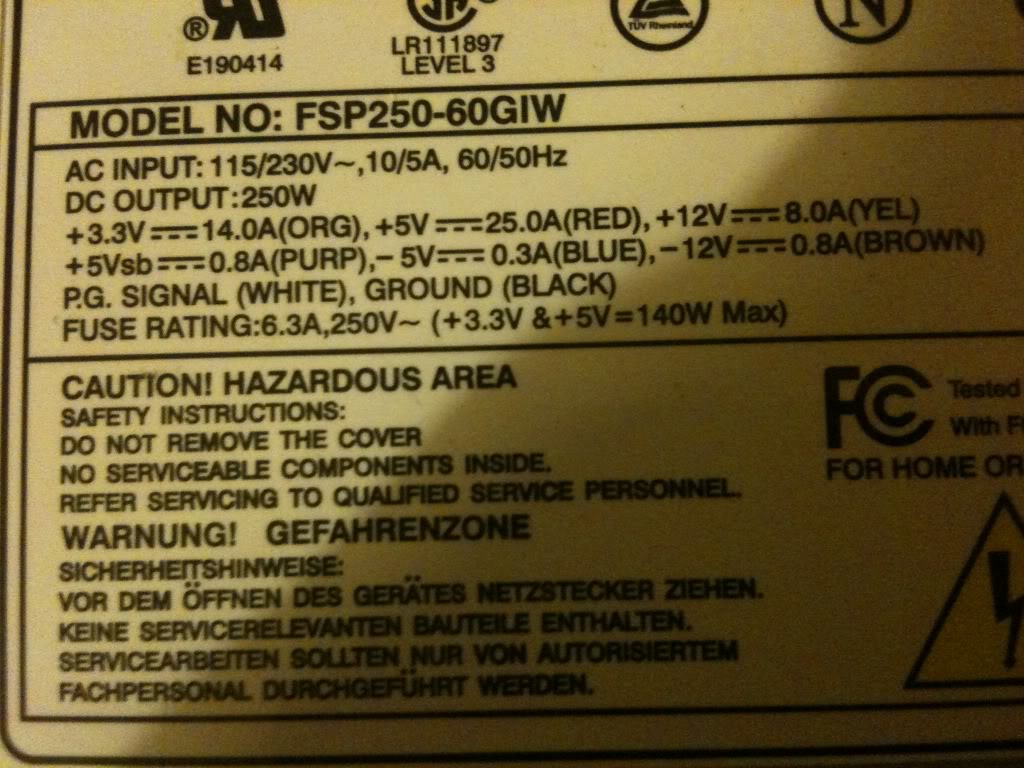
Converting a power supply
Parts and tools required
>an old computer power supply
>a screw driver
>some terminal posts
>Wire cutters
>A switch (push to make locking switch)
>A LED
>A 10mm drill bit
>A drill
>A 6mmDrill bit
>Insulated screw terminals -these are not important, you may chose to leave these out
>A 470Ohm resistor
>A soldering Iron
>Solder (flux core)
Taking it all apart
The first thing that I did was take off the lid of the box, The fan is connected directly to the board with no plug to remove it, so I removed the fan from the case lid.
Modifying the part
Lets deal with the lid first,
I knew that in the lid i'd need to put a switch (basically in place of the wire that I had before),
You might want (I did) a nice LED to tell you that the supply is on.
I also wanted to put plugs that to connect the wires to in the lid.
I chose to mount my plugs in two columns, (2 x 12v, 2x 5v, 2x3.3v and 2x0v) as these are the voltages that I'll use the most often, then I have one plug for -5 and -12, as I'll use these less often.
As it happens, banana plugs are usually stackable, so you won't really loose an functionality just using a single row of connectors.
When I looked on the inside, of the power supply, I saw that there were basically two sides, one side has big heat sinks in it, and the mains plugs next to it, the other side is fairly low profile leaving the top of the case empty. I decided that I'd like to keep my plugs away from the side with exposed mains connectors that the bottom of the terminals might hit, and away from the heat sinks for the same reason
I marked out the lid and drill the holes for all the part to go into.
Then installed the plugs, LED and switch (I used a simple black collar for the LED it's called a panel mount and costs about a penny. -you could leave the LED out completely).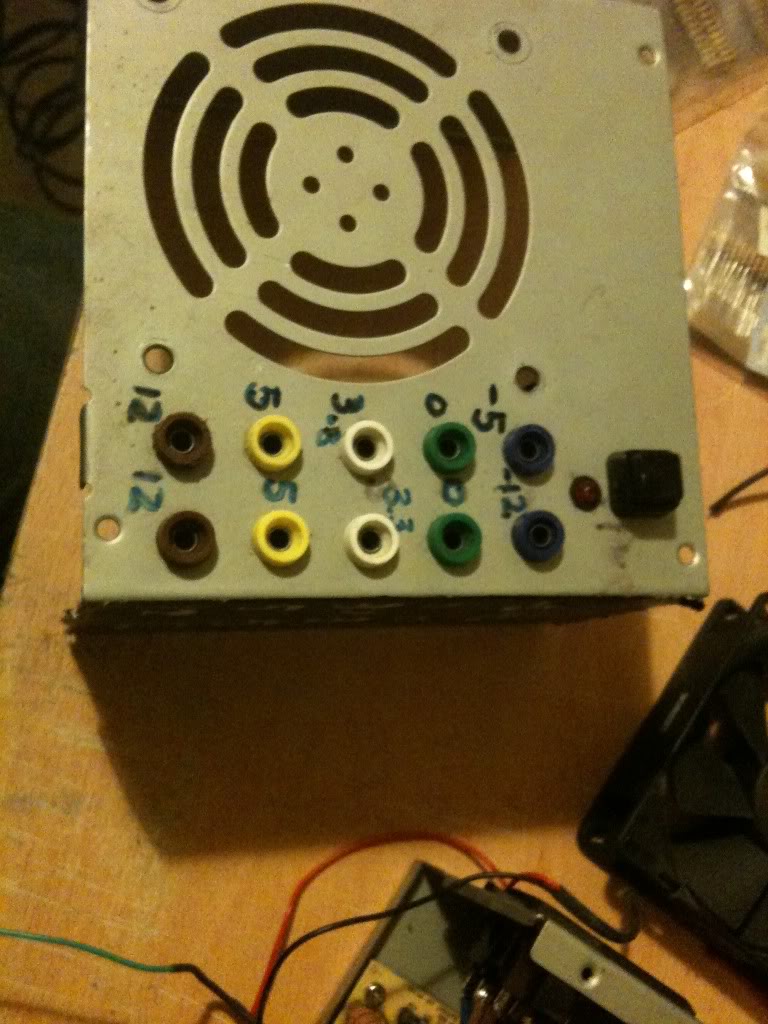
I just used a marker pen to write the voltages on the top of my supply, you might use nothing relying on the colour of the plugs to tell you the supply voltage, perhaps you might like to try etching or engraving, or using a label printer, I don't really care, pen works for me, and that's good enough.
Next as I have two plugs for one voltage, I connected these plugs, using a piece of wire running between them.
I also want to add a 470Ohm resistor to one leg of the LED (this is to limit the current that goes into the resistor).
(That'll connect to the 5v rail 5/470 = 0.01A or 10mA, enough to make the LED glow, you might like a bigger or smaller resistor depending on the needs of your LED, it's also 1/20th of a watt, so a simple small 1/8th watt resistor will be fine.)
I soldered leads to everything ready to connect to the terminal block connector.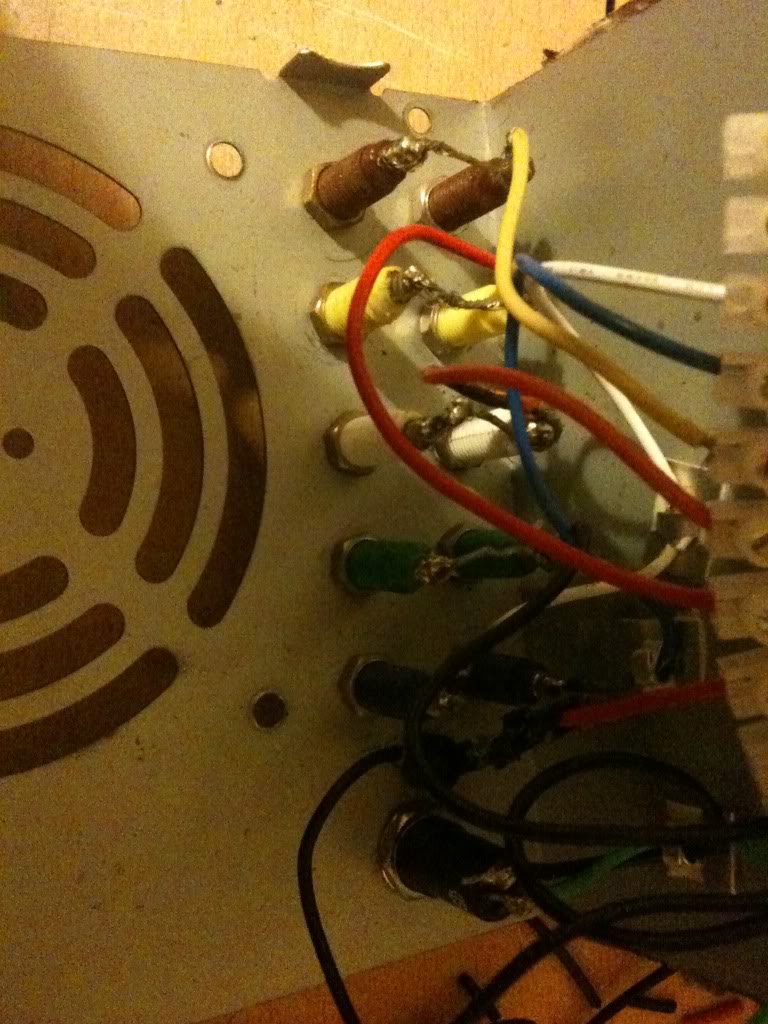
Finally I was able to stop working on the lid and move onto modifying the actual PSU.
One thing that you'll notice is that the wires are colour coded depending on their job. And there are a LOT of wires that are the same colour, in the supply I used there were about 10 black wires, all 0v, all from the same pad on the PCB!
I needed 3 black wires, could have got away with 1, but three was good (one for the power button, 1 for the LED and 1 for the output plug).
I really only needed 1 -12 wire, only 1 -5 wire, only 1 +12 wire. and two +5v wires (one for the plug, and one for the LED.
You do only need 1 3.3v wires, but in addition to the thicker wires you must keep the very thin orange wire, this is the sense wire that determines what voltage is being generated, and regulates the supply, without this wire your supply can float.
Anyway, I cut away the wires that I didn't need (that I could get to)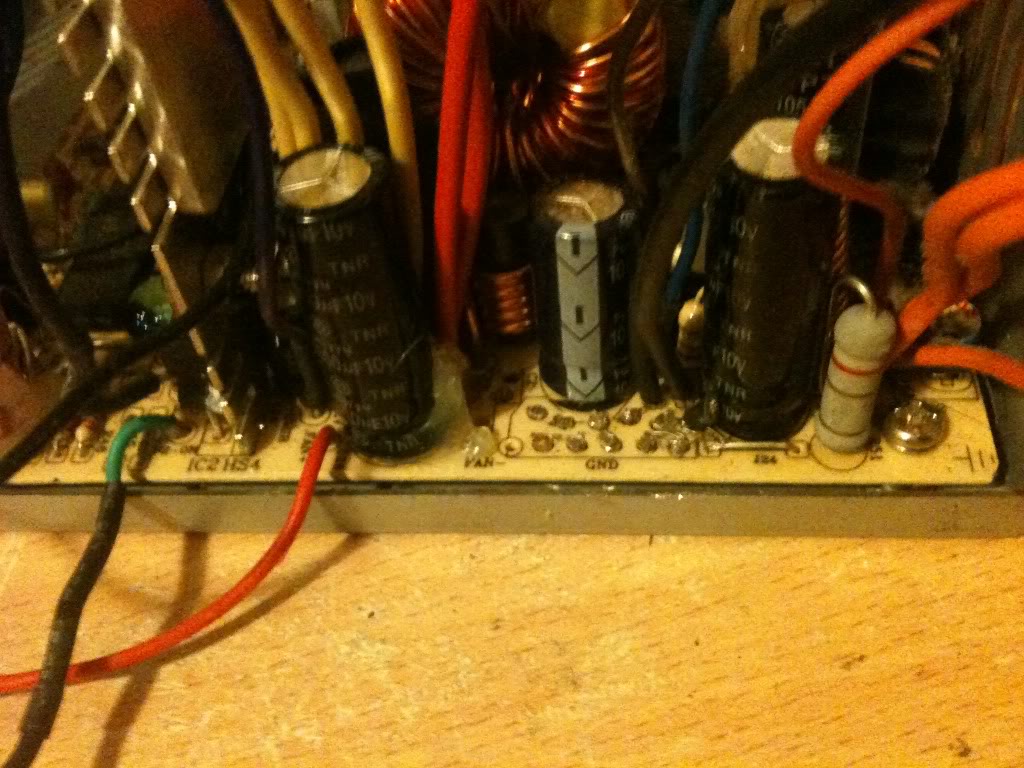
I couldn't get to cut the red or yellow wires, so I'm going to tie these off later in some spare terminals on the connector.
Putting is all together
So I'm now in a position where I've thinned out all the wires that I don't need, and I've trimmed all the wires that I do need to about four or five inches long so that I have plenty to work with.
Now I striped back the wires, and attached them to the terminal block.
It doesn't matter what order you make the connections in, just that black wires connect to ground, terminals, and the negative side of your LED, also that there is a black wire attached to one terminal of your switch.
You want the green wire to attach to the other leg of your switch, and a red wire to attach to the LED for your "on indicator".
Yellow wires are alwyas 12v, Orange is always 3.3v, Red is always 5v, minus five and minus 12 however do not appear to have a set colour scheme, and as such may vary.
The colours were written on the outside of the supply I used, you may have to poke around with a multimeter. or look for an ATX pinout and just select the correct wire from the plug.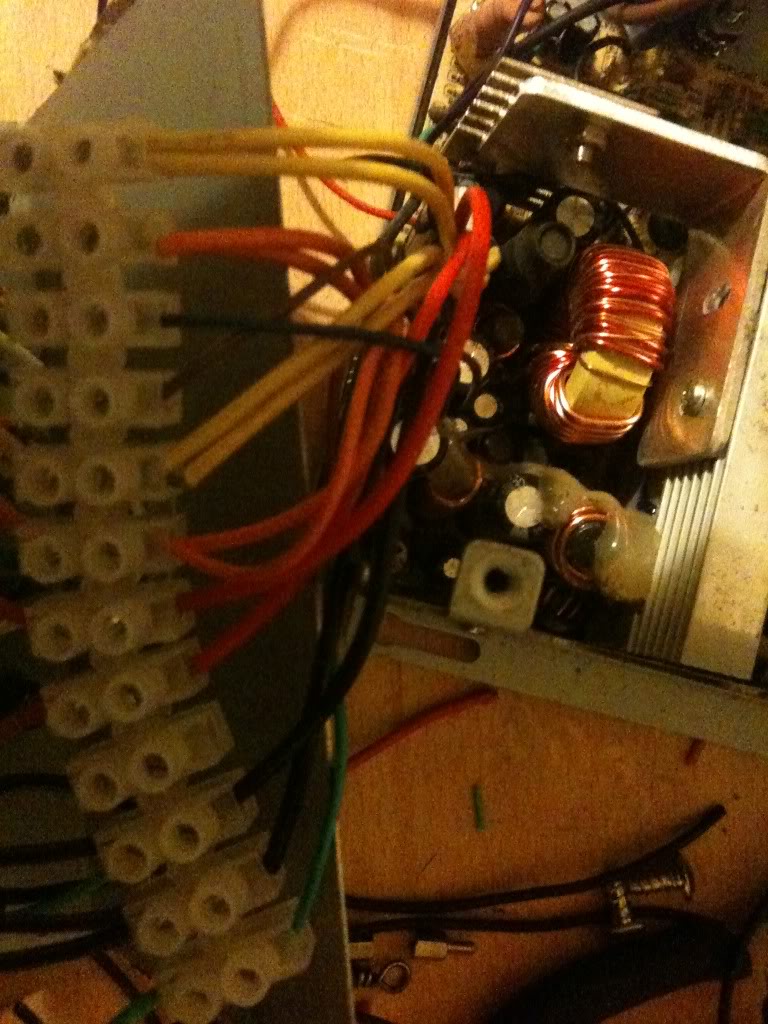
Once all the wires were connected I attached the fan to the top of the case again, and put the top of the case onto the bottom. as I said earlier, make sure that the bottom of your sockets do not touch the metal bits inside. Also make sure that no wires are touching the heat sink where the insulation could melt, and that no wires or the large terminal block is getting in the way of the fan.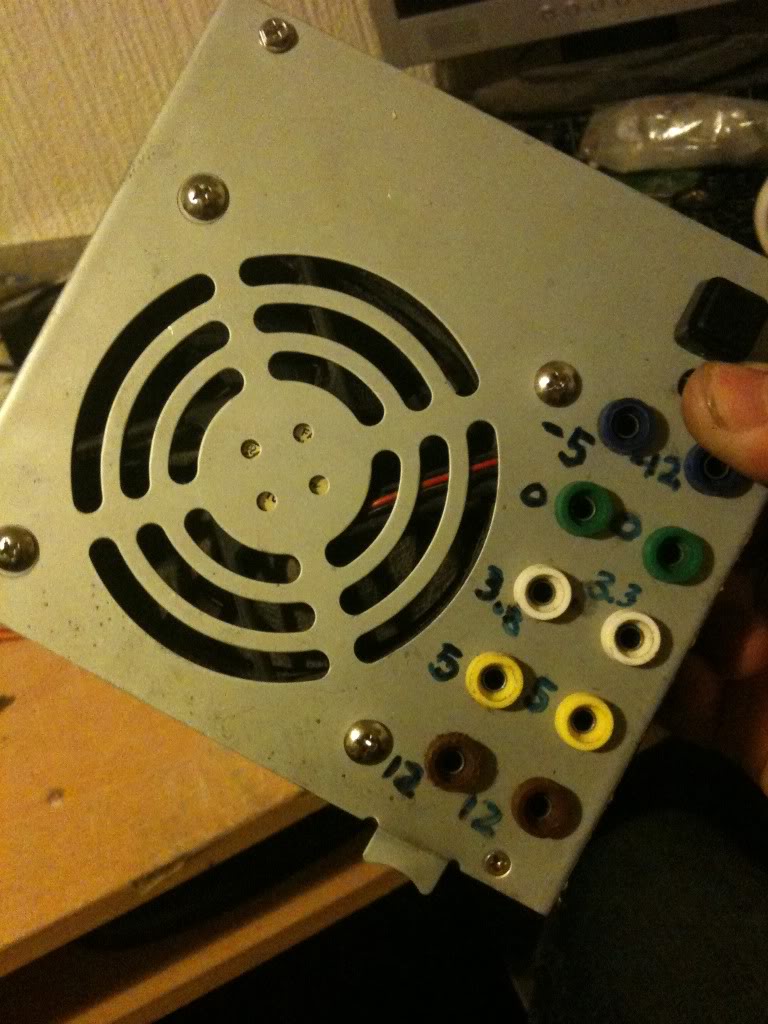
Now I measured The output voltages using a multimeter.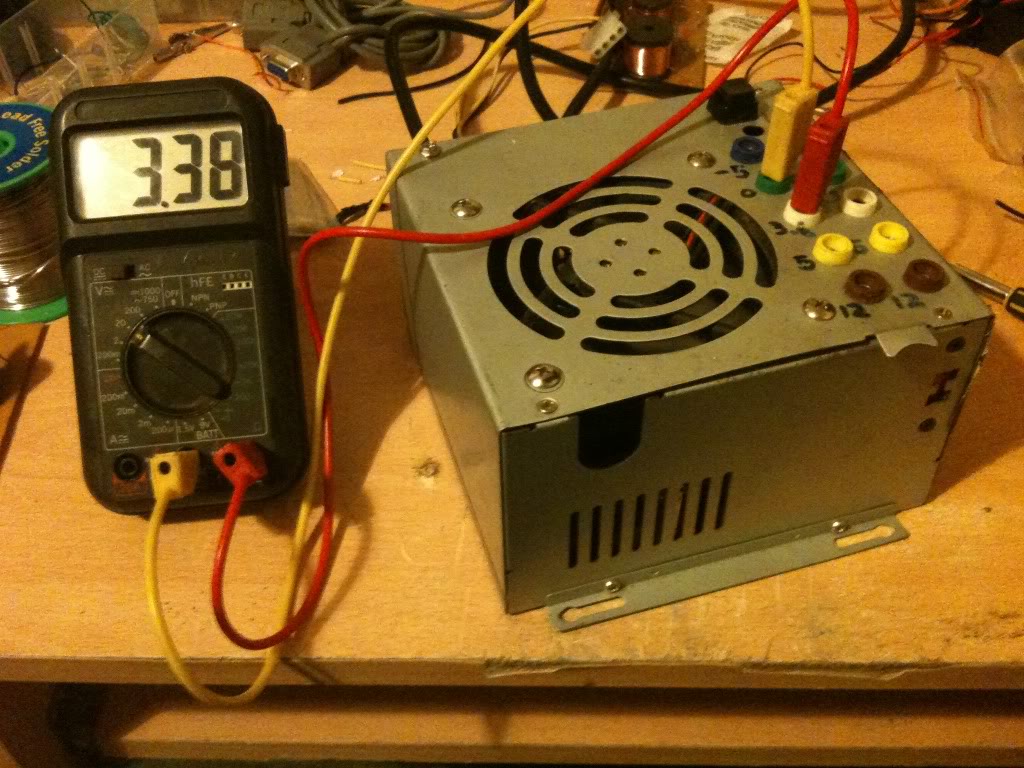
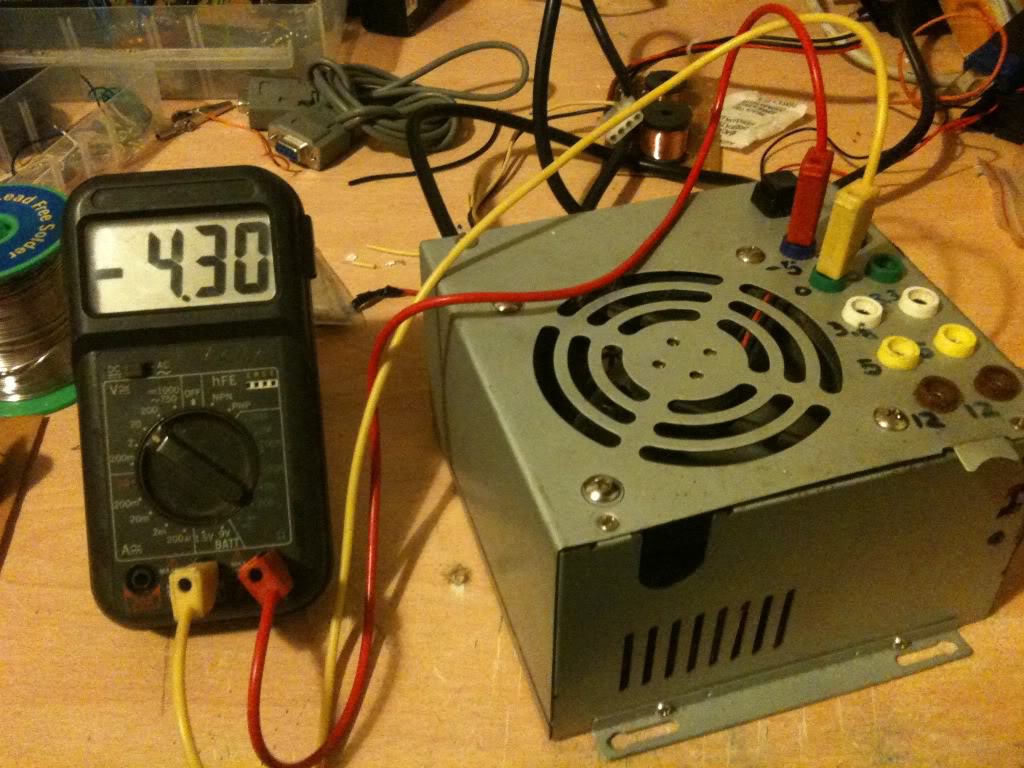
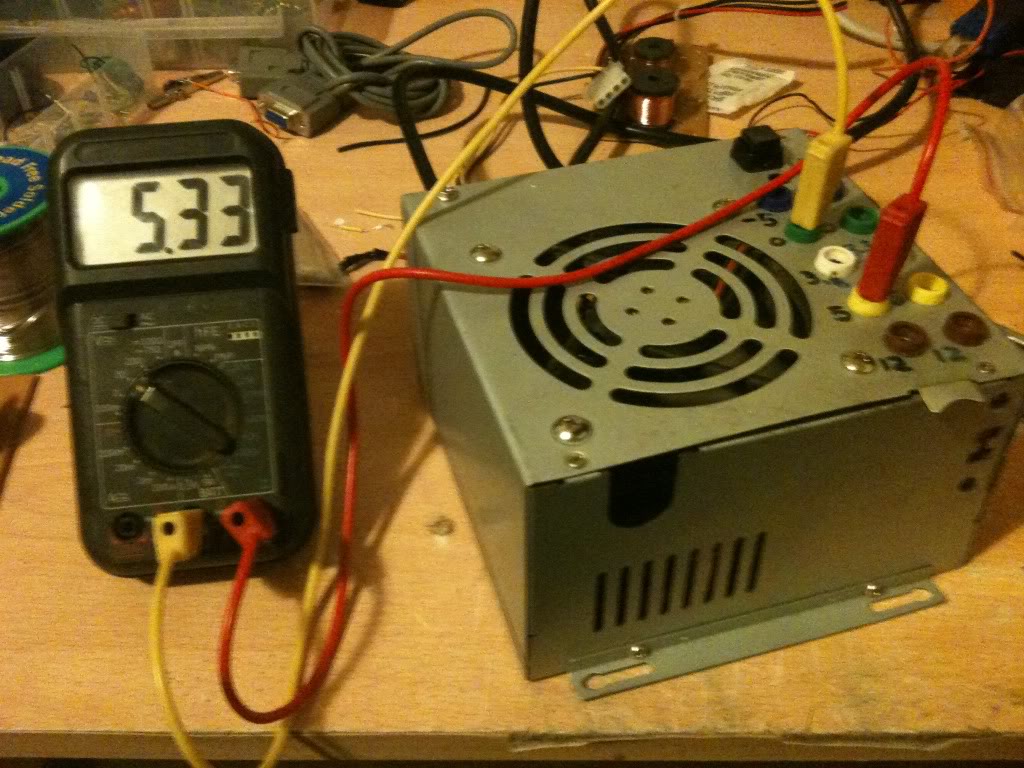
Since I'm always seeming to run out of power outlets, I chose a power supply that lets me get mains power out as well so I can daisy chain equipment together.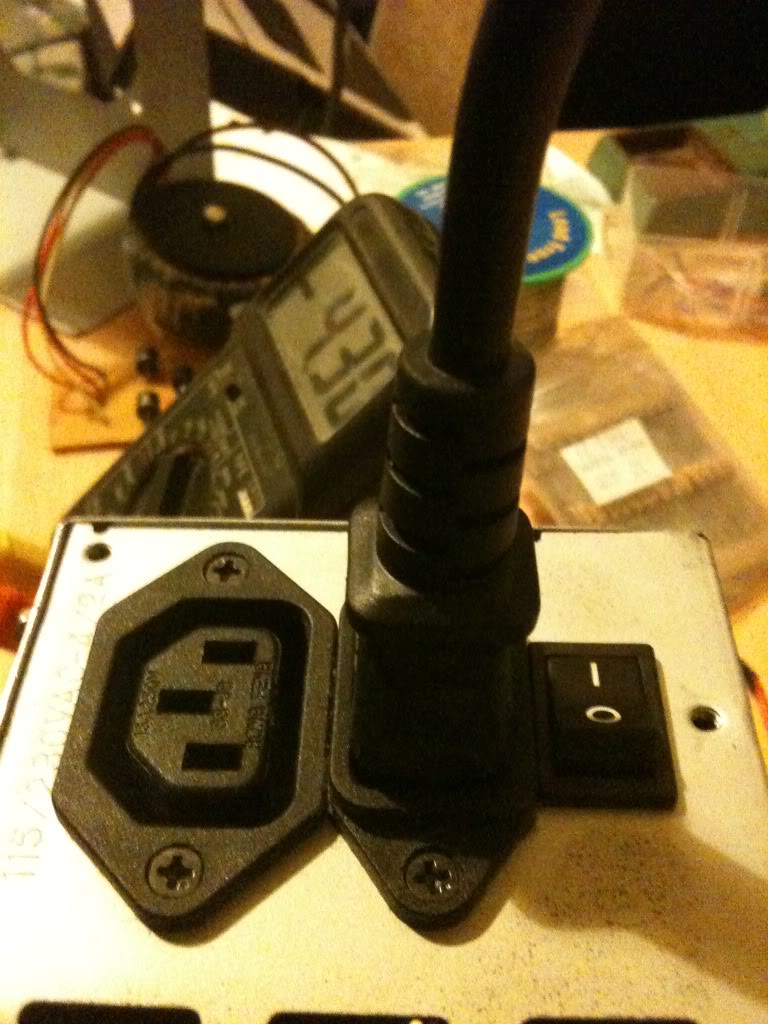
Costs
This is not the cheapest project in the world, but it is cheaper than buying a power supply with the same amount of usable outputs, regardless of whether those outputs are of a fixed voltage, or five variable voltages. I had everything either in my parts box/junk bin so this really cost me nothing.
There are 10 4mm sockets, these are 20 pence each from Rapid Electronics
http://www.rapidonline.com/Cables-Connectors/Connectors-Single-Pole/4mm-Connectors/4mm-Sockets/63893
(total cost £2)
The Square Single pole single throw switch cost 36 pence.
http://www.rapidonline.com/Electronic-Components/Switches/Push-Button-Switches/Square-push-switches-1A/30275
(toal cost £2.36)
LEDs cost around 9 pence (or less) (when you buy them in bulk).
here's one for 6 pence http://www.rapidonline.com/Electronic-Components/Optoelectronics/5mm-LEDs/Low-current-5mm-LEDs/29336
(total cost £2.45)
Resistors cost even less than this when bought in quantity.
http://www.rapidonline.com/Electronic-Components/Resistors-Potentiometer/Carbon-Film-Resistors/CR12-0.125W-Carbon-film-resistors/65192
65 pence for 100, seriesly people stop shopping at Maplin/Radioshack
Rapid cost 65 pence for 100, (or ~ half a penny per resistor).
Maplin cost 25pence per single resistor. (50 times more expensive).
http://www.maplin.co.uk/components/resistors/metal-film
If your project requires 3 resistors, it's cheaper to order on-line and have 97 spare/left over!
(total cost £3.10)
Now comes the expensive part, if you don't have a spare power supply laying about, (and don't have the resourcefulness to find one for free), then you'll have to buy one. for the princely sum of £7.86!
http://www.ebuyer.com/product/20083
Total cost £10.96! Much cheaper than any other power supply that I know of. in fact we're really knocking on the cost of a single voltage wallwart cost here, which has a lower power capacity and only 1 voltage output (which may or may not be adjustable!)
Alternatives, -and Why I didn't use them
This is something I started when I wrote up the red light torch, there are so many ways to crack an egg. So my way is not the only way, just the way that I chose on that day.
Spring terminals:
Spring terminals are useful if you're doing a lot of breadboard work, without a breadboard that has power terminals, but practically everything I've got is set-up for 4mm banana plugs, my multimeter, the power terminals on my breadboards, crocodile clips connect to 4mm plugs. Spring terminals may well have been cheaper, and indeed wouldn't require me to buy 4mm plugs to go with them, but since I'm set-up for using 4mm plugs it makes sense to use them
Binding posts:
Yes, these are just like 4mm sockets, except that you can also attach bare wires and screw them down, making them a whole heap more versatile. The only reason that I didn't use these is that I didn't have any in my parts box, and I did this project one evening after the shops were closed.
Directly soldering the leads:
I could have missed out the terminal block connector, and indeed the first time I made this supply I did. without that chunky connector however there are two things.
The wires that you can't cut off at the board end up loose in the case, you can wrap them in tape, but it's a bit messier than being able to put them in a spare space on the terminal block.
The first time I built this supply I soldered straight to the plugs, I broke that supply, and it was quite a PITA to remove all the old connections to put new connections on it. if I ever need to change the actual board again I can just take the case lid as I did this time and bolt it to a new supply just cutting and stripping the few wires that I need to use.
Sandbar resistor
Instead of just a locking switch on the green "power on" line, you should use a resistor on the 5v line to apply a load to the circuit that'd sense that it's on. That's the "proper" way of doing it.
I didn't do it like this because...
1> The sandbar resistor has to be a high power resistor, tied to the case for cooling, this seemed like it's take a lot of space inside the already cramped case, and is a part that's going to increase the idle power consumption of the power supply.
2> My supply works without it, so I'm not too worried really.
External plug-set with ATX/Molex connections
In the theory section you saw that it's possible to turn the supply on with nothing more than a piece of wire, I could have kept the supply as is, put molex connections on my projects, of I could have just made a board with my 4mm sockets arranged just as they are where the power supply just plugged straight into it.
The good side of this is that I wouldn't have had to open the case at all. So if you have a skittish partner or parents then you may wish to go this route. (If they aren't happy for you to plug things in after you're taken them apart and soldered bits to them!)
On the other hand, I think that you'll end up with something a lot messier.
I'm definitely going to continue the tutorials because it's actually quite fun to write them, and I'm finding that as I go over the ground again, I'm re-remembering some stuff that I'd completely forgotten about. But this post is right back to the core of why I even started this blog, and that's to share something that I've made.
Firstly,
There's your warning, but if you can't figure out for yourself that there is an element in danger in modifying anything that plugs directly into the wall then you should probably stop reading now and go elsewhere.
Theory
The theory for this is so simple, I have a power supply (a computer power supply), and I want to turn it into a bench power supply, so I pretty much just need to cut off the wires that aren't needed, and attach the appropriate plugs to the wires that are need!
How it works
The computer power supply maker has done all the hard design parts for me it's a switch mode power supply, mains supply and as it's switching faster, the transmission of the energy inside the ferrite core, basically that means that inside the power supply is switching on and off at a very high frequency, this is much faster than your 50Hz s of the transformers inside is more efficient, more efficient means that you're not generating as much heat, and not as much energy is wasted as heat.
A traditional power supply, would require an absolutely huge iron core surrounded by pounds of wire to be able to get the same kind of output power that a switch mode power supply (SMPS) gets.
Why it's important
The high frequency is important as that's what allows the supply to be so efficient. The fact that someone else made it is important because it means that you can make this supply inside a single afternoon.
If I was designing my own SMPS, I'd probably need to research for at least days, if not weeks, I'd need to source components. Create circuits to sense the output voltage and adjust the input if necessary, it'd be a lot of work, yet I can turn an old supply from a broken PC into a perfectly reasonable bench supply in a matter of hours.
Simple experiment
Before even breaking out the screw drivers, or plug in the soldering iron. I took a look at the computer power supply unit.
There is a big plug with either 20, or 24 pins on it. inside all these pins there will be a single green wire, with a black wire either side of it.
Using a small bit of wire I pushed it into the pin connected to the green pin, and one of the black pins from either side. The fans spun into life, and voltage could be measured at other pins.
You can just use the supply like this with no further modification, inserting your bit of wire to turn it on, removing your bit of wire to turn it off.
On the side of the case there was a table that telling me what colour wire carries what voltage, and what the limits of the current capabilities are for each voltage. this made it a whole load easier that searching for a pin out on-line for the ATX plug to know what pin was what.
Converting a power supply
Parts and tools required
>an old computer power supply
>a screw driver
>some terminal posts
>Wire cutters
>A switch (push to make locking switch)
>A LED
>A 10mm drill bit
>A drill
>A 6mmDrill bit
>Insulated screw terminals -these are not important, you may chose to leave these out
>A 470Ohm resistor
>A soldering Iron
>Solder (flux core)
Taking it all apart
The first thing that I did was take off the lid of the box, The fan is connected directly to the board with no plug to remove it, so I removed the fan from the case lid.
Modifying the part
Lets deal with the lid first,
I knew that in the lid i'd need to put a switch (basically in place of the wire that I had before),
You might want (I did) a nice LED to tell you that the supply is on.
I also wanted to put plugs that to connect the wires to in the lid.
I chose to mount my plugs in two columns, (2 x 12v, 2x 5v, 2x3.3v and 2x0v) as these are the voltages that I'll use the most often, then I have one plug for -5 and -12, as I'll use these less often.
As it happens, banana plugs are usually stackable, so you won't really loose an functionality just using a single row of connectors.
When I looked on the inside, of the power supply, I saw that there were basically two sides, one side has big heat sinks in it, and the mains plugs next to it, the other side is fairly low profile leaving the top of the case empty. I decided that I'd like to keep my plugs away from the side with exposed mains connectors that the bottom of the terminals might hit, and away from the heat sinks for the same reason
I marked out the lid and drill the holes for all the part to go into.
Then installed the plugs, LED and switch (I used a simple black collar for the LED it's called a panel mount and costs about a penny. -you could leave the LED out completely).
I just used a marker pen to write the voltages on the top of my supply, you might use nothing relying on the colour of the plugs to tell you the supply voltage, perhaps you might like to try etching or engraving, or using a label printer, I don't really care, pen works for me, and that's good enough.
Next as I have two plugs for one voltage, I connected these plugs, using a piece of wire running between them.
I also want to add a 470Ohm resistor to one leg of the LED (this is to limit the current that goes into the resistor).
(That'll connect to the 5v rail 5/470 = 0.01A or 10mA, enough to make the LED glow, you might like a bigger or smaller resistor depending on the needs of your LED, it's also 1/20th of a watt, so a simple small 1/8th watt resistor will be fine.)
I soldered leads to everything ready to connect to the terminal block connector.
Finally I was able to stop working on the lid and move onto modifying the actual PSU.
One thing that you'll notice is that the wires are colour coded depending on their job. And there are a LOT of wires that are the same colour, in the supply I used there were about 10 black wires, all 0v, all from the same pad on the PCB!
I needed 3 black wires, could have got away with 1, but three was good (one for the power button, 1 for the LED and 1 for the output plug).
I really only needed 1 -12 wire, only 1 -5 wire, only 1 +12 wire. and two +5v wires (one for the plug, and one for the LED.
You do only need 1 3.3v wires, but in addition to the thicker wires you must keep the very thin orange wire, this is the sense wire that determines what voltage is being generated, and regulates the supply, without this wire your supply can float.
Anyway, I cut away the wires that I didn't need (that I could get to)
I couldn't get to cut the red or yellow wires, so I'm going to tie these off later in some spare terminals on the connector.
Putting is all together
So I'm now in a position where I've thinned out all the wires that I don't need, and I've trimmed all the wires that I do need to about four or five inches long so that I have plenty to work with.
Now I striped back the wires, and attached them to the terminal block.
It doesn't matter what order you make the connections in, just that black wires connect to ground, terminals, and the negative side of your LED, also that there is a black wire attached to one terminal of your switch.
You want the green wire to attach to the other leg of your switch, and a red wire to attach to the LED for your "on indicator".
Yellow wires are alwyas 12v, Orange is always 3.3v, Red is always 5v, minus five and minus 12 however do not appear to have a set colour scheme, and as such may vary.
The colours were written on the outside of the supply I used, you may have to poke around with a multimeter. or look for an ATX pinout and just select the correct wire from the plug.
Once all the wires were connected I attached the fan to the top of the case again, and put the top of the case onto the bottom. as I said earlier, make sure that the bottom of your sockets do not touch the metal bits inside. Also make sure that no wires are touching the heat sink where the insulation could melt, and that no wires or the large terminal block is getting in the way of the fan.
Now I measured The output voltages using a multimeter.
Since I'm always seeming to run out of power outlets, I chose a power supply that lets me get mains power out as well so I can daisy chain equipment together.
Costs
This is not the cheapest project in the world, but it is cheaper than buying a power supply with the same amount of usable outputs, regardless of whether those outputs are of a fixed voltage, or five variable voltages. I had everything either in my parts box/junk bin so this really cost me nothing.
There are 10 4mm sockets, these are 20 pence each from Rapid Electronics
http://www.rapidonline.com/Cables-Connectors/Connectors-Single-Pole/4mm-Connectors/4mm-Sockets/63893
(total cost £2)
The Square Single pole single throw switch cost 36 pence.
http://www.rapidonline.com/Electronic-Components/Switches/Push-Button-Switches/Square-push-switches-1A/30275
(toal cost £2.36)
LEDs cost around 9 pence (or less) (when you buy them in bulk).
here's one for 6 pence http://www.rapidonline.com/Electronic-Components/Optoelectronics/5mm-LEDs/Low-current-5mm-LEDs/29336
(total cost £2.45)
Resistors cost even less than this when bought in quantity.
http://www.rapidonline.com/Electronic-Components/Resistors-Potentiometer/Carbon-Film-Resistors/CR12-0.125W-Carbon-film-resistors/65192
65 pence for 100, seriesly people stop shopping at Maplin/Radioshack
Rapid cost 65 pence for 100, (or ~ half a penny per resistor).
Maplin cost 25pence per single resistor. (50 times more expensive).
http://www.maplin.co.uk/components/resistors/metal-film
If your project requires 3 resistors, it's cheaper to order on-line and have 97 spare/left over!
(total cost £3.10)
Now comes the expensive part, if you don't have a spare power supply laying about, (and don't have the resourcefulness to find one for free), then you'll have to buy one. for the princely sum of £7.86!
http://www.ebuyer.com/product/20083
Total cost £10.96! Much cheaper than any other power supply that I know of. in fact we're really knocking on the cost of a single voltage wallwart cost here, which has a lower power capacity and only 1 voltage output (which may or may not be adjustable!)
Alternatives, -and Why I didn't use them
This is something I started when I wrote up the red light torch, there are so many ways to crack an egg. So my way is not the only way, just the way that I chose on that day.
Spring terminals:
Spring terminals are useful if you're doing a lot of breadboard work, without a breadboard that has power terminals, but practically everything I've got is set-up for 4mm banana plugs, my multimeter, the power terminals on my breadboards, crocodile clips connect to 4mm plugs. Spring terminals may well have been cheaper, and indeed wouldn't require me to buy 4mm plugs to go with them, but since I'm set-up for using 4mm plugs it makes sense to use them
Binding posts:
Yes, these are just like 4mm sockets, except that you can also attach bare wires and screw them down, making them a whole heap more versatile. The only reason that I didn't use these is that I didn't have any in my parts box, and I did this project one evening after the shops were closed.
Directly soldering the leads:
I could have missed out the terminal block connector, and indeed the first time I made this supply I did. without that chunky connector however there are two things.
The wires that you can't cut off at the board end up loose in the case, you can wrap them in tape, but it's a bit messier than being able to put them in a spare space on the terminal block.
The first time I built this supply I soldered straight to the plugs, I broke that supply, and it was quite a PITA to remove all the old connections to put new connections on it. if I ever need to change the actual board again I can just take the case lid as I did this time and bolt it to a new supply just cutting and stripping the few wires that I need to use.
Sandbar resistor
Instead of just a locking switch on the green "power on" line, you should use a resistor on the 5v line to apply a load to the circuit that'd sense that it's on. That's the "proper" way of doing it.
I didn't do it like this because...
1> The sandbar resistor has to be a high power resistor, tied to the case for cooling, this seemed like it's take a lot of space inside the already cramped case, and is a part that's going to increase the idle power consumption of the power supply.
2> My supply works without it, so I'm not too worried really.
External plug-set with ATX/Molex connections
In the theory section you saw that it's possible to turn the supply on with nothing more than a piece of wire, I could have kept the supply as is, put molex connections on my projects, of I could have just made a board with my 4mm sockets arranged just as they are where the power supply just plugged straight into it.
The good side of this is that I wouldn't have had to open the case at all. So if you have a skittish partner or parents then you may wish to go this route. (If they aren't happy for you to plug things in after you're taken them apart and soldered bits to them!)
On the other hand, I think that you'll end up with something a lot messier.
Saturday, May 28, 2011
About and regarding tools and materials (ten tips.)
My tool collection is reasonably impressive. there is surely many hundreds of pounds, if not thousands.
It's not as complete as my fathers. that's for sure, (I'm missing a full sized pillar drill, bench grinder, lathe, table saw, table planing machine), but then I'm also clearly a few years behind him, and have time to keep collecting...
So here a few observations that I've made about tools and parts...
1, Tools are expensive, quality tools even more so. -but good tools, or good enough tools needn't be.
now I'm torn on this, for two reasons, I bought a B&Q value drill, it's ok, but it's not particularly strong (800w I think), it also has no speed control, so it's not particularly useful. It did only cost £10 though...
I've got a power craft drill, that's a little more powerful, with variable speed and only cost a little more something like £13 from ALDI.
does it hold up to a professional DeWALT drill, I doubt it.
will it stand up as well as a dewalt drill? I also doubt that.
will it last as long, probably not...
BUT, I can buy the £13 drill from ALDI 20 times over before I've spent as much as buying a single Dewalt drill, (which if I drop from a height would break just as easily!).
I'm already nearly 30, If my ALDI drill lasts 2 or three years, then I'll basically be able to keep buying cheap drills until I die, and still have spent less.
Basically, spend your cash wisely, sometimes the cheapest is not the best buy.
sometimes the most expensive, is not the best buy either.
2, Parts are expensive, but not if you know where to look.
do two searches now, open ebay and search 1hp motor on ebay, you'll see that 1/4 watt motors start at around £30, with up to £100 for a single phase 1hp electric motor...
now do another search, HP Watt conversion. you'll find 1hp = 746W.
now go read point 1 again, now point two... read until you notice that I can buy a drill that's got more than a 1ho motor in it for £10, or I can buy a 1/4hp motor for £30, a 1HP motor from £50 - £100.
the lesson here, sometimes cheap tools are good for a maker, they let you have a part that's cheaper than buying a retail.
if you buy the drill you get,
(a 3 pin plug) -retail £0.59
a length of flex -retail ~£1
a 3 jaw jacobs chuck searching ebay lists those as around £5.99
(so we're already over half the price of the thing!)
then you've got a motor. AND a small plastic gearbox.
3, Go into shops looking for tools, but don't necessarily buy tools.
Both ALDI and LIDL stock tools that are a decent price, and decent quality, their stock sale lasts about a week and you get a decent tool at a decent price (see the drill above).
When I bought the drill for example, I wasn't starting a project that required a drill, I just knew that in the future I would want a drill (that was better than my B&Q value one). so I bought it.
Next time I did a project that needed a drill ALDI weren't selling them any more. so I'd have had to go to B&Q or wickes and spend twice as much for the same quality drill.
Go into a hardware shop for a browse, you don't have to buy anything, and if you feel weird about doing that, choose little things, buy some carpenters pencils (for when you're working with wood), or a scribe (for when you're using metal), if you see a decent offer on a tool, buy it! even if you don't need it at the moment.
The same goes for tool boxes. I got a tool box with two draws and a space in the top for £20 from B&Q a couple of years ago, it was full of tools too (which did kind of upset the idea that I'd fill it with tools). it was on sale, and less than half the price of simillar tool boxes from the halfords next door.
I bought a rolling cabinet with a five draw box to go on top from LIDL for £60 (some £200 cheaper than similar set-ups in Halfords.
4, When you're in a hardware shop check the sales bins.
B&Q have little orange baskets that they fill with stock that's either end of line, or damaged packaging.
I've got tons of jig saw blades for less than half price before I looked in a bin.
Brazing rods in B&Q came down from £3 for a pack to £0.50 a pack, (so I took a lot, and a mixture of brass for working with steel, Aluminium for working with aluminium, and a different brass allow for working with copper). I've got something along the lines of 60 packs (I spent £30 on £180 worth of materials.
5, with some things there is no difference in quality
I have "value" tape measures, set squares steel rules, the value that they save is not in the size of the unit. my ruler isn't shorter because it was cheaper!
6, Go to Poundland, that's where I got my hack saw £4 saving on the B&Q value price, it's where I got a set of rasps from, it's where I got blades for my hacksaw, where I've bought vice grips from etc. It's your choice, you can go to a DIY store and buy five tools and spend £25, or go to Poundland, but five tools and spend £5...
7, Go to car boot sales, my router came from a car boot sale (it's a fairly decent black and decker one too) -from their pro range. it works perfectly.
I've gotten hammers, spanners and clamps from car boot sales, the price is pretty much always negotiable and if you don't think it's sufficiently lower than the price for buying it new, then walk away. go and buy it new.
If you're buying from car boot sales, do check that the things look like they'll work though, I bought a belt sander, electronically it works fine, but is missing the belt tensioner, so the belt just stops rotating when you try to sand anything. -if i'd opened my eyes and looked properly I'd have saved some money. (I'll strip it down and scavenge the motor, but it's hardly the point right!)
car boot sales and charity shops are good for fabrics if you're making anything with textiles, (as an example I bought a whole roll of flame resistant sofa covering, this will be the inside of a seat one day, and will also be the head liner on the roof of the car I'm restoring.
I bought a five draw A4 filing cabinet (the sort that do on top of desks and take paper laying flat the draws are about 1.5 inches tall) £5 or £10 from a car boot sale.
I have a much larger 15 draw one, given to me.
and found four sets of the same sort of filing cabinet (but with 3" draws) and six draws on gumtree to whoever could take them away.
so 8, look on gumtree. and free cycle.
I use these as a tool box, (a draw for metal tools, a draw for wood tools, a draw for screws, a draw for bolts, a draw for blades) (32 draws in total as I gave two of the 6 draw units to my dad),
they are not tool boxes, but they work well as tool boxes.
larger filing cabinets work well as power tool storage as you can stack quite a lot inside them.
steel cupboards make great component storage (you can put draw units inside and on the doors).
Don't be afraid to get things for free, something that cost you nothing is great.
Also don't be afraid of getting tools from ebay, (but don't expect to be able to return them!).
9, keep everything.
I might be a bit of a hoarder (in fact a selection of my stuff was once pictured in a PC magazine of what a person with too much stuffs house looks like!
but seriously, keep things that you think you have a use for.
just yesterday I was raiding my parts bit for screws from a computer case, without them at hand I'd have had to go to Maplins and buy some.
I just re-used some chromed steel rods (that strangely came from an old PC case), without them I'd have beeing buying steel from B&Q.
don't keep what you don't have to though.
as an example, when I built a tab welder, I was scrapping loads of PC's at work at the time, I took (de soldered) hundreds of capacitors from main boards, then threw the main boards away. I couldn't use the surface mount components. keeping 20 broken computers? that's have been silly, (even if I know that I'll probably want flat steel sheets in the future, and could have used the cases).
it's not going to hurt you to keep a stock of materials, but be realistic. in my latest project I've been working with aluminium, and saving as many of cuts as I can, simply because I want to do some casting (this is even on my to-do list). but don't save what you won't or can't use, don't keep what you can't store, and don't expand your store to the size of your house, because it's just messy, you'll end up dying alone amongst the piles of broken DVD burners that you were hoping to scavenge lasers from "one day"!
you can melt down milk bottles to make rep-rap materials, but don't keep endless supplies of old milk bottles, either melt them down or throw them away!
and number 10...
The most valuable tools that you have are your hands/eyes/ears/lungs protect them.
that means knowing how to use tools, keeping your fingers away from spinning blades, or behind the sharp point of a chisel.
and keeping your fingers from under the foot of a sewing machine.
holding work in a vice rather than in your hand and drilling into your hand.
if means after cutting metal, you should use a file to clean up the edges, don't leave them sharp, they will cut you!
It means tying back long hair. before going near spinning machinery.
That means ear defenders, dust masks, eye protection (either clear goggle or specific wavelength blocking with lasers, I reccommend auto darkening welding helmets, the ones from halfords are the cheapest ones I've found and they are good.
looking after yourself means wearing long sleeves whilst welding, (the uv from the arc burns you).
It means not drinking, or doing drugs and making stuff with dangerous tools. (the results are worse when you're wasted anyway. better to just enjoy being wasted and continue the making another day.
As you may have guessed I learned all these bits of advice the hard way, I did them wrong first. Sometimes hurting my hands, sometimes hurting my wallet.
It's not as complete as my fathers. that's for sure, (I'm missing a full sized pillar drill, bench grinder, lathe, table saw, table planing machine), but then I'm also clearly a few years behind him, and have time to keep collecting...
So here a few observations that I've made about tools and parts...
1, Tools are expensive, quality tools even more so. -but good tools, or good enough tools needn't be.
now I'm torn on this, for two reasons, I bought a B&Q value drill, it's ok, but it's not particularly strong (800w I think), it also has no speed control, so it's not particularly useful. It did only cost £10 though...
I've got a power craft drill, that's a little more powerful, with variable speed and only cost a little more something like £13 from ALDI.
does it hold up to a professional DeWALT drill, I doubt it.
will it stand up as well as a dewalt drill? I also doubt that.
will it last as long, probably not...
BUT, I can buy the £13 drill from ALDI 20 times over before I've spent as much as buying a single Dewalt drill, (which if I drop from a height would break just as easily!).
I'm already nearly 30, If my ALDI drill lasts 2 or three years, then I'll basically be able to keep buying cheap drills until I die, and still have spent less.
Basically, spend your cash wisely, sometimes the cheapest is not the best buy.
sometimes the most expensive, is not the best buy either.
2, Parts are expensive, but not if you know where to look.
do two searches now, open ebay and search 1hp motor on ebay, you'll see that 1/4 watt motors start at around £30, with up to £100 for a single phase 1hp electric motor...
now do another search, HP Watt conversion. you'll find 1hp = 746W.
now go read point 1 again, now point two... read until you notice that I can buy a drill that's got more than a 1ho motor in it for £10, or I can buy a 1/4hp motor for £30, a 1HP motor from £50 - £100.
the lesson here, sometimes cheap tools are good for a maker, they let you have a part that's cheaper than buying a retail.
if you buy the drill you get,
(a 3 pin plug) -retail £0.59
a length of flex -retail ~£1
a 3 jaw jacobs chuck searching ebay lists those as around £5.99
(so we're already over half the price of the thing!)
then you've got a motor. AND a small plastic gearbox.
3, Go into shops looking for tools, but don't necessarily buy tools.
Both ALDI and LIDL stock tools that are a decent price, and decent quality, their stock sale lasts about a week and you get a decent tool at a decent price (see the drill above).
When I bought the drill for example, I wasn't starting a project that required a drill, I just knew that in the future I would want a drill (that was better than my B&Q value one). so I bought it.
Next time I did a project that needed a drill ALDI weren't selling them any more. so I'd have had to go to B&Q or wickes and spend twice as much for the same quality drill.
Go into a hardware shop for a browse, you don't have to buy anything, and if you feel weird about doing that, choose little things, buy some carpenters pencils (for when you're working with wood), or a scribe (for when you're using metal), if you see a decent offer on a tool, buy it! even if you don't need it at the moment.
The same goes for tool boxes. I got a tool box with two draws and a space in the top for £20 from B&Q a couple of years ago, it was full of tools too (which did kind of upset the idea that I'd fill it with tools). it was on sale, and less than half the price of simillar tool boxes from the halfords next door.
I bought a rolling cabinet with a five draw box to go on top from LIDL for £60 (some £200 cheaper than similar set-ups in Halfords.
4, When you're in a hardware shop check the sales bins.
B&Q have little orange baskets that they fill with stock that's either end of line, or damaged packaging.
I've got tons of jig saw blades for less than half price before I looked in a bin.
Brazing rods in B&Q came down from £3 for a pack to £0.50 a pack, (so I took a lot, and a mixture of brass for working with steel, Aluminium for working with aluminium, and a different brass allow for working with copper). I've got something along the lines of 60 packs (I spent £30 on £180 worth of materials.
5, with some things there is no difference in quality
I have "value" tape measures, set squares steel rules, the value that they save is not in the size of the unit. my ruler isn't shorter because it was cheaper!
6, Go to Poundland, that's where I got my hack saw £4 saving on the B&Q value price, it's where I got a set of rasps from, it's where I got blades for my hacksaw, where I've bought vice grips from etc. It's your choice, you can go to a DIY store and buy five tools and spend £25, or go to Poundland, but five tools and spend £5...
7, Go to car boot sales, my router came from a car boot sale (it's a fairly decent black and decker one too) -from their pro range. it works perfectly.
I've gotten hammers, spanners and clamps from car boot sales, the price is pretty much always negotiable and if you don't think it's sufficiently lower than the price for buying it new, then walk away. go and buy it new.
If you're buying from car boot sales, do check that the things look like they'll work though, I bought a belt sander, electronically it works fine, but is missing the belt tensioner, so the belt just stops rotating when you try to sand anything. -if i'd opened my eyes and looked properly I'd have saved some money. (I'll strip it down and scavenge the motor, but it's hardly the point right!)
car boot sales and charity shops are good for fabrics if you're making anything with textiles, (as an example I bought a whole roll of flame resistant sofa covering, this will be the inside of a seat one day, and will also be the head liner on the roof of the car I'm restoring.
I bought a five draw A4 filing cabinet (the sort that do on top of desks and take paper laying flat the draws are about 1.5 inches tall) £5 or £10 from a car boot sale.
I have a much larger 15 draw one, given to me.
and found four sets of the same sort of filing cabinet (but with 3" draws) and six draws on gumtree to whoever could take them away.
so 8, look on gumtree. and free cycle.
I use these as a tool box, (a draw for metal tools, a draw for wood tools, a draw for screws, a draw for bolts, a draw for blades) (32 draws in total as I gave two of the 6 draw units to my dad),
they are not tool boxes, but they work well as tool boxes.
larger filing cabinets work well as power tool storage as you can stack quite a lot inside them.
steel cupboards make great component storage (you can put draw units inside and on the doors).
Don't be afraid to get things for free, something that cost you nothing is great.
Also don't be afraid of getting tools from ebay, (but don't expect to be able to return them!).
9, keep everything.
I might be a bit of a hoarder (in fact a selection of my stuff was once pictured in a PC magazine of what a person with too much stuffs house looks like!
but seriously, keep things that you think you have a use for.
just yesterday I was raiding my parts bit for screws from a computer case, without them at hand I'd have had to go to Maplins and buy some.
I just re-used some chromed steel rods (that strangely came from an old PC case), without them I'd have beeing buying steel from B&Q.
don't keep what you don't have to though.
as an example, when I built a tab welder, I was scrapping loads of PC's at work at the time, I took (de soldered) hundreds of capacitors from main boards, then threw the main boards away. I couldn't use the surface mount components. keeping 20 broken computers? that's have been silly, (even if I know that I'll probably want flat steel sheets in the future, and could have used the cases).
it's not going to hurt you to keep a stock of materials, but be realistic. in my latest project I've been working with aluminium, and saving as many of cuts as I can, simply because I want to do some casting (this is even on my to-do list). but don't save what you won't or can't use, don't keep what you can't store, and don't expand your store to the size of your house, because it's just messy, you'll end up dying alone amongst the piles of broken DVD burners that you were hoping to scavenge lasers from "one day"!
you can melt down milk bottles to make rep-rap materials, but don't keep endless supplies of old milk bottles, either melt them down or throw them away!
and number 10...
The most valuable tools that you have are your hands/eyes/ears/lungs protect them.
that means knowing how to use tools, keeping your fingers away from spinning blades, or behind the sharp point of a chisel.
and keeping your fingers from under the foot of a sewing machine.
holding work in a vice rather than in your hand and drilling into your hand.
if means after cutting metal, you should use a file to clean up the edges, don't leave them sharp, they will cut you!
It means tying back long hair. before going near spinning machinery.
That means ear defenders, dust masks, eye protection (either clear goggle or specific wavelength blocking with lasers, I reccommend auto darkening welding helmets, the ones from halfords are the cheapest ones I've found and they are good.
looking after yourself means wearing long sleeves whilst welding, (the uv from the arc burns you).
It means not drinking, or doing drugs and making stuff with dangerous tools. (the results are worse when you're wasted anyway. better to just enjoy being wasted and continue the making another day.
As you may have guessed I learned all these bits of advice the hard way, I did them wrong first. Sometimes hurting my hands, sometimes hurting my wallet.
Monday, February 05, 2007
Fag Pack amp

well I made the fag pack amp...
not that it worked... Damn Maplin... looked up all the parts online, went to the shop expecting to be able to just grab the things off the shelf only to be told... "I'm sorry they are web only orders"...
not to be put off, I had a quick flick through the catalogue in store... decided that my design would have to be abandonned, and went about getting parts for a stock amp using the simple suggested design in the catalogue... (the reference circuits).
it's only one fucking IC and a handful of resistors and caps... how could it possibly fail...
I don't know but it did!
ahh well I'll have another go sometime in the near future when I get a bit more spare time.
Why is this tagged scavenging? well the speakers for the amp were from a laptop they fitted nicely into the cigarette packet leaving plenty of space for the battery.
Subscribe to:
Comments (Atom)