Showing posts with label diode. Show all posts

Monday, June 11, 2012

Electronics lessons: Music effects: The distortion pedal

This is the first guitar pedal that I eve made...

What is distortion.
Distortion is the changing of a wave form from one form to another so as to distort it.

Technically speaking, a tone control distorts the signal, a envelop filter distorts the signal, anything that "colours" the signal also distorts it.

but if I stop being a smart ass for a second.

distortion to most people means fuzz.

History of overdrive.
It seems to make sense to me to start at the very beginning, and lets take a look at the physics of what's happening.

Many people try to make a distinction of what type of distortion they are listening to, if it's a hard clipping, or soft clipping, some people thing that an over drive and a distortion are different, they kind of are, but fundamentally it's all the same.

OK, distortion was around long before this, but lets set the scene...
To understand this analogy you;re going to need to know what a green back is.
A green back is a speaker made by the British speaker manufacturing company Celestion in the 60's or 70's.
It was a basic run of the mill speaker, which has gained cult status (and price) with it's inability to handle the power of the signals that people were trying to drive thought it.

Now you might think that from the description above of a basic speaker that's gained notoriety for sounding bad might make you think that I dislike it.
nothing could be further from the truth. the point I'm getting at here is that the magic sound of 60/70 British rock, (think Rolling stones/Yard birds/Led Zepplin) lays a lot in the mechanical and electrical limitations of the time.

Consider how a speaker works,
a coil of wire is suspended in a permanent magnet,
the coil of wire is subject to an electrical current, this makes the coil magnetic, where it will be either attracted to, or repelled from the permanent basket on the back of the cone.
the coil has a paper cone attached to it.
as the coil moves the paper cone moves, this moves air particles, which vibrate through the air and then the air vibrates against our ear drums and happy days we hear sound.

So we get that the coil is moving, and we get that we can turn the volume up and make it move more, but, the coil is attached (with what's called suspension) to the metal frame (spider) in the speaker construction. The size and stiffness of the suspension limits how far that speaker cone can move.
that means that for very large wave forms the speaker will not replicate exactly what is being asked of it.
it tries to reach the point where the signal applied it telling it to go, but excersion limits are met and the speaker cannot move any more.
additionally the suspension on the speaker slows down the cone as it reaches the excursion limit

So the following picture hopes to show you what I mean, I've drawn it on it's side so you can visualise a speaker cone going in and out.
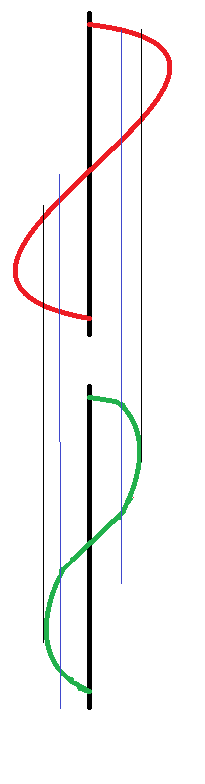
The thick black line is zero, this is where the speaker normally rests.
the red line is the input to the speaker.
you see it rising, the green line (speaker position) moves with it, then we reach the blue line, this is nearing the excursion limits for the speaker, so whilst the red line continues to move, the green line is being slowed by the suspension of the speaker.

The red line continues to rise where it meets the black line, this is the excursion limit the speaker can no longer move at all past this point whilst the red line continues to be at this point the speaker sits as it's maximum excursion position waiting for the red line to fall.

This is, in the most traditional sense an over drive distortion.
the wave is quite smooth, (as the suspension prevents square edges to the sound wave) and as such will sound like a warm fuzz.

It is also possible to get over drive distortion from an amplifier.
Consider the following chart.
the blue wave is what we want. the red wave is what we get
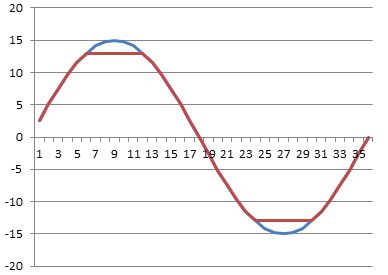
lets say we have an amplifier with supply rails of +15 and -15 volts, you we give the amplifier a 1v / -1v signal and say, amplify that, and set the gain to 15.

What should come out of the amplifier is a smooth wave (the same as went in) with peak values of + and - 15 volts.
but we can't actually drive the amplifier to the supply rail voltages, the most that we could get out is +13 and -13 volts, so the top and the bottom of the votlage is cut off.

This is a much harder clipping sound.

Now that we've listened to loads of music and realised that the classic hot sound of the 60/70s is so desirable what can we do to emulate that?
(clearly we don't want to run our amplifier at that level forever, and the amount of power that you need to put into a speaker cone to reach cone excursion limits makes your show loud, (and perhaps not suited to the venue size you have!)

So you want to fake it.


Well, now that we know what we're trying to fake, it's a very simple matter of finding a way to cut a little from the top and a little from the bottom of an audio wave.


So what we want to do is take a small wave form say 1 or 2 volts then shave a small amount of voltage off of it.

So what we want is a component that can give a low resistivity for small signals, and gradually that resistivity will increase until it hits a limit then it will only allow that amount of signal to pass.
kind of like some kind of flow control.


well, we don't exactly want flow control, but if we look at the diode we have the component that we need.

the following graph shows the voltage and current flow of a regular silicone an germanium diodes as they approach their forward conduction zones:
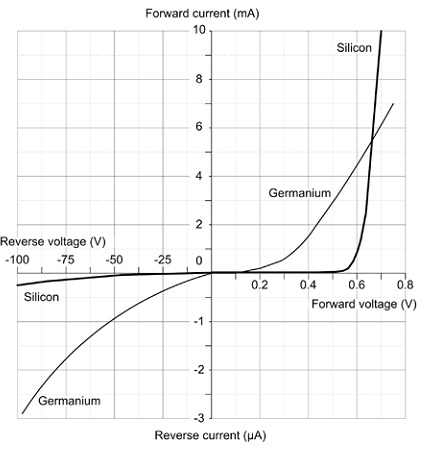
You see that (especially with the silicone diode) there is a gently slope on the voltage vs current graph, this is that component gradually decreasing it's resistance to a signal, until it reaches ~0.65 volts where it begins to conduct, at 0.7 volts the junction inside the diode is saturated and it's in full conduction mode.


So what does this mean for our distortion effect.

Well, quite simply, we wanted a component that we could use to clamp our voltage inside an artificial set of parameters that would mimic the gentle slowing due to suspension and then flat constraint of an over driven speaker. and with a diode we actually have that.


There are two ways of using diodes in a distortion circuit, these are often called hard and soft distortions.
what makes a distortion hard is very angular edges on the wave form when it flattens off, (see the picture of the amplifier distortion above, and soft distortion is more controlled, the distortion still exists, but it's smoother.

not only does the wave look smoother, but it sounds smoother too!.

There are two ways to use diodes to produce this distortion.

First we need to understand the building block that we're using.

two diodes are placed back to back, (and front to front)
this looks like a crazy way to put a diode,-surely they'll just conduct to ground regardless of the signal applied and there will be no output?

Well, no they won't just conduct to ground because as explained above, as the diode is switching on it has a resistance, and even when it's on there is a voltage drop.

So what actually happens is we clamp the signal line to only permit signals within a certain threshold, and limit any larger signals to that threshold.

So now we have a simple model.

for signals under 0.5 volts a diode acts much like an open circuit,
for (silicone) 0.5 - 0.7 volts a diode acts like a resistor with progressively less resistance being applied as the signal rises
for germanium diodes 0.2-0.3 volts acts like a resistor with progressively less resistance being applied as the signal rises
for signal over 0.7 volts the diode acts like a short circuit grounding the circuits and therefore clamping the signal to the activation energy threshold.


now that we have this component block figured out we can look at how to apply to to a circuit.

The first method of connection is to follow the amplifier that is used in the circuit with the component block.
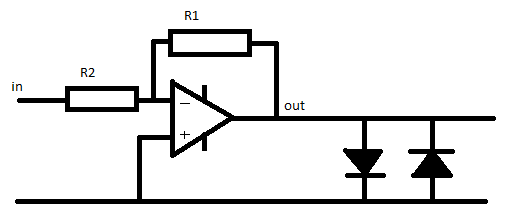
This literally clamps the output to 0.7v, this type of circuit arrangement is suited to either Light emitting diodes or germanium diodes.
the use of silicone diodes produces a quiet hard clipping in this position, mixing a silicone diode and a germanium diode in series for the block can have a positive effect in making this clipping less harsh.


The second way to use this component block is in the feed back network of the inverting amplifier.

we put the network in parallel with the feedback resistor.
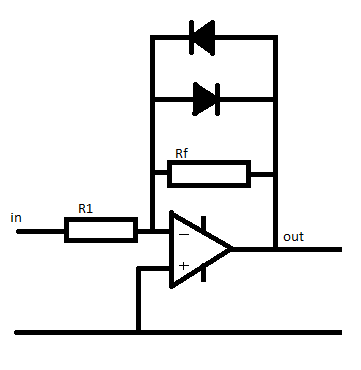
At low signals the diodes act like an infinitely large resistor.

so the value of 1/Rfn = 1/Rf + 1/diodeR(infinity) therefore the total value for the resistor network (Rfn) equals Rf

so if R1 = 100 Ohm, and Rf = 200 Ohms,
Gain = -Rf / R1 so the gain = 2

now as the signal gets larger the amplifier will put out a larger signal, when the output of the amplifier reached 0.55v the diodes are behaving like a resistor.
we'll (for the sake of simplicity) say that the value of this acting resistor is 200 Ohms.

now the feedback network has a resistivity if found by the equation
1/Rfn =  (1/200) + (1/200)
so Rfn = 100 Ohms

now the gain of the amplifier is
Gain =-rf/R1
gain = -100 / 100 = -1

so the gain has gone down.

Now the voltage continues to rise to above 0.7 volts, the diodes now act like short circuits.

the resistance of the feed back network a 1/Rfn = 1/200 + 1/0  so Rfn 0

and the gain is
-0/100 which also equals zero.

Remember a gain of 1 is unity.
the output = input x gain.

so a gain of zero actually turns the output off completely.
(but if that were to actually happen the there would be no voltage so the diodes would have infinite resistance again.

thus the voltage is again clamped in the region of the diode conduction threshold.


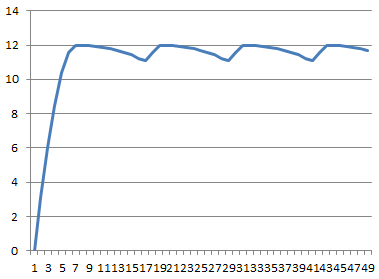
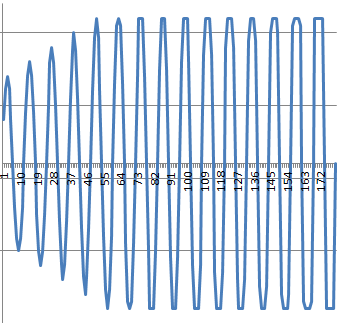
You can see in the graph below what a gradually increasing waveform looks like as it approaches the clipping region.
at the start there is no distortion, as teh wave gets gradually larger the clamping effect of the distortion begins to take effect, you see by the end of the graph the distortion is no longer smooth, the input signal is massive and the clipping is more and more choppy (and will sound worse)

Monday, May 21, 2012

Electronics Lessons: More on Diodes

So far I only introduced the humble silicone diode, the one that we use for blocking voltage from travelling one way in a circuit.

there are many types of diodes, so I'm going to attempt a very quick round up of the three main diodes that have interested me:

Silicone diode:
the silicone diode was covered before, it has a high reverse breakdown voltage (i.e would not conduct in reverse unless a large voltage was applied to it), it's activation energy is 0.7 volts (it will not forward conduct until this time.)

The way in which the diode goes from non-conduction to conduction is rather like a transistor, there is a curve that is centred around 0.7 volts

Germanium diode
The germanium diode is pretty similar to the silicone diode, however it is a lot older. it still has a high reverse breakdown voltage (though not as high as a silicone diode, but it's activation energy is lower at a mere 0.3 volts.
The conduction curve for the germanium diode is centreed around 0.3 volts

Zener Diode
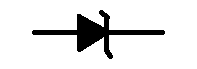
the zener diode is a little weird, it's symbol is the same as a regular diode, except with the edition of a flare on either side of the bar in the symbol.

What makes a zener diode weird is it's breakdown voltage figures and behaviour


For a silicon diode, once the breakdown voltage for the component is reached that's it, the diode gives up, it conducts in forward connection and reverse connection, it's more like a piece of wire than a diode, or maybe a resistor. but certainly not a diode.

A zener diode has a very specific breakdown voltage, (of say 9 volts) and it recovers from this too! so that it only conducts in reverse when the voltage applied to the positive side of the component is above the breakdown voltage.


Monday, April 02, 2012

Electronics lessons: Power supply

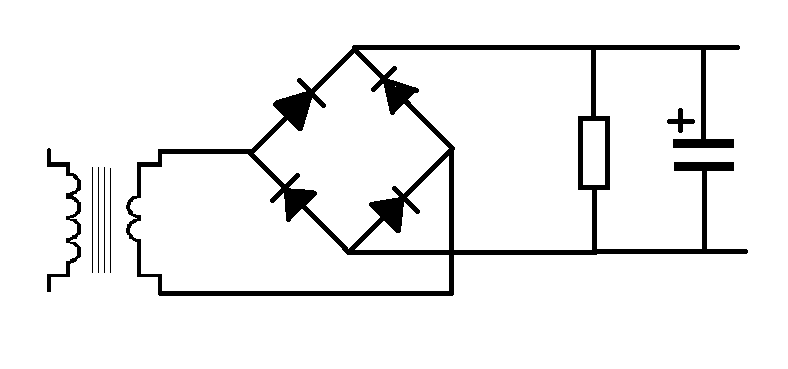
This is a very simple power supply circuit.
With the lessons on the transformer, diodes and capacitor this should be fairly self explanatory as to how this works, but I'll go through step by step.

What we need is to take a 240 volt supply an turn this into a 12 v supply for a circuit.

So we start with a transformer.

our mains voltage is 240, out ideal output voltage is 12

240/12 = 20, our transformer needs to be 20:1

After this we need to stop the voltage being an AC wave and rectify it.

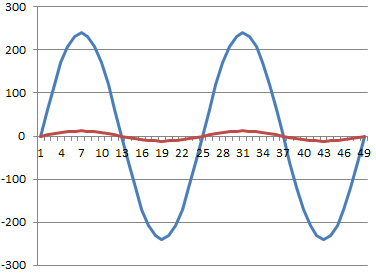
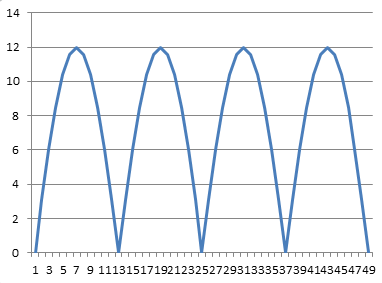
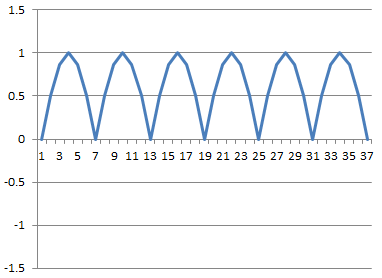
We'll use the full wave rectifier discussed earlier. this gives us that two humps per cycle (as the negative waveform becomes positive).

But this wave form isn't all that useful, you see each time it dips to zero it's effectively turning off.
in order to smooth out the humps in the power supply we add a capacitor across the power rails, this acts like a battery storing power from the peaks of the humps and discharging, (and thus keeping the rail voltage high) as the hump drops to zero and whilst it's on it's way back up again.

Ripple Voltage
the series of humps has now been transformed into a straight DC line with a ripple in it.

That ripple can be very unwanted, consider what you can hear (20hz - 14Khz).
mains voltage is 50Hz, if you connected a speaker to the mains you would hear a low hum, (just before the fire started).

well, if the supply voltage in the circuit has a 50Hz ripple on it, that's also going to appear as hum at the output.

the ripple voltage is calculated as

Vpp = i/2fc where a full wave rectifier is used (as above)
Where a half wave rectifier is use it is Vpp = i/fc

So, where do we get the values from.

well,
vpp is the peak to peak value for the ripple voltage
I is the current in the circuits,
C is the value of the capacitor
and F is the frequency of the AC power

for the example above lets say that the load of the circuit is 1200Ohms.
we know that the votlage applied to that circuit is 12 volts

so the current is
12/1200 = 0.01A

The capacitor value is 0.001F (1 milifarfad)
and mains voltage is 50Hz

so the ripple voltage here is

vpp = 0.01/(50 * 0.001) = 0.2

so in this case the voltage goes between 11.8 and 12 volts, the ripple is 0.2 volts

Monday, March 12, 2012

Electronics Lessons: Diode bridges

Sometime last year I gave a basic introduction to the diode, now I'm going to look at networks of diodes and how they are used for half wave and full wave rectification of signals.

First we'll start with the half wave rectified.

The half wave rectifier is just a diode, this just blocks and therefore chops off the negative part of the power source signal effectively leaving humps with gaps between them.


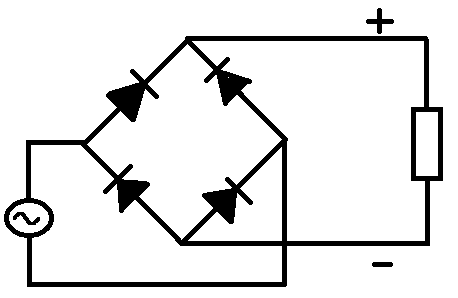
A full wave rectifier is a little more difficult to understand, what you see is a network of resistors in a diamond shape.


When the top rail of the AC signal is in it's positive half cycle the Positive voltage flows through the diode to the circuit, just like the half wave rectifier.
now when the top rail of the AC signal is in it's negative half cycle, the bottom rail is in a positive half cycle, (which is why we have a diode coming from the bottom rail to the positive rail of the circuit.
Clearly the positive rails is now positive, but if the negative rail is directly connected to the AC source it's going to make the negative/earth rail positive too, so the potential difference between the positive and negative rails would be zero.

For this reason we also have a diode to make sure that the negative rail of the circuit does not go positive.

Now when the same AC wave is fed into this full wave rectifier we see that there are still positive humps, but these are a lot closer together.

Monday, November 21, 2011

Electronics lessons: revisiting the relay

So a few weeks ago I introduced the relay, in my planning of what I'd like to appear next in this blog I realised that I forgot to include a mention of precautions that should be taken when dealing with electromagnetic relays.

As you know electromagnets can be used to generate electricity.
you have a coil of wire, you put a magnet inside of it, then you take the magnet away.
the collapsing magnetic field causes electricity to be generated.

When you have energised a relay you have created a magnet. when you turn a relay off you cut electricity going to the coil, the magnetic field collapses, and much like in a generator electricity is generated in the coil.

This spike of electricity occurs in the relay coil, and will travel throughout the circuit, if there are electrically sensitive parts, (transistors, or micro controllers) in the circuit these can be damaged by this electrical charge, which travels backwards through the circuit.

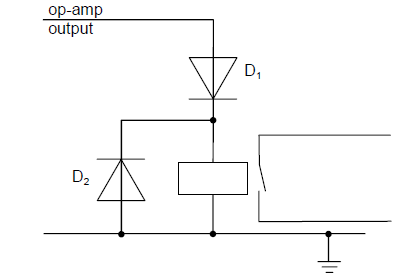
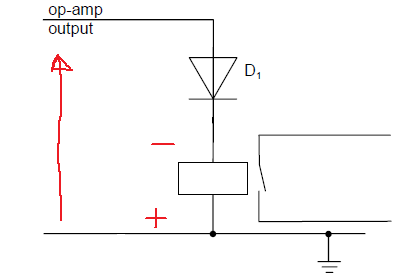
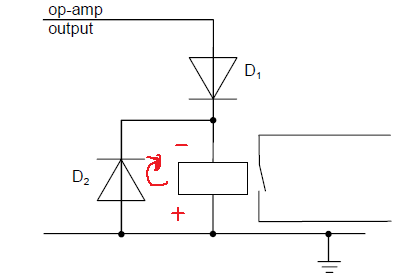
this "back EMF" backward electromotive force, can be limited by putting a diode in parallel with the relay like so:


During normal operation electricity flows from positive to negative.
the relay is energised


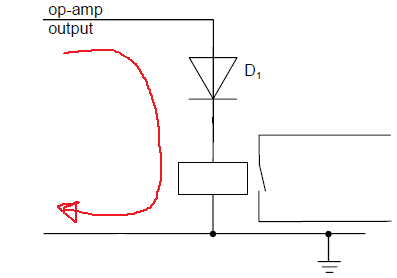
When the coil collapses the relay becomes a generator, but a generator that's connectted the wrong way around.

now a large voltage spike is introduced to the circuit, backwards, this voltage spike may be greater than a components maximum rating for reverse polarity connecttion:

the result is that the components may die.

putting a protection diode in means that rather than travelling backwards through the sensitive components, (where not inconsiderable work needs to be done to breakdown a component) the path the voltage spike takes is through the diode right back to the other side of the relay coil.

Thursday, August 18, 2011

Electronics Lessons: The Transistor Simple Circuits 2 (Lab 3)

Now that we've looked at resistors, transistors, and capacitors. Lets see if we can put them to some use to build another really simple circuit, this will be a bit more complicated than using the transistor as a switch.

Lets start by build an amplifier;

I don't expect that you know how to design the amplifier yourself (that's why you're here?), so I'll hold your hand all the way through the design process, we'll be using at least one of the components in a way that I haven't described that it could be used like that yet, so there will be a little deviation to describe that, but hey, this is only lab3 and you're already building something pretty cool... you know the components from the past 5 lessons, and you're aware of one of the building blocks that we'll be using from a past lab lesson (lab 1).

Perhaps the holly grail of all analogue circuits is the amplifier, I don't know why if I'm honest, but just about everyone seems to want to know how to make amplifiers, and those that do know how to make amplifiers, well, in spite of the maths involved seem to get a kick out of making them, and even those that shy away from the maths have a really good go following reference circuits.

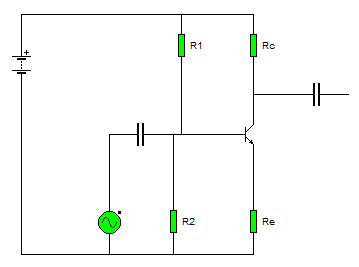
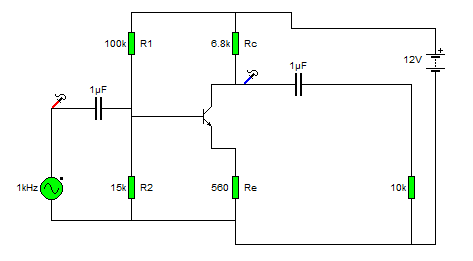
This is the first amplifier circuit I was ever introduced to:

Common Emitter Amplifier
The last amplifier that we looked at was an emitter follower or common collector amplifier, that's a device that amplifies current, whilst leaving voltage unchanged, we used that to boost the amount of current available from a low power source so that we could turn on a light.

The amplifier that we'll be looking at now doesn't amplify current, it amplifies voltage.
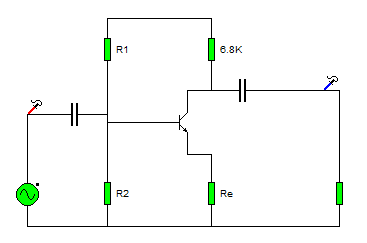
The first thing to do is introduce you to the circuit.

Firstly, lets break the circuit down,
The little round thing with the waveform shape in it is a signal source,

For this demonstration we'll set the output of the generator to a sine wave, with a frequency of 1KHz and we'll set the amplitude (size of the signal) to 1v.

This means that the waveform outputted by this generator is:
A nice curvy wave form, that is modelled by the math function sin(x).
It goes between +1v and -1v.
And it does this one thousand times a second (a complete cycle take 1millisecond -1ms.)

The next component we see is a capacitor, in the lesson on capacitors I talked about the capacitor acting like a storage tank for electricity, saying that you could charge a capacitor and discharge a capacitor, here we are using a different property of the capacitor, it's ability to block DC (direct current) signals, and allow AC (alternating current) to pass.

The reason that we want to use this is because we need to set a bias on the transistor so that it's working in a linear region, -don't worry about that for now, I'll explain more later, right now we'll look at the DC blocking capabilities of the capacitor.

When we use a capacitor like this it's called a coupling capacitor.

Coupling capacitors
The problem with the signal source that we have is that it's waveform is centred around 0volts.
fair enough the transistor will turn on then the voltage rises above zero volts, but when it's in it's negative half of the cycle (or anywhere in the cut-off region), the transistor won't be conducting at all. So we need to move the centreline of the wave form up so that it's centred around a positive voltage, that'll let our transistor work in a region where it's on a little right up to on a lot, (remember how we talked about the transistor as a variable switch? now we're going to use it as a variable switch.)

Before we introduce the transistor into the mix we'll look at how we get that wave form to climb up to a more positive voltage using coupling capacitors.

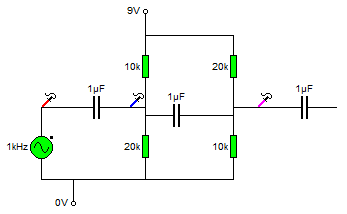
The diagram below shows some things that should be familiar to you from lab 1.

Ignore the capacitors and signal generator for now.
There is a positive voltage source (+9v) and a zero voltage source (0v) (just like the battery terminals.) And there are two resistors set up as a potential divider, followed by two more resistors set up as potential dividers.

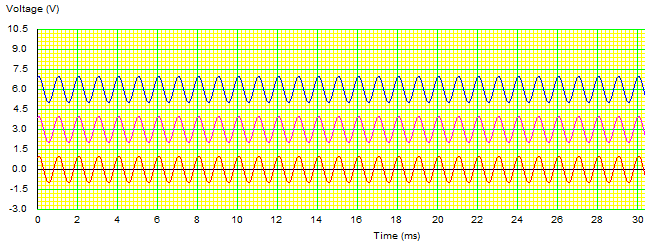
Using the maths learned in Lab 1 we can see that the voltage at the blue probe is 6v, and the voltage at the pink probe will be 3v. -remember Vout = (Z2/(Z1+Z2)) * Vin)?

So we know that there is a DC voltage of 6v at the blue probe, and a DC voltage of 3v at the pink probe.

(now we'll include the capacitors and signal source again).

The resistors used are significantly high enough to not interfere with the source when the AC signal is introduced.

Reading from left to right.
The first red probe, measures voltage a +/-1v centred around 0v.

The capacitor then blocks any DC voltage going to, or from that point in the circuit moving onto the next point, (blue probe).

If there were no DC component here we'd measure +/- 1v centred around 0v, however, the potential divider here means that there is a 6v DC voltage at this point, so that +/-1v is superimposed on this 6v source. meaning that the wave form is now alternating between +7v and +5v (+/-1v centred around 6v).

Moving a little further on there is another capacitor that stops this +6v DC component from moving to or from any other part of the circuit. Here we reach the pink probe.

Now the wave form has had all it's DC component removed and is once again 0v +/-1v.
but our potential divider has set a DC voltage of 3v onto this part of the circuit. So once again the AC voltage is superimposed on the DC voltage giving a wave form that's +/- 1v centred around 3v (+4v to +2v).

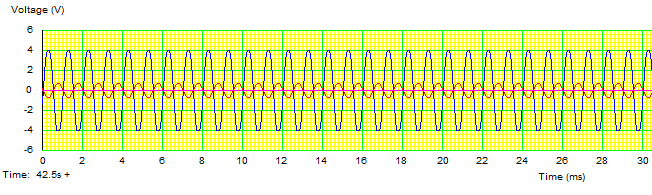
Here is what the wave forms are looking like at each part of the circuit.


Biasing
I suppose that the first question that needs to be answered is Why do we bias amplifiers. I gave a pretty poor description above about the fact that it doesn't turn on on the negative half cycle of the input wave, (and that is true).
but to answer the question properly again we're going to need to look at the data sheets for the component again.

Lets take a really simple (and now really rather old transistor, the BC108).

http://www.datasheetcatalog.org/datasheet/MicroElectronics/mXuvuyv.pdf

As before there are a couple of important things to look at in the data sheet.

The first is Base - Emitter voltage (Vbe) you can see that this is 0.6v

Next look at the gain value of the transistor, (this is called hfe) this is (for group A components typically 170).
this large hfe value means that we know that the collector current is much much larger than the base current.

so Vbe = 0.6
Gain = large
Ic >> Ib
Ie = Ic + Ib

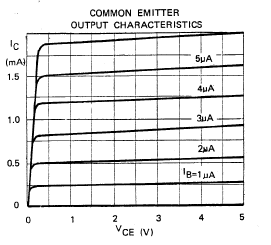
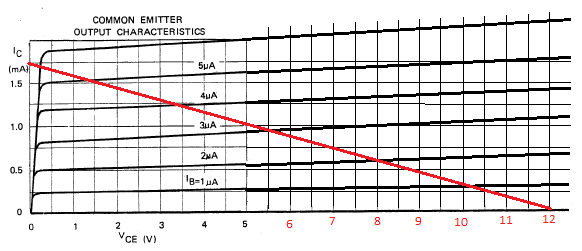
You'll find a graph in that data sheet called "output characteristics",
The output characteristics these define the voltages that you need across the device to make it work in a region called the linear region, this is the region where the device is going to amplify small and large signals equally without distorting either.
There are several lines on the device, all are in a shape that goes up at the start, and has a sharp knee, then settle into a straight line, the different line correspond to different base currents.

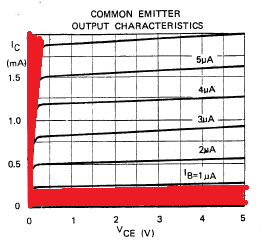
On the graph below I've marked two areas in red, you want to stay out of these regions because either the transistor is off or behaving in a non linear way (very on), (the one closest to the X axis is the cut off region) and the one closest to the Y axis is the saturation region.

The first thing that you're going to need to determine is the Resistor RL, this is the load resistor for the amplifier,

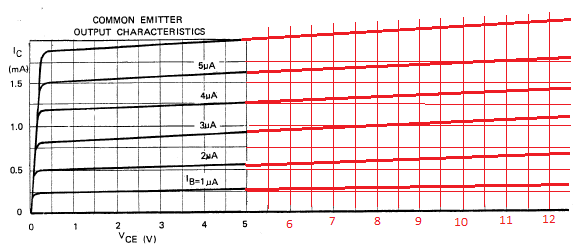
First, you're going to need to extend the graph so that we can see it working inside the voltages that you're working with, (the x axis only goes up to 5v, and we're going to use a 12volt supply).
(I'll assume by now that you've murdered an ATX power supply and therefore have a 12v supply (and are no longer relying on 9v batteries).

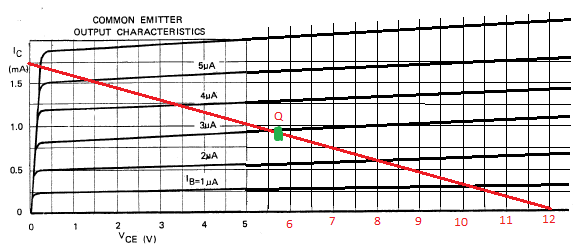
Now you need to draw line on the graph between the point the you want to set as ICmax, (on the Y axis, and your supply voltage (Vcc) on the X axis.

Set your ICmax somewhere below the highest marking on the chart, I've chosen 1.75mA

This new red line is called the DC load line, and in the middle of this line is a point that's at the middle of the linear operating region of the amplifier, this is the quiescent point, or Q point.

You can see the green dot in the middle, set at around 5.8v (you might also be realising that this is not an exact science!)

Right... so what we know now is:

Ic(max) = 1.75mA
and Vcc = 12
Vce(q) = 5.8
Ic(q) = 0.9mA

We need to make a decision now as to what we want the voltage of our emitter to sit at, some guides suggest splitting the voltage equally between the Rc, Rb and the transistor itself, however, I think that setting Vre as 1v doesn't seem like a terribly bad thing to do! -you could chose a different value.

To find a value for Rc
We use the forumla

Ic(max) = (Vcc - Vre)/Rl

0.00175 = (12 - 1)/Rl

Which works through to give us the equation
Rl = 11/0.00175 = 6285
The closest standard value is 5.6K or 6.8K

It'll be perfectly fine to use a 5.6K this will increase your IC(max) value, but you're still far below the absolute maximum rating given on the first page of the data sheet. the higher the voltage here the more restrictive you're being on the input signal voltages that could be used before the amplifier clips the signal.

The current gain of the transistor we know from the data sheet is 170

the gain is the value of the collector current, over the base current

hfe = Ic /Ib

hfe = 170 and Ic = 1.75mA
Therefore Ib = 1.75ma / 170 = 10uA


Given that we now know the values of Vre, Vbe and Ib we can start to set the bias of the base leg of the transistor.

To find the value of R2 we use the following formula.

R2 = (Vre + Vbe)/(10 * Ib)

R2 = (1 + 0.6)/10 * 0.00001)
R2 = 1.6/100 * 100^-6 = 16000 -15k is the closest standard value

and we can also figure out the value for R1

R1 = (Vcc -(Vre + Vbe))/(11*Ib)
R1 = (12 - 1.7)/(11*0.00001)
R1 = 10.3/0.00011 = 93636 - 100k is the closest value


Now we need to go about setting that emitter resistor Re.
We calculate this using Ohms law
We know that the emitter current is the sum of the base and collector current
Ie = Ic + Ib
Ie = 1.75ma + 10uA
Ie = 1.76mA

We know that Ohms law says V/I = R

Vre / Ie = Re
1 / 1.76mA
1/0.00176 = 568 Ohms (and the closest standard value is 560Ohms)

Earlier we talked about coupling capacitors,
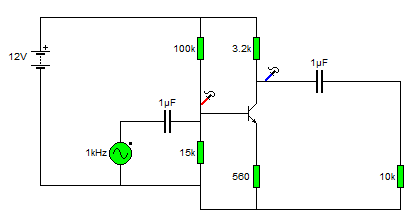
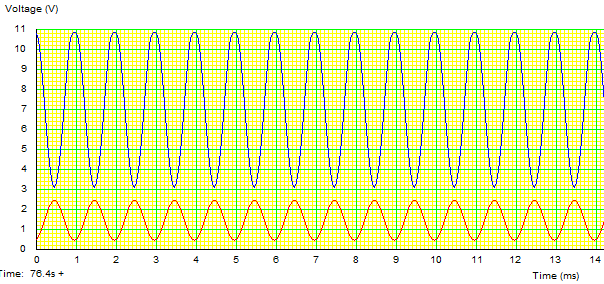
on that last amp circuit you'll see red and blue probes, this is what the signal looks like at those points.


Input vs. Output
Finally, let's move our probes to measure the input and output signals.


Look closely at that chart.

The red line is the input signal, and the blue line is the output. We see that the blue line is much bigger than the red line, but also notice that as the red line is going up, the blue line is going down.
This amplifier has switched this signal upside down.

This type of amplifier is called an inverting amplifier.

Gain
The gain of am amplifier is its output divided by its input.

remember the current gain of the transistor was the collector current, over the base current.
(actually it's emitter current over the base current, but since the gain factor is so large we assume that Ie is just about equal to Ic)

The voltage gain works the same.
The input voltage is +/-1v, (e.g 2v).
and the output voltage swing is +/- 4v (eg 8v)

So the gain of this amplifier is 8/2 = 4

The signal coming in is made 4 times larger.

Tuesday, August 09, 2011

Electronics Lessons: The LED

I briefly touched on LEDs previously in the output devices post a while back.

That post was designed to be a little bit of a primer into all kinds of output devices, to get you thinking about the kind of output that you want to put on your projects.

Now I'm going to start looking at those output devices in a little more detail.
I'll skip over light bulbs for the moment, other than small signal lamps, (torch bulbs) there aren't a lot of light bulbs that are particularly practical to drive from beginner projects, they don't solder directly to boards (requiring bulb holders), and lots require either mains voltage, or the type of current that's really going to burn you if it goes wrong. -I'll come back to light bulbs as output devices later in the series mostly because it'll be necessary to explain a project that I've written up and am waiting to publish.)

LEDs
LEDs are light emitting diodes.

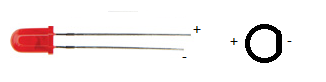
When you buy an LED you'll normally find that appears in a round shape with a dome top.
the round shape has a small ledge of skirt at the bottom of it and one of the sides of this next to a leg is flat.
You'll also find that when you buy the component that one leg is slightly shorter than the other.

The reason that a diode has these characteristics is:
The round body: this is a nice easy package type to make, however, LEDs to come in all different shapes and sizes.
A look here: http://www.rapidonline.com/Electronic-Components/Optoelectronics will help to show just how many different shapes and sizes!

The reason that LEDs generally have a dome shaped top is so that they can be seen from a variety of different angles. if you look at surface mount LEDs these will generally have flat tops, this is so that light guides, that will carry the light from your board to your front panel can fit on top. (a light guide is like a fibre optic cable, except that it's generally made of clear plastic (not glass) and is quite thick (measured in millimetres not microns), and is rigid.

The reason that there is one leg shorter than the other, and the reason for the flat spot on the case is that these show which leg is negative.

The component is a diode and will only conduct one way (when used within specification). and when the diode is conducting it will let you know by giving out light.

Circuit symbol
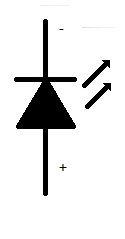
The LED is a diode, therefore is shares the same basic symbol as the diodes, (arrow with a flat bar on it) however, as this device emits light there are also two arrows the come out of the diode.

I've only drawn the basic, and now standard symbol for the LED.
however, you may find that there is a circle around the diode symbol, you may find that the arrows have a zig-zag in the middle, the arrow heads may or may not be filled.

Some experiments to try
There are some experiments that you may wish to try.

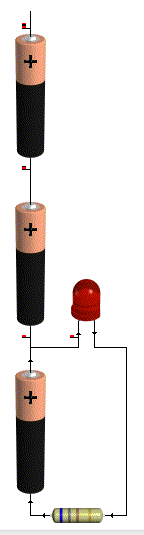
The first experiment that you should do is either using a power supply with a variable voltage. or using batteries, the examples that I'll use will involve batteries.

For this experiment you're going to need 3AA batteries, (1.5 Volts).
and a 1K resistor (note this is not the same colour bands as shown in the pictures, that's just a picture).
and a 100Ohm resistor

First connect all the batteries end to end inside a battery holder.
Connect the 1k resistor to the battery packs' negative terminal.
Now connect the other leg of the resistor to the negative leg of the LED
Connect the positive leg of the LED to the first battery in the battery pack.

You'll see that the LED doesn't come on at all.


That's because in order to make the LED light up around 2volts is used up. since you don't even have 2 volts this thing won't light up.

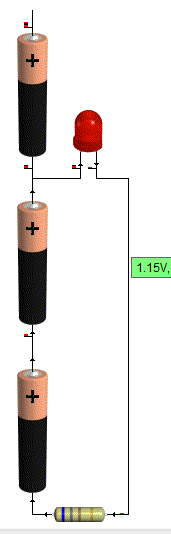
so now connect the positive leg of the LED to the second batteries positive terminal.

Now you've got 3v as a supply voltage, so you've got enough to make the LED light up.
but it'll be very dim.

That's there isn't much current flowing through the device, and the amount of current going through the device is proportional to how bright it looks.

To figure out how much current goes through the device,
start with your supply voltage (3v)
take away the forward voltage of the LED (2v) you're left with 1v

Now use Ohms law to determine how much power is flowing through the circuit
1/1000 = 1miliamp (barely enough to even make it work!)

Now swap your 1k resistor for the 100Ohm, resistor.
the LED should appear to be brighter. the reason is that more current is flowing
1v / 100 Ohms = 10milliamps of current flowing.

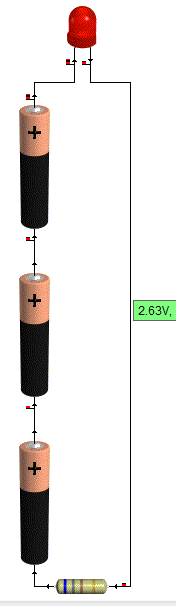
Now repeat the same steps on the positive voltage of the last battery.

This time the LED should be reasonably bright with the 1k resistor and much brighter with the 100Ohm resistor

this is due to the fact that there is now 4.5v supply. (subtract 2 for the LED) leaves 2.5v being dissipated in the resistor.
2.5/1000 = 2.5milliamps.

Before you substitute the 1k resistor for the 100Ohm resistor be sure to take a look at the resistor from the top (birds eye view looking down on the dome,) and from the side.

Notice how it looks brighter at the top. and as you come down to look at the side view, the light almost disappears completely?

Now put that 100 Ohm resistor in the circuit.
When you put the 100ohm resistor into the circuit
2.5/100 = 25milliamps.


You may now find that either the LED is lit very brightly, or that it sort of lit brightly for a bit, but now doesn't work.
It's not going to have exploded! but it might have failed inside. (if you pump enough power through an LED it will explode though!)

Looking at data sheets
To find out why your LED doesn't work any more we'll have a look at the data sheet.

The data sheet that I'm using for reference is:
http://datasheet.octopart.com/L-53GD-5V-Kingbright-datasheet-578943.pdf

Data sheets give you all kinds of useful information, some are better than others, this one just happens to give a lot of information.

So... lets look at the data sheet and find out why the things that were happening above happened.
why varying the resistor made a difference to the brightness, why varying the voltage made a difference, and why the viewing angle made a difference.

We'll start with the viewing angle:
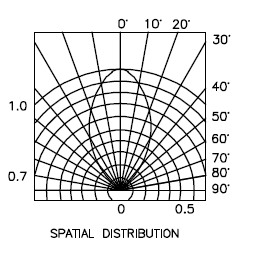
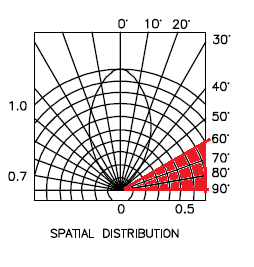
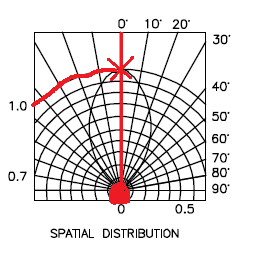
At the end of the data sheet is a diagram called spatial distribution. this diagram is a little confusing at first, but here is now to read it.

firstly there is a circle at the bottom, you need to imagine that the dome of the LED is inside this circle, now you notice that there is a straight line going up to the marking 0 degrees.

This means that you're looking straight down on the LED.
you can see on the blob shape in the middle touches this 0degree line at the top.
moving along this reaches 1 on the brightness scale.


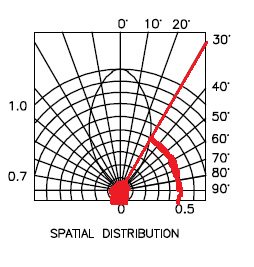
Now if you change your viewing angle to 30degrees, you find that the blob touches a different brightness line, this line is 0.5
This means that at 30degrees that LED is half as bright as when looking at it from the top.

Now if you move anywhere in the 60 - 90degree region, you'll see that the blob doesn't even touch the line, basically, you'd be lucky to see any light at all.


Clearly this is important if you're using the light to indicate anything.

For a start, lets say that your device sits flat at one end of a room, sitting down at the other end of the room your viewing angle will be so shallow that you won't see it at all, OK so this might mean that you just don't know if your cat is inside of outside, no big deal.

Now consider that you're using these LED as brake lights? you're braking in one lane, people behind you can see, but what about people who are only slightly behind and alongside. they can't see that you're braking. what if you try to use these as direction indicators/turn signals? now it's really dangerous as people who need to know your intentions are now given no warning of your intentions.

You might think those LED bulbs are super bright and look cool (and they do) But what if they aren't bright enough? what of the viewing angle? what if they are too bright? this is why (in Europe at least) all car parts have to be E marked, to say that they are tested and approved.

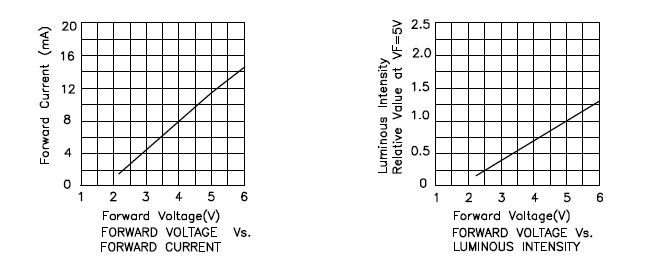
Next let's look at the voltage characteristics:
What these charts are telling us is that as more voltage is applied, the device will get brighter.


And that as more voltage is applied, more current is passed through the device.
This is exactly what we saw in the experiment, as voltage increased, the device got brighter.
As the current limiting resistor was decreased, more current flowed through the device, which was proportional to the voltage "used" in the device, and so the device got brighter.

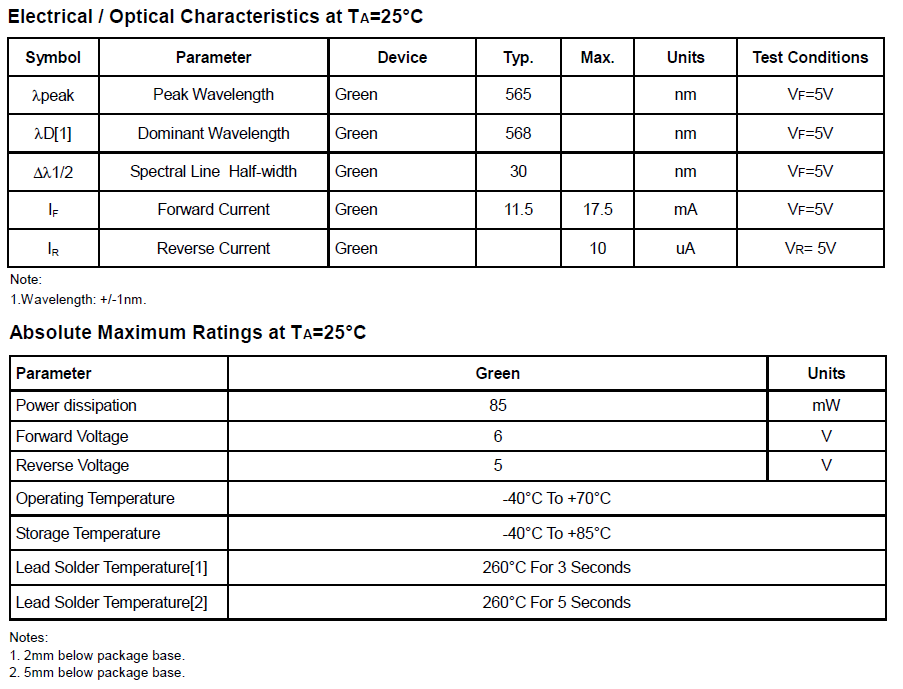
Next lets look at the maximum ratings:
The maximum ratings are there to tell us what conditions we can place on the device, this this case the maximum rating tell us a few things.


Firstly: forward current (max) the maximum current permitted to flow through this device is 17.5mA (when the voltage is 5v)
This means, select your current limiting resistor such that only this much current can flow.

Then we have absolute maximum ratings:
maximum power: 85mW this means select your input voltage, and current limiting resistor such that less power than this is able to flow, (for lower voltages you can use lower value resistors.)

The absolute maximum voltage rating is 6v, putting more voltage than this through the device will make it stop work, (possibly in a spectacular way.)

Last, but not least we have temperature ratings.
now these are important if you're planning on making a project that'll go in a particular place.
With temperatures of -40 - 60 degrees Celsius, these devices aren't going to be suitable for making stuff that you plan to use in the Antarctic, nor will they be suitable for devices that are left in the baking hot equatorial sunshine.

But lastly, they tell you how long you can hold a soldering iron on the leads before the heat will damage the component. this goes back to the Electronics workbench shopping list of equipment.

If you buy a low power soldering iron, you will have to wait longer for things to heat up. That's because it take the heating element longer to heat up, in the same way that a 2000w kettle boils faster than a 1000w, a 40W soldering iron heats up the components quicker than a 15 or 20Watt one, meaning that you don't have to hold it on the work as long. meaning that you're less likely to damage the components.

Friday, July 15, 2011

Electronics Lessons: The Diode

Diodes come in a lot of different formats, not only high or low voltage, but for specific purposes, I would try and make a list here of all the different types, but I know that I'd miss at least one!

What I want to concentrate on here is a small silicon diode, A say small, as diodes can be bigger and perhaps have different electrical characteristics. diodes can also be made of different things, which again gives them different characteristics.

What is a diode
In the simplest sense a diode is a one way valve for electricity. It'll let voltage flow one way. but not the other way.

So diodes are quite useful things to put into circuits as a reverse polarity protection. protecting sensative components where they can't handle negative voltages, or being connected backwards.

Symbol
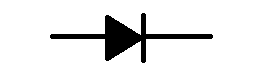
The symbol for a diode looks like an arrow, the arrow shows the way that the electricity flows, at the head of the arrow is a bar, this shows where the electricity is blocked.

So approach from the left you see an arrow sort of saying this way through, approach from the right you see a big bar saying no entry.

The left side is the positive leg, the right side is the negative leg.


Diode use
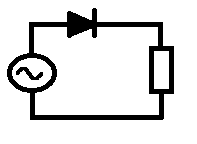
The easiest way to show what a diode is would be to look at a very simple circuit.

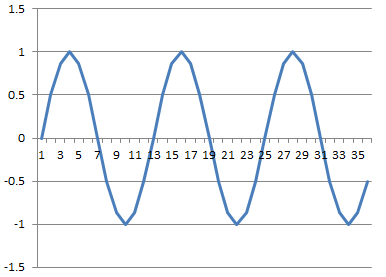
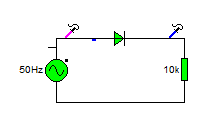
At the left hand side of the circuit there is a sine wave generator, this generates positive and negative signals in a sine wave.

At the right hand side of the circuit is a resistive load, in the middle there is a diode.

There are two probes connectted to the circuit that show you what the wave on that circuit looks like.

Here is the circuit.


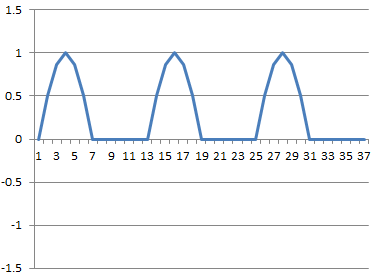
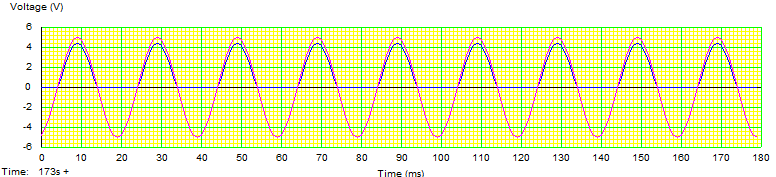
the graph below shows the voltage that you'd see if you'd hooked up an oscilloscope to that circuit at the places shown.


you can see that the original waveform is the pink line, it goes both up and down in a sine wave formation.
The blue line is after the diode, you can see that it's letting through the positive half of the sine wave, but the negative half is being blocked.

This circuit is called a half wave rectifier.

Another thing that you might notice is that the blue line isn't quite as big as the pink line. some voltage appears to have disappeared.

Forward bias voltage drop
That's a bit of a mouthful. so lets break it down.

Forward bias simply means it's connected so that electricity flows through it forward.

The voltage drop of a small silicon diode is usually around 0.6 - 0.8V (say 0.7) but the larger the diode the larger the voltage drop. So a large Silicone diode like you might find in a power supply rated for a thousand million volts might have a voltage drop of 1 - 1.5V

Take a look here http://en.wikipedia.org/wiki/Line_level#Nominal_levels

If you're dealing with line level audio signals a 1.5v drop passing through a diode is going to eat up much of the signal!

The blue line is a little lower than the pink line because some voltage is lost/used up inside the diode.

You may also hear the forward voltage drop referred to as forward bias breakdown voltage, as it's the voltage required in the forward bias to start breaking the bonds inside the silicone to allow electrons to flow.

Reverse breakdown voltage
To be honest, I hadn't planned to include this, however, I've got a bit of a point to including it...
Diodes don't conduct when connected backwards right? Well... that's nearly right, at a certain point when there is a large amount of voltage, the internal structure of the diode will breakdown, and it will start conducting both ways. and the component is dead (I'm not talking about Zener diodes, I'll cover those later).

The point to including it was to say that it's important to chose the correct component for the job that you're doing.

Components can be selected on cost and function, sometimes you have to compromise the function to keep inside the cost, sometimes you have to compromise the cost (spend more) so that you can get the correct function. There is no one component fits all approach to electronics.

If you have 1 diode that you always use, then the chances are that it's not the right diode.
as I said earlier, 1000v diodes just aren't going to work as signal diodes in sensitive equipment, but at the same time small signal diodes aren't going to be any good for creating power supplies.

Selecting Diodes
Selecting resistors was a bit obvious, you picked the right resistivity, and the right power handling then you were more or less done. (it can be more complicated than that, but at the basic level that's all there is to it).

With a diode, it's just as simple, but you don't get it divided into nice easy to spot sizes, or colour codes written on the casing.

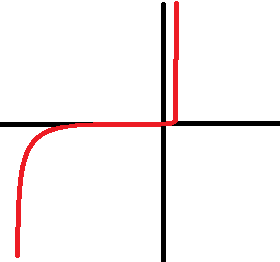
What you do get is a data sheet, and somewhere in that data sheet is a chart that looks a bit like this:

Now I've deliberately left off the values, look at the chart,
In the middle is a standard set of axis, X and Y at right angles to each other.

The middle where the lines meet is 0,
The X axis represents voltage;
From the middle to the right it's positive.
From the middle to the left it's negative.

The Y axis represents the current flowing through the diode.

lets go from the middle towards the right first, you'll see that its only a short distance (0.6 - 0.8 volts in the case of a small signal diode) until the diode "turns on" and allows the current to flow, increasing the voltage past this point doesn't really make a different. (until you exceed another value that you'll find in the data sheet call maximum voltage, or Vmax -at which pooint the component fails).

Going from the middle reading towards the left, you'll see it's quite a big distance that the voltage has to travel before reverse breakdown voltage is reached, when the component fails and conducts both ways.

Now, for a big 1000v rated diode, (that's 1000v Vmax) it'll be 1 - 2 volts forward voltage to turn on, and perhaps -800v to fail when connected backwards.

So can you use this diode to build a power supply (-240 - 0 - +240)? yes
should you use this to construct a circuit where voltages as low as 1.5v are used? no, because it won't conduct at that lower voltage.

For a small signal diode, that turn on voltage might be 0.5v (with a Vmax or 50v), and a reverse breakdown voltage of 30v.
can you use this voltage inside a tiny small signal circuit? yes, it's perfect!

Can you use it in a power supply? definitely not! it can't handle the reverse bias (so won't even act like a diode), it can't handle the forward bias either. as soon as you flip the switch you'd toast this little diode...

The moral of the story is read the data sheets and select your components according to what you want to do with them.