Showing posts with label Voltage. Show all posts

Thursday, August 11, 2011

Electronics Lessons: The Transistor Simple Circuits (Lab 2)

So in the last lesson I talked about the transistor, I talked about how you could turn the transistor on to a fully conducting state.

I also mentioned that transistors could be used as current amplifiers.

You'll use a current amplifier when you need a little more power to switch on an output than that output can supply.

We discussed before how the transistor was off, and how it could be turned on.

So, lets make a device that puts a light on with the presence of a voltage, even if that voltage source doesn't have the power (current sourcing capability) to light up the light itself.

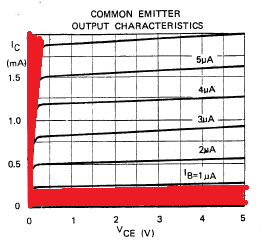
In this tutorial we're interested in two areas of the transistors output, because we're going to use the transistor as a switch we'll either have the transistor in the cut-off region (off), or the saturation region (on) of it's output characteristics. (There are the areas marked in red in the chart below).


The Circuit
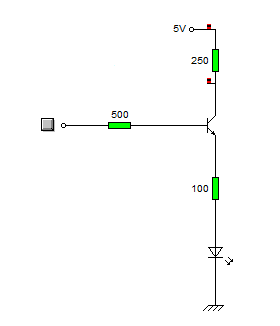
What we do is connect the input to the base of the transistor, we use a resistor to ensure that not too much current is pulled from the voltage source that we're detecting.

We'll also put a resistor between the circuit voltage source, and the transistor to limit the current being drawn from the source.

Our light will be an LED, we're expecting that the voltage going to the LED will be 5V at most, but as little as 3v so we look at some data sheets for LEDs and we find that the there are a couple that we can't use, (some have Vmax as 4v), and others will tolerate a higher voltage, but won't light with only 3v.

Eventually we come across the L-53GD-5V made by Kingbright

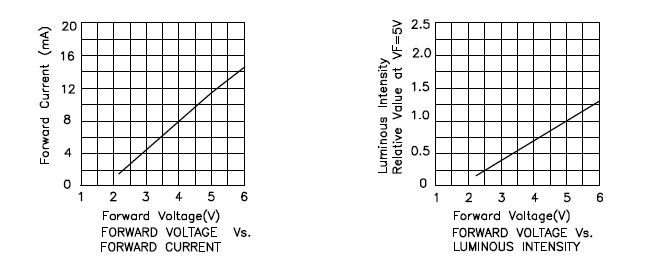
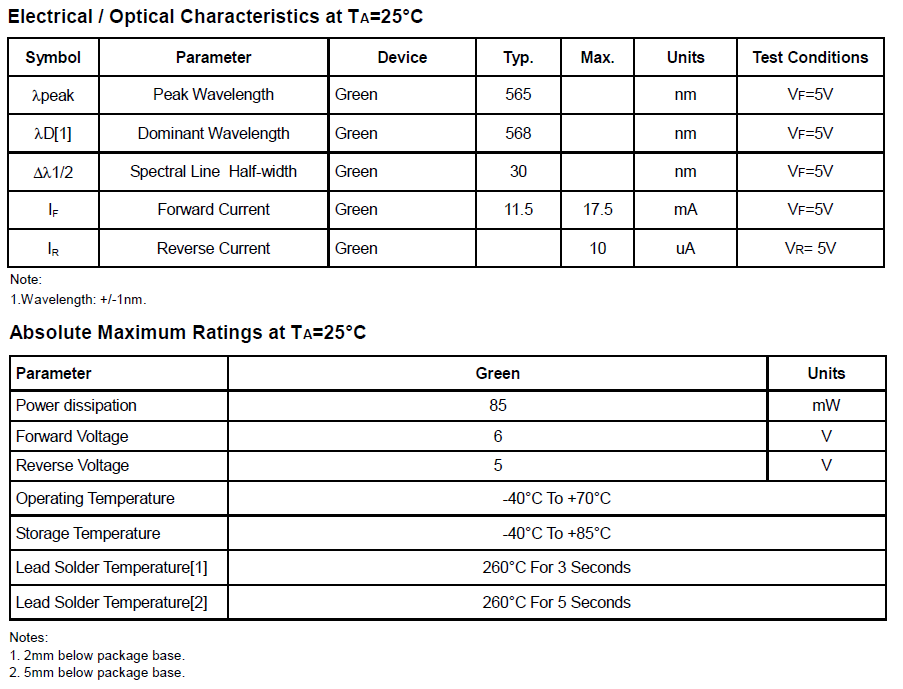
It has the following characteristics.


So we can see that it'll be on, and bright at 5v, and it will turn on, (though only be half as bright) at 3volts, (we're interested in sensing 5v Logic levels and 3.3v Logic levels right?)

Elsewhere in the data sheet it tells us that the maximum current is 17mA
We know that our greatest voltage going through the LED will be 5v
So we use ohms law to determine the resistor needed.

5/0.017 = 294

So we really want to make the total resistance between the supply voltage and the indicator LED around 300Ohms
In case you're interested

3.3/300 = 0.011 or 11mA available for the 3.3v logic level to light the LED.

I say the 3.3v, remember this is a current amplifier, not a voltage amplifier. The voltage is going to remain the same as what's going into the transistor base.
Anyway, at 3.3v the LED only draws some 6mA, so there is plenty of current available. (and that 11mA is below the devices max draw of 17mA

Schematic
Here is the schematic of the circuit.


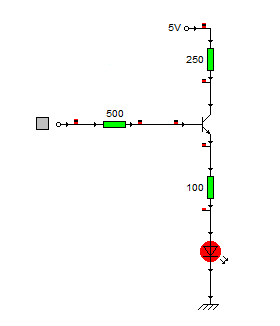
And here's what happens when a logic level of 1 (+5v) is applied to the base resistor


When the circuit is on it pulls around 6ma from the logic source, and the current going through the LED is about 14mA.

Stay tuned to see this idea scaled up!

Tuesday, August 09, 2011

Electronics Lessons: The LED

I briefly touched on LEDs previously in the output devices post a while back.

That post was designed to be a little bit of a primer into all kinds of output devices, to get you thinking about the kind of output that you want to put on your projects.

Now I'm going to start looking at those output devices in a little more detail.
I'll skip over light bulbs for the moment, other than small signal lamps, (torch bulbs) there aren't a lot of light bulbs that are particularly practical to drive from beginner projects, they don't solder directly to boards (requiring bulb holders), and lots require either mains voltage, or the type of current that's really going to burn you if it goes wrong. -I'll come back to light bulbs as output devices later in the series mostly because it'll be necessary to explain a project that I've written up and am waiting to publish.)

LEDs
LEDs are light emitting diodes.

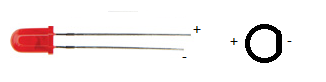
When you buy an LED you'll normally find that appears in a round shape with a dome top.
the round shape has a small ledge of skirt at the bottom of it and one of the sides of this next to a leg is flat.
You'll also find that when you buy the component that one leg is slightly shorter than the other.

The reason that a diode has these characteristics is:
The round body: this is a nice easy package type to make, however, LEDs to come in all different shapes and sizes.
A look here: http://www.rapidonline.com/Electronic-Components/Optoelectronics will help to show just how many different shapes and sizes!

The reason that LEDs generally have a dome shaped top is so that they can be seen from a variety of different angles. if you look at surface mount LEDs these will generally have flat tops, this is so that light guides, that will carry the light from your board to your front panel can fit on top. (a light guide is like a fibre optic cable, except that it's generally made of clear plastic (not glass) and is quite thick (measured in millimetres not microns), and is rigid.

The reason that there is one leg shorter than the other, and the reason for the flat spot on the case is that these show which leg is negative.

The component is a diode and will only conduct one way (when used within specification). and when the diode is conducting it will let you know by giving out light.

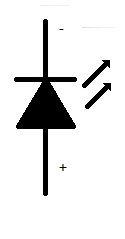
Circuit symbol
The LED is a diode, therefore is shares the same basic symbol as the diodes, (arrow with a flat bar on it) however, as this device emits light there are also two arrows the come out of the diode.

I've only drawn the basic, and now standard symbol for the LED.
however, you may find that there is a circle around the diode symbol, you may find that the arrows have a zig-zag in the middle, the arrow heads may or may not be filled.

Some experiments to try
There are some experiments that you may wish to try.

The first experiment that you should do is either using a power supply with a variable voltage. or using batteries, the examples that I'll use will involve batteries.

For this experiment you're going to need 3AA batteries, (1.5 Volts).
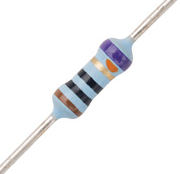
and a 1K resistor (note this is not the same colour bands as shown in the pictures, that's just a picture).
and a 100Ohm resistor

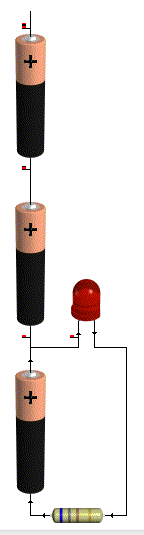
First connect all the batteries end to end inside a battery holder.
Connect the 1k resistor to the battery packs' negative terminal.
Now connect the other leg of the resistor to the negative leg of the LED
Connect the positive leg of the LED to the first battery in the battery pack.

You'll see that the LED doesn't come on at all.


That's because in order to make the LED light up around 2volts is used up. since you don't even have 2 volts this thing won't light up.

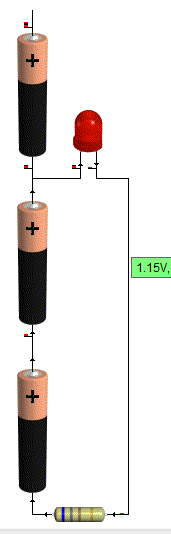
so now connect the positive leg of the LED to the second batteries positive terminal.

Now you've got 3v as a supply voltage, so you've got enough to make the LED light up.
but it'll be very dim.

That's there isn't much current flowing through the device, and the amount of current going through the device is proportional to how bright it looks.

To figure out how much current goes through the device,
start with your supply voltage (3v)
take away the forward voltage of the LED (2v) you're left with 1v

Now use Ohms law to determine how much power is flowing through the circuit
1/1000 = 1miliamp (barely enough to even make it work!)

Now swap your 1k resistor for the 100Ohm, resistor.
the LED should appear to be brighter. the reason is that more current is flowing
1v / 100 Ohms = 10milliamps of current flowing.

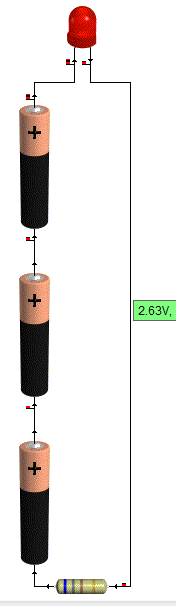
Now repeat the same steps on the positive voltage of the last battery.

This time the LED should be reasonably bright with the 1k resistor and much brighter with the 100Ohm resistor

this is due to the fact that there is now 4.5v supply. (subtract 2 for the LED) leaves 2.5v being dissipated in the resistor.
2.5/1000 = 2.5milliamps.

Before you substitute the 1k resistor for the 100Ohm resistor be sure to take a look at the resistor from the top (birds eye view looking down on the dome,) and from the side.

Notice how it looks brighter at the top. and as you come down to look at the side view, the light almost disappears completely?

Now put that 100 Ohm resistor in the circuit.
When you put the 100ohm resistor into the circuit
2.5/100 = 25milliamps.


You may now find that either the LED is lit very brightly, or that it sort of lit brightly for a bit, but now doesn't work.
It's not going to have exploded! but it might have failed inside. (if you pump enough power through an LED it will explode though!)

Looking at data sheets
To find out why your LED doesn't work any more we'll have a look at the data sheet.

The data sheet that I'm using for reference is:
http://datasheet.octopart.com/L-53GD-5V-Kingbright-datasheet-578943.pdf

Data sheets give you all kinds of useful information, some are better than others, this one just happens to give a lot of information.

So... lets look at the data sheet and find out why the things that were happening above happened.
why varying the resistor made a difference to the brightness, why varying the voltage made a difference, and why the viewing angle made a difference.

We'll start with the viewing angle:
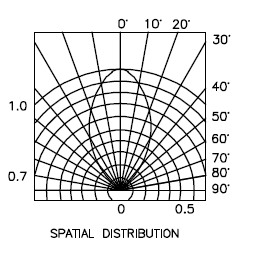
At the end of the data sheet is a diagram called spatial distribution. this diagram is a little confusing at first, but here is now to read it.

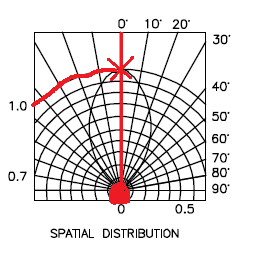
firstly there is a circle at the bottom, you need to imagine that the dome of the LED is inside this circle, now you notice that there is a straight line going up to the marking 0 degrees.

This means that you're looking straight down on the LED.
you can see on the blob shape in the middle touches this 0degree line at the top.
moving along this reaches 1 on the brightness scale.


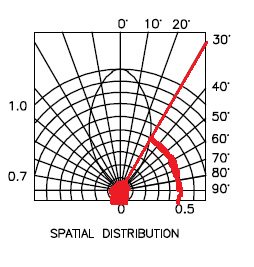
Now if you change your viewing angle to 30degrees, you find that the blob touches a different brightness line, this line is 0.5
This means that at 30degrees that LED is half as bright as when looking at it from the top.

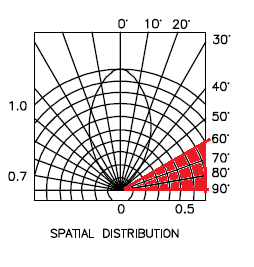
Now if you move anywhere in the 60 - 90degree region, you'll see that the blob doesn't even touch the line, basically, you'd be lucky to see any light at all.


Clearly this is important if you're using the light to indicate anything.

For a start, lets say that your device sits flat at one end of a room, sitting down at the other end of the room your viewing angle will be so shallow that you won't see it at all, OK so this might mean that you just don't know if your cat is inside of outside, no big deal.

Now consider that you're using these LED as brake lights? you're braking in one lane, people behind you can see, but what about people who are only slightly behind and alongside. they can't see that you're braking. what if you try to use these as direction indicators/turn signals? now it's really dangerous as people who need to know your intentions are now given no warning of your intentions.

You might think those LED bulbs are super bright and look cool (and they do) But what if they aren't bright enough? what of the viewing angle? what if they are too bright? this is why (in Europe at least) all car parts have to be E marked, to say that they are tested and approved.

Next let's look at the voltage characteristics:
What these charts are telling us is that as more voltage is applied, the device will get brighter.


And that as more voltage is applied, more current is passed through the device.
This is exactly what we saw in the experiment, as voltage increased, the device got brighter.
As the current limiting resistor was decreased, more current flowed through the device, which was proportional to the voltage "used" in the device, and so the device got brighter.

Next lets look at the maximum ratings:
The maximum ratings are there to tell us what conditions we can place on the device, this this case the maximum rating tell us a few things.


Firstly: forward current (max) the maximum current permitted to flow through this device is 17.5mA (when the voltage is 5v)
This means, select your current limiting resistor such that only this much current can flow.

Then we have absolute maximum ratings:
maximum power: 85mW this means select your input voltage, and current limiting resistor such that less power than this is able to flow, (for lower voltages you can use lower value resistors.)

The absolute maximum voltage rating is 6v, putting more voltage than this through the device will make it stop work, (possibly in a spectacular way.)

Last, but not least we have temperature ratings.
now these are important if you're planning on making a project that'll go in a particular place.
With temperatures of -40 - 60 degrees Celsius, these devices aren't going to be suitable for making stuff that you plan to use in the Antarctic, nor will they be suitable for devices that are left in the baking hot equatorial sunshine.

But lastly, they tell you how long you can hold a soldering iron on the leads before the heat will damage the component. this goes back to the Electronics workbench shopping list of equipment.

If you buy a low power soldering iron, you will have to wait longer for things to heat up. That's because it take the heating element longer to heat up, in the same way that a 2000w kettle boils faster than a 1000w, a 40W soldering iron heats up the components quicker than a 15 or 20Watt one, meaning that you don't have to hold it on the work as long. meaning that you're less likely to damage the components.

Monday, July 18, 2011

Converted ATX Power supply

Recently you could be forgiven for thinking that this had changed from the idiots guide to puttin' shit together, to the opinionated guide to how you should have done your projects, or the idiots musings and bad teachings.

I'm definitely going to continue the tutorials because it's actually quite fun to write them, and I'm finding that as I go over the ground again, I'm re-remembering some stuff that I'd completely forgotten about. But this post is right back to the core of why I even started this blog, and that's to share something that I've made.

Firstly,


There's your warning, but if you can't figure out for yourself that there is an element in danger in modifying anything that plugs directly into the wall then you should probably stop reading now and go elsewhere.

Theory
The theory for this is so simple, I have a power supply (a computer power supply), and I want to turn it into a bench power supply, so I pretty much just need to cut off the wires that aren't needed, and attach the appropriate plugs to the wires that are need!

How it works
The computer power supply maker has done all the hard design parts for me it's a switch mode power supply, mains supply and as it's switching faster, the transmission of the energy inside the ferrite core, basically that means that inside the power supply is switching on and off at a very high frequency, this is much faster than your 50Hz s of the transformers inside is more efficient, more efficient means that you're not generating as much heat, and not as much energy is wasted as heat.
A traditional power supply, would require an absolutely huge iron core surrounded by pounds of wire to be able to get the same kind of output power that a switch mode power supply (SMPS) gets.

Why it's important
The high frequency is important as that's what allows the supply to be so efficient. The fact that someone else made it is important because it means that you can make this supply inside a single afternoon.

If I was designing my own SMPS, I'd probably need to research for at least days, if not weeks, I'd need to source components. Create circuits to sense the output voltage and adjust the input if necessary, it'd be a lot of work, yet I can turn an old supply from a broken PC into a perfectly reasonable bench supply in a matter of hours.

Simple experiment
Before even breaking out the screw drivers, or plug in the soldering iron. I took a look at the computer power supply unit.

There is a big plug with either 20, or 24 pins on it. inside all these pins there will be a single green wire, with a black wire either side of it.

Using a small bit of wire I pushed it into the pin connected to the green pin, and one of the black pins from either side. The fans spun into life, and voltage could be measured at other pins.

You can just use the supply like this with no further modification, inserting your bit of wire to turn it on, removing your bit of wire to turn it off.

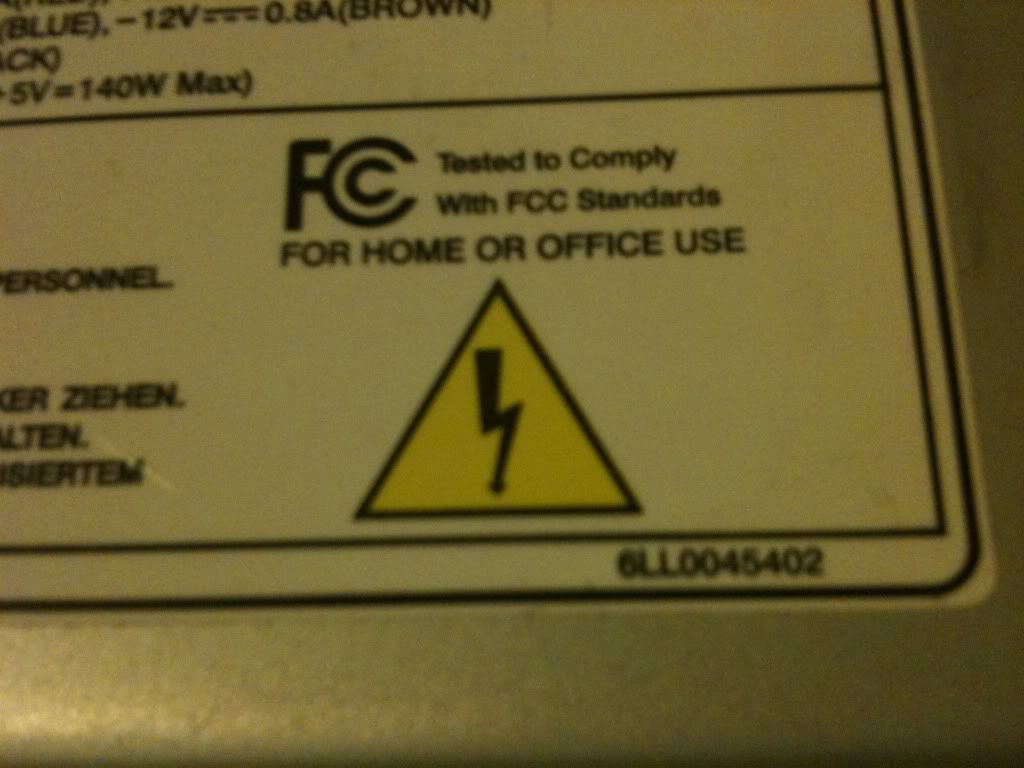
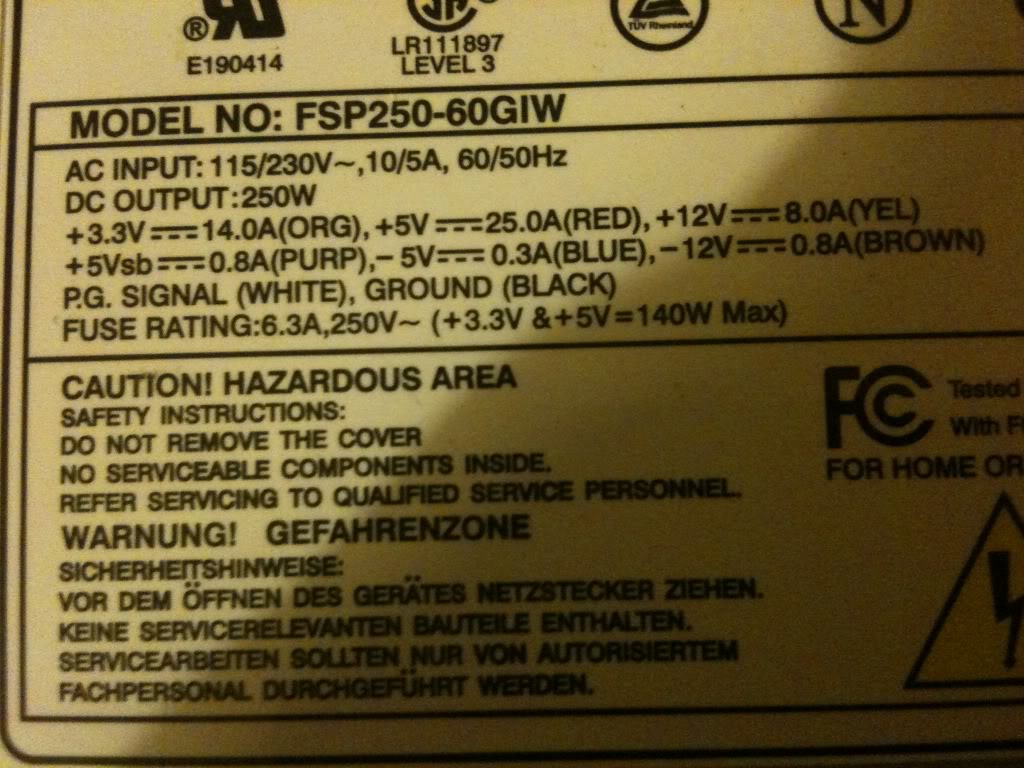
On the side of the case there was a table that telling me what colour wire carries what voltage, and what the limits of the current capabilities are for each voltage. this made it a whole load easier that searching for a pin out on-line for the ATX plug to know what pin was what.


Converting a power supply

Parts and tools required
>an old computer power supply
>a screw driver
>some terminal posts
>Wire cutters
>A switch (push to make locking switch)
>A LED
>A 10mm drill bit
>A drill
>A 6mmDrill bit
>Insulated screw terminals -these are not important, you may chose to leave these out
>A 470Ohm resistor
>A soldering Iron
>Solder (flux core)

Taking it all apart

The first thing that I did was take off the lid of the box, The fan is connected directly to the board with no plug to remove it, so I removed the fan from the case lid.
Modifying the part
Lets deal with the lid first,
I knew that in the lid i'd need to put a switch (basically in place of the wire that I had before),
You might want (I did) a nice LED to tell you that the supply is on.
I also wanted to put plugs that to connect the wires to in the lid.

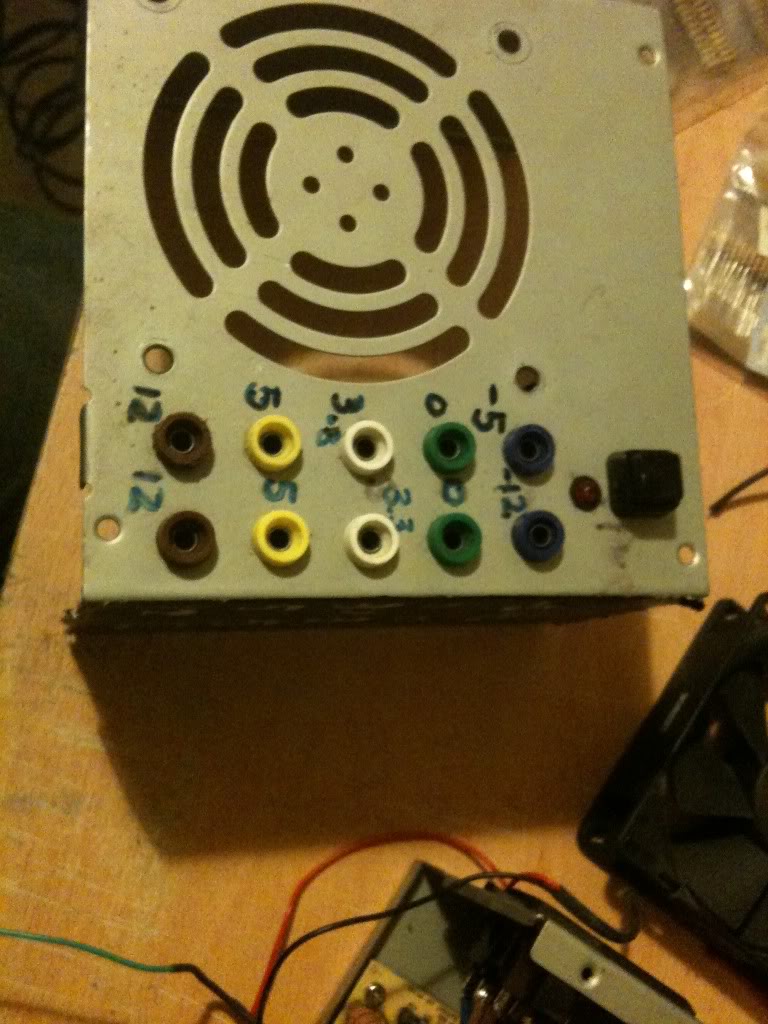
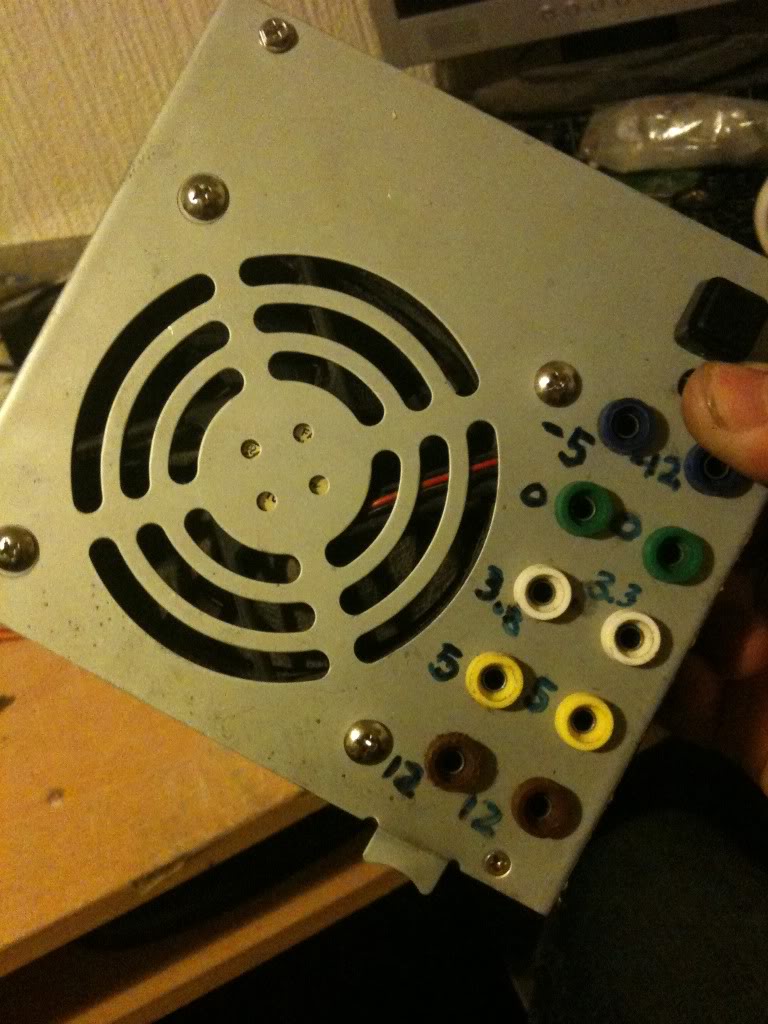
I chose to mount my plugs in two columns, (2 x 12v, 2x 5v, 2x3.3v and 2x0v) as these are the voltages that I'll use the most often, then I have one plug for -5 and -12, as I'll use these less often.
As it happens, banana plugs are usually stackable, so you won't really loose an functionality just using a single row of connectors.

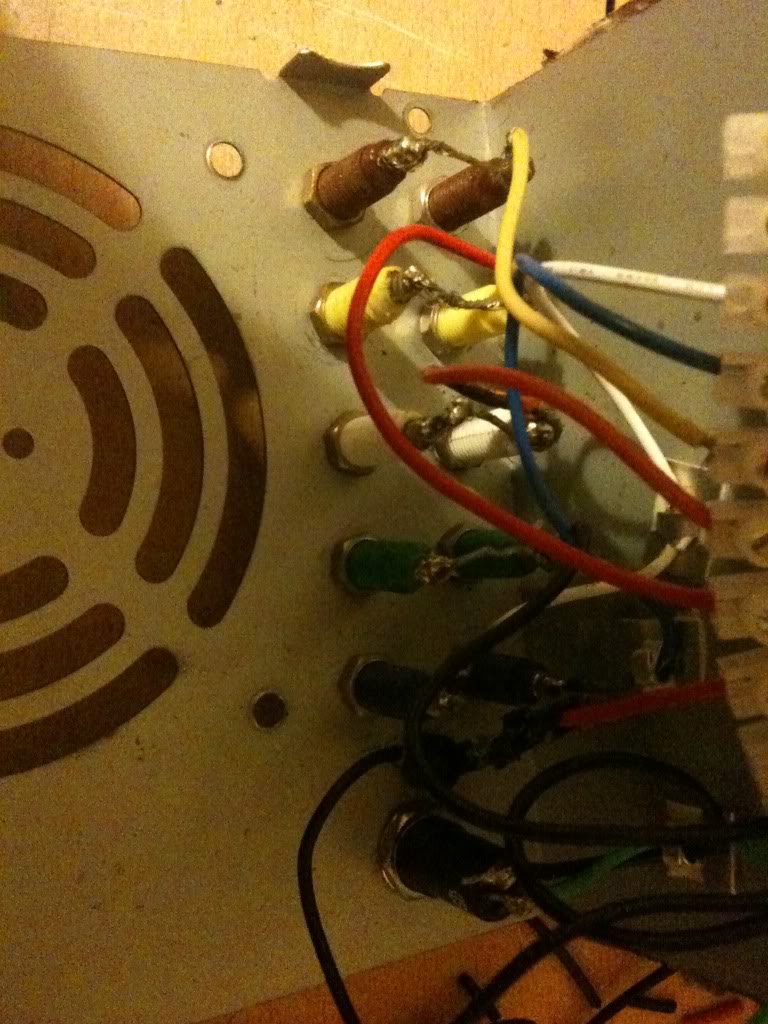
When I looked on the inside, of the power supply, I saw that there were basically two sides, one side has big heat sinks in it, and the mains plugs next to it, the other side is fairly low profile leaving the top of the case empty. I decided that I'd like to keep my plugs away from the side with exposed mains connectors that the bottom of the terminals might hit, and away from the heat sinks for the same reason

I marked out the lid and drill the holes for all the part to go into.
Then installed the plugs, LED and switch (I used a simple black collar for the LED it's called a panel mount and costs about a penny. -you could leave the LED out completely).


I just used a marker pen to write the voltages on the top of my supply, you might use nothing relying on the colour of the plugs to tell you the supply voltage, perhaps you might like to try etching or engraving, or using a label printer, I don't really care, pen works for me, and that's good enough.

Next as I have two plugs for one voltage, I connected these plugs, using a piece of wire running between them.

I also want to add a 470Ohm resistor to one leg of the LED (this is to limit the current that goes into the resistor).

(That'll connect to the 5v rail 5/470 = 0.01A or 10mA, enough to make the LED glow, you might like a bigger or smaller resistor depending on the needs of your LED, it's also 1/20th of a watt, so a simple small 1/8th watt resistor will be fine.)

I soldered leads to everything ready to connect to the terminal block connector.


Finally I was able to stop working on the lid and move onto modifying the actual PSU.

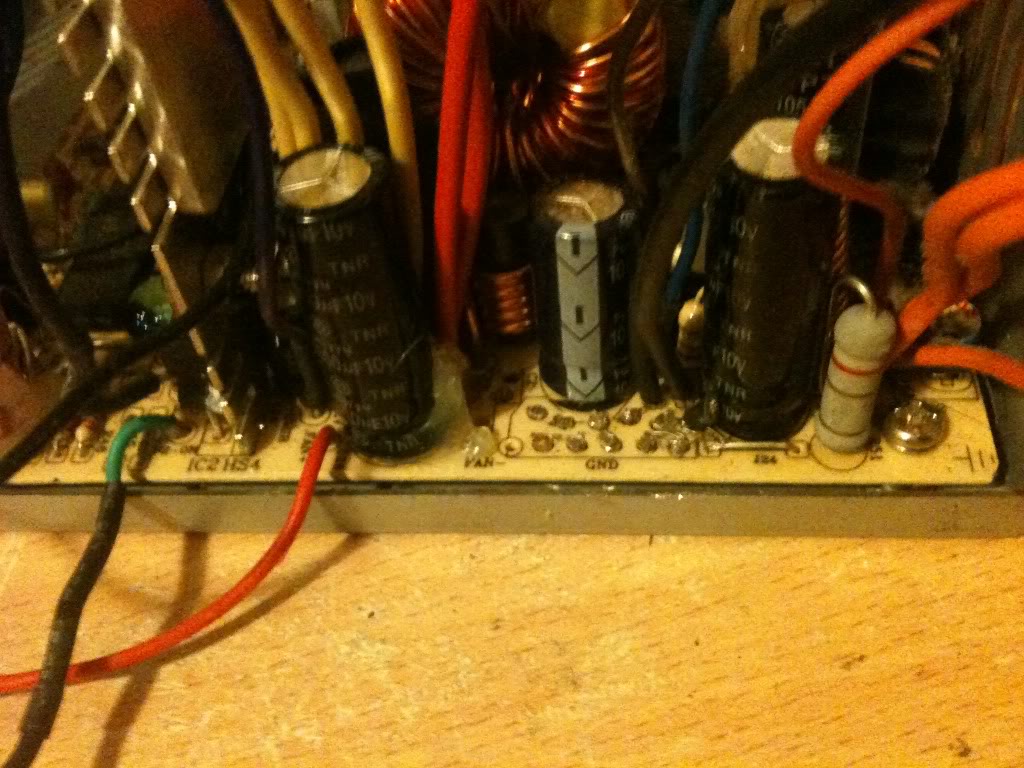
One thing that you'll notice is that the wires are colour coded depending on their job. And there are a LOT of wires that are the same colour, in the supply I used there were about 10 black wires, all 0v, all from the same pad on the PCB!
I needed 3 black wires, could have got away with 1, but three was good (one for the power button, 1 for the LED and 1 for the output plug).
I really only needed 1 -12 wire, only 1 -5 wire, only 1 +12 wire. and two +5v wires (one for the plug, and one for the LED.

You do only need 1 3.3v wires, but in addition to the thicker wires you must keep the very thin orange wire, this is the sense wire that determines what voltage is being generated, and regulates the supply, without this wire your supply can float.

Anyway, I cut away the wires that I didn't need (that I could get to)


I couldn't get to cut the red or yellow wires, so I'm going to tie these off later in some spare terminals on the connector.

Putting is all together
So I'm now in a position where I've thinned out all the wires that I don't need, and I've trimmed all the wires that I do need to about four or five inches long so that I have plenty to work with.

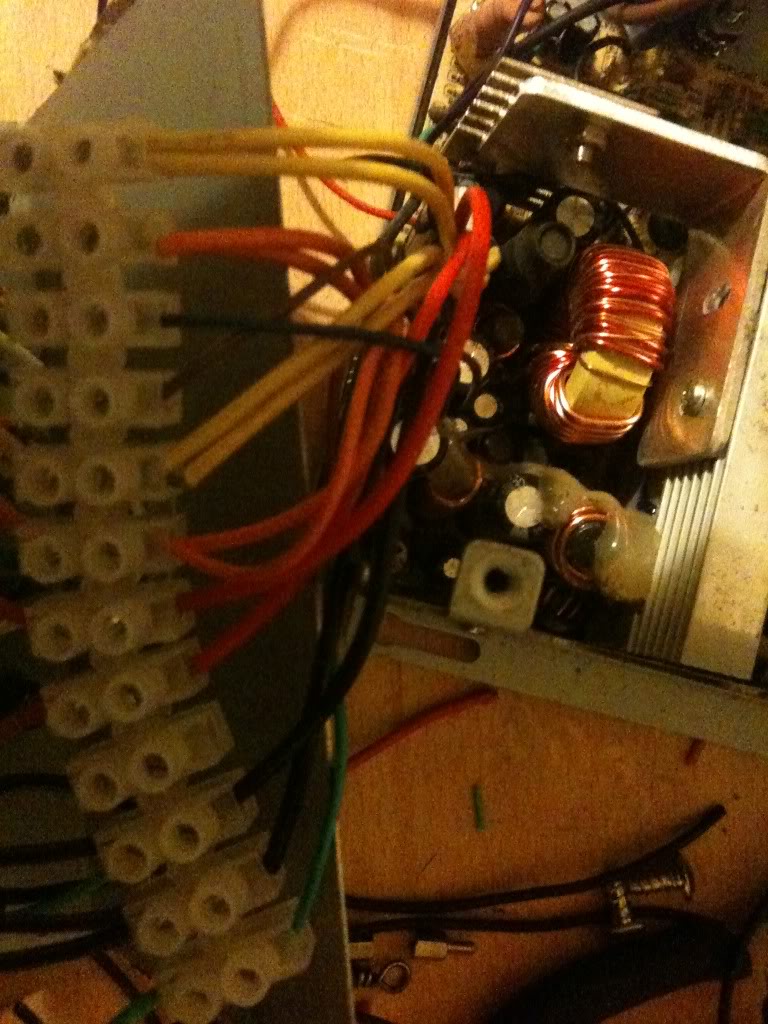
Now I striped back the wires, and attached them to the terminal block.

It doesn't matter what order you make the connections in, just that black wires connect to ground, terminals, and the negative side of your LED, also that there is a black wire attached to one terminal of your switch.

You want the green wire to attach to the other leg of your switch, and a red wire to attach to the LED for your "on indicator".
Yellow wires are alwyas 12v, Orange is always 3.3v, Red is always 5v, minus five and minus 12 however do not appear to have a set colour scheme, and as such may vary.

The colours were written on the outside of the supply I used, you may have to poke around with a multimeter. or look for an ATX pinout and just select the correct wire from the plug.


Once all the wires were connected I attached the fan to the top of the case again, and put the top of the case onto the bottom. as I said earlier, make sure that the bottom of your sockets do not touch the metal bits inside. Also make sure that no wires are touching the heat sink where the insulation could melt, and that no wires or the large terminal block is getting in the way of the fan.


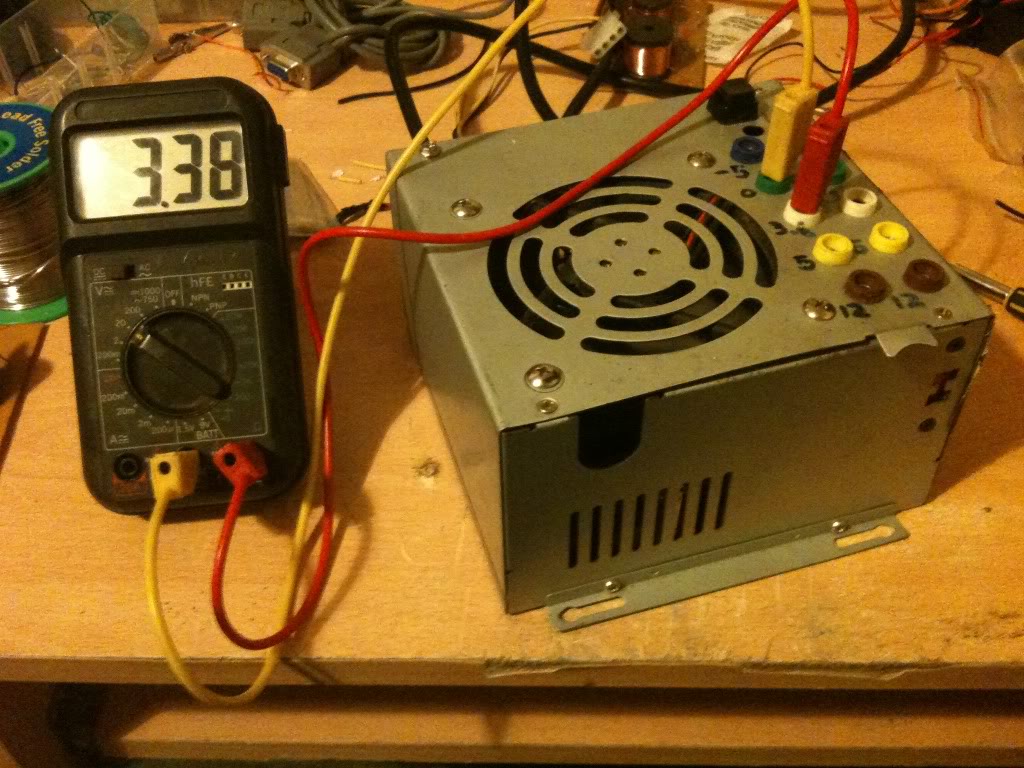
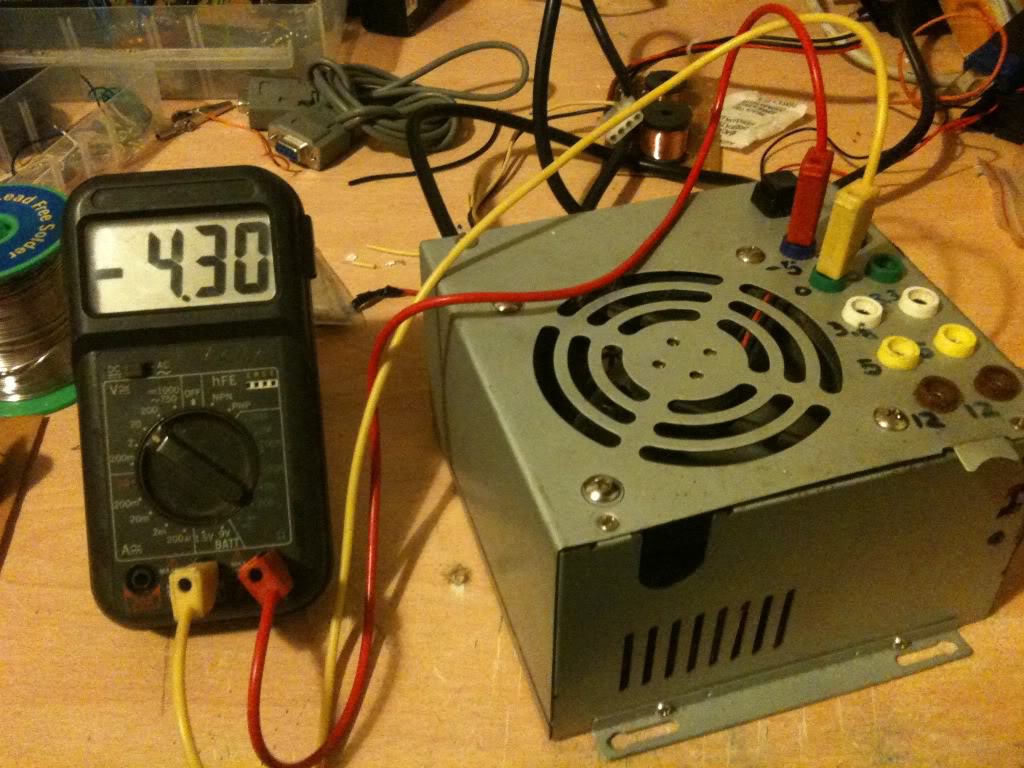
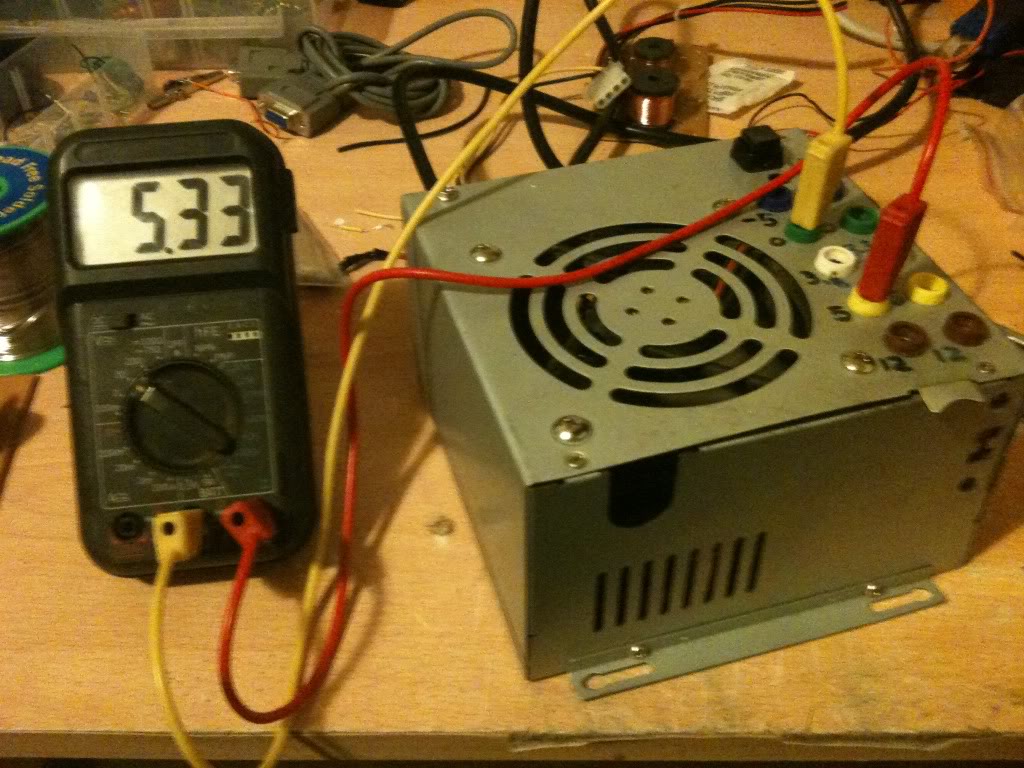
Now I measured The output voltages using a multimeter.


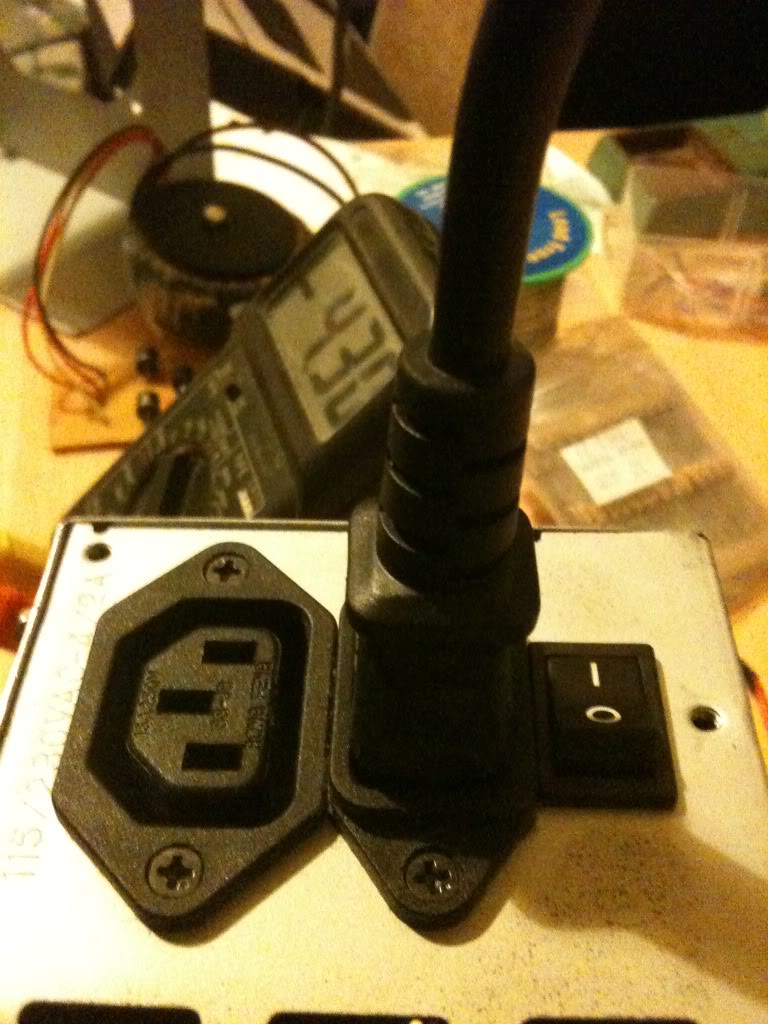
Since I'm always seeming to run out of power outlets, I chose a power supply that lets me get mains power out as well so I can daisy chain equipment together.


Costs
This is not the cheapest project in the world, but it is cheaper than buying a power supply with the same amount of usable outputs, regardless of whether those outputs are of a fixed voltage, or five variable voltages. I had everything either in my parts box/junk bin so this really cost me nothing.

There are 10 4mm sockets, these are 20 pence each from Rapid Electronics
http://www.rapidonline.com/Cables-Connectors/Connectors-Single-Pole/4mm-Connectors/4mm-Sockets/63893
(total cost £2)
The Square Single pole single throw switch cost 36 pence.
http://www.rapidonline.com/Electronic-Components/Switches/Push-Button-Switches/Square-push-switches-1A/30275
(toal cost £2.36)
LEDs cost around 9 pence (or less) (when you buy them in bulk).
here's one for 6 pence http://www.rapidonline.com/Electronic-Components/Optoelectronics/5mm-LEDs/Low-current-5mm-LEDs/29336
(total cost £2.45)
Resistors cost even less than this when bought in quantity.
http://www.rapidonline.com/Electronic-Components/Resistors-Potentiometer/Carbon-Film-Resistors/CR12-0.125W-Carbon-film-resistors/65192

65 pence for 100, seriesly people stop shopping at Maplin/Radioshack

Rapid cost 65 pence for 100, (or ~ half a penny per resistor).
Maplin cost 25pence per single resistor. (50 times more expensive).
http://www.maplin.co.uk/components/resistors/metal-film
If your project requires 3 resistors, it's cheaper to order on-line and have 97 spare/left over!

(total cost £3.10)

Now comes the expensive part, if you don't have a spare power supply laying about, (and don't have the resourcefulness to find one for free), then you'll have to buy one. for the princely sum of £7.86!
http://www.ebuyer.com/product/20083

Total cost £10.96! Much cheaper than any other power supply that I know of. in fact we're really knocking on the cost of a single voltage wallwart cost here, which has a lower power capacity and only 1 voltage output (which may or may not be adjustable!)

Alternatives, -and Why I didn't use them
This is something I started when I wrote up the red light torch, there are so many ways to crack an egg. So my way is not the only way, just the way that I chose on that day.

Spring terminals:
Spring terminals are useful if you're doing a lot of breadboard work, without a breadboard that has power terminals, but practically everything I've got is set-up for 4mm banana plugs, my multimeter, the power terminals on my breadboards, crocodile clips connect to 4mm plugs. Spring terminals may well have been cheaper, and indeed wouldn't require me to buy 4mm plugs to go with them, but since I'm set-up for using 4mm plugs it makes sense to use them

Binding posts:
Yes, these are just like 4mm sockets, except that you can also attach bare wires and screw them down, making them a whole heap more versatile. The only reason that I didn't use these is that I didn't have any in my parts box, and I did this project one evening after the shops were closed.

Directly soldering the leads:
I could have missed out the terminal block connector, and indeed the first time I made this supply I did. without that chunky connector however there are two things.

The wires that you can't cut off at the board end up loose in the case, you can wrap them in tape, but it's a bit messier than being able to put them in a spare space on the terminal block.

The first time I built this supply I soldered straight to the plugs, I broke that supply, and it was quite a PITA to remove all the old connections to put new connections on it. if I ever need to change the actual board again I can just take the case lid as I did this time and bolt it to a new supply just cutting and stripping the few wires that I need to use.

Sandbar resistor
Instead of just a locking switch on the green "power on" line, you should use a resistor on the 5v line to apply a load to the circuit that'd sense that it's on. That's the "proper" way of doing it.
I didn't do it like this because...
1> The sandbar resistor has to be a high power resistor, tied to the case for cooling, this seemed like it's take a lot of space inside the already cramped case, and is a part that's going to increase the idle power consumption of the power supply.
2> My supply works without it, so I'm not too worried really.

External plug-set with ATX/Molex connections
In the theory section you saw that it's possible to turn the supply on with nothing more than a piece of wire, I could have kept the supply as is, put molex connections on my projects, of I could have just made a board with my 4mm sockets arranged just as they are where the power supply just plugged straight into it.

The good side of this is that I wouldn't have had to open the case at all. So if you have a skittish partner or parents then you may wish to go this route. (If they aren't happy for you to plug things in after you're taken them apart and soldered bits to them!)

On the other hand, I think that you'll end up with something a lot messier.
Wednesday, July 06, 2011

Electronics Lessons: The resistor and Ohms law

I started to write a post on what is electricity, but soon realised that subject was far too broad, far to detailed, far to simple and far to complicated all at once...

Suffice to say, what electricity is doesn't matter so much as what you can do with it.

I'm going to create a series of blog posts as a kind of electronics 101, the idea being that anyone can start at the beginning, learn about components, and learn how to build up circuits.

Throughout these lessons I'll be making a series of good analogies, and bad analogies.

Resistors


Theory
In Physics things have potential energy when they are sat still, a weight sitting on top of a book shelf has potential energy, if you nudge the weight to the edge it'll fall off, that potential energy has been converted into kinetic energy.

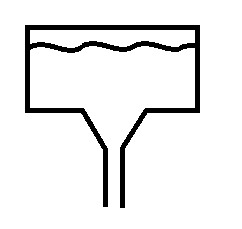
For the purpose of a resistor, think of electricity as like a tank of water, sat on top of a hill, the electricity, like anything is itching to get to the ground, and will take the path of least resistance.

A resistor adds resistance to the flow of electricity.


Look at the two pictures, the first shows a tank of water with a small opening, when you think about it you'll see that in this case the water will run down slowly, the narrow channel adds resistance and stops the water just gushing out.

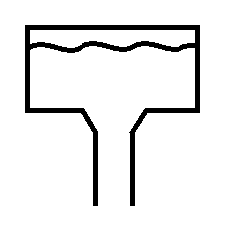
The second picture has a bigger opening, in this case the water just gushes out, you can't stop it because the channel is too wide, the water gushes out with such force that you couldn't just put your hand over it.

There are calculations that you could do, knowing the size of the header tank and the size of the outlet to know with what force the water is pouring through the hole.

In electricity, the size of the header tank is measured in Volts, the size of the pipe or opening is measured in Ohms, and the force that the water pushes is not measured in PSI but is measured in Amps.

Resistance, Voltage and Current
The equation is simple.

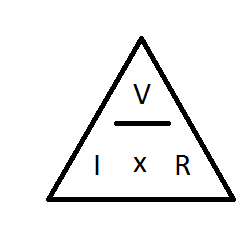
The voltage, divided by the resistance is equal to the current.
V/R = I
so say you have a 9v battery, and a 100Ohm Resistor.
9/10 - 0.09A (or 90mA)

Next you might be thinking about about how much power that actually is. (if your resistor can't handle the power it's get hot and fail, sometimes quite spectacularly.)

Voltage, Current and Power
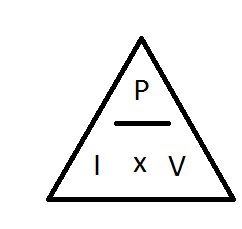
Another electronics law tells us that Power = Voltage multiplied by Current
In the example above the voltage was 9V, and the current dissipated was 0.09A

9 x 0.09 = 0.81W

Now less than 1 Watt doesn't sound like a lot, but consider that resistors generally come in 1/8th Watt, 1/4 Watt, 1/2 Watt, you're going to need at least a 1Watt resistor, so it's going to be reasonably large.

Resistor values

Resistor values are quite easy to remember, once you've been told what the values equate to.
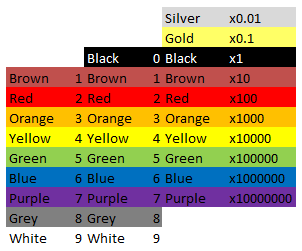
black is zero and brown is one, after that the colours follow the colour spectrum, Red, Orange, Yellow, Green, Blue, Purple, then Grey and white are tagged onto the end. quite why it was done like this with black and brown first, and not just the spectrum colours first then extra ones I don't know...

Anyway,

Black = 0
Brown = 1
Red = 2
Orange = 3
Yellow = 4
Green = 5
Blue = 6
Purple = 7
Grey = 8
White = 9

The last band on the resistor is always Silver, Gold, Brown, Red, Green, Blue, Purple or Grey, these colours relate to the tolerances. (how far off of the stated values the component might be).
Silver = 10%
Gold = 5%
Brown = 1%
Red = 2%
Green = 0.5%
Blue = 0.25%
Purple = 0.1%
Grey = 0.05%

So, if you have a resistor that has colour codes

Red, Red, Brown, Silver
the values are
2 2 * 10 = 220Ohm, +/- 10% -i.e the value is somewhere in the region of 220 Ohm, 198 Ohm - 242 Ohm range (quite a range.)

You might notice that black is missing from the first column, and be thinking how do you write 1Ohm, this should be Black, Brown, Black right? (01 x 1)

Wrong, the correct way to write 1 ohm, is Brown, Black, Gold (10 x 0.1)

Symbols
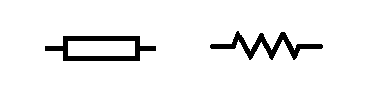
Resistors, like all components have a symbol user to indicate them on electronics schematics.
the symbol for a resistor looks like a box (the box does not have a line through it) however you may sometimes find the symbol written as a zig zagged line.

So that about wraps up the humble resistor. There is of course more to learn, there is indeed always more to learn. I'll cover some more advanced stuff with resistors, and the different type of resistors later.
Calculations
As with everything electronics related, sooner or later you run into something maths related.

Even with the simplest of components, maths somehow finds it's way in.
Not to worry though, the calculations concerning resistors are really simple.

Resistors in series
This is as easy as one add one.

When resistors are in series (one linked to the other like a train) you just add all the values together.
R1 + R2 + R3 + ... + Rn = Rtotal

In the circuit above there are 4 x 8Ohm resistors.

8 + 8 + 8 + 8 = 32Ohms.

Resistors in parallel
When you connect resistors in parallel, things get a little more complicated, a mathematician would tell you that it's the sum of the reciprocal of the values of the resistors that makes the reciprocal of the total resistance.

And they would be right, but they'd also likely confuse the hell out of you.

In laymans terms, it's the sum of one over the value of all the components, that makes one over the final value, 1 over this value gives you the total resistance.
(1/R1) + (1/R2) + (1/R3) + ...+ (1/Rn) = 1/Rtotal

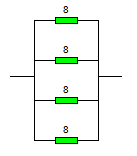
In this circuit the resistors are all arranged parallel to each other and connected differently from the original circuit.

The sum for creating this circuit is

(1/8) + (1/8) + (1/8) + (1/8) = (1/total)
1/8 = 0.125

So writing this out a bit more long hand we have...
0.125 + 0.125 + 0.125 + 0.125 =(1/total)

If you add all of those together you get 0.5
And 1/0.5 = 2

The total resistance of 4 x 8ohm resistors in parallel is 2 Ohms.


Series and parallel connections
Sometimes you're going to want to connect things in a mixture of series and parallel.

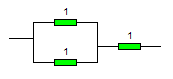
You might do this because you want a 1.5ohm resistor, they don't make these but you could connect 2 x 1ohm resistors in parallel

1/1 + 1/1 = 2
1/2 = 0.5

Then add a third 1 ohm resistor in afterwards in series and you get 1.5Ohm.

You might want to do this for a completely different reason than getting values that you can't get...

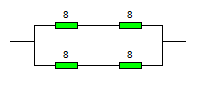
look at this example:

To start with break it down into two halves.
there's clearly a top half (2x 8ohm resistors) and a bottom half that's the same.

So work out the values of those first.

Top half = 8 + 8 = 16 Ohms.
The bottom half also is 16Ohms.

Now they are in parallel to each other
( 1/16) + ( 1/16) = 0.125
1/0.125 = 8

Now you may be wondering why anyone would be such a sadist as to use four components, have to go through that maths when they end up with the same value as just one of those components.

And the answer is power, as in power handling.
If you have a wire that can conduct a certain amount of power (voltage and current), and if you exceed that it'll heat up and melt, then you want to get a bigger gauge wire, you're adding more strands of wire, more paths to go down.

In the example above imagine that they were 10W resistors, but you needed to be able to handle 20W of load, buy arranging two side by side you've doubled that power handling capability to the 20W that you want.

but you've also halved the resistance, so then you add a couple more resistors in series to increase the resistance again.